17
After Sales Support
Telephone: 1300 663 907
Email: customercare
@
winplus.com.au
NOTE: Do not let foods sit on keep warm setting for more than 4 hours.
Slow Cooker Operation
The Slow Cooker mode offers two cooking settings and a keep warm setting. The
minimum cooking time is 4 hours and maximum 16 hours.
1. Place the unit on a at surface away from any obstructions.
2. Plug the power cord into the back of the unit. Plug into a power point and turn on.
Press the ON button until unit beeps.
3. Fill the cooking pan with your ingredients and replace lid.
6. Press the FUNCTION button to begin setting the timer.
7. Select the time by pressing the + or – buttons.
NOTE: Default time is 8 hours. The timer changes in 30 minute increments.
8. After setting the time press the START/STOP button. The (:) symbol will begin
ashing indicating that the timer has started.
9. Once the timer nishes counting down the unit will beep three times and
automatically switch to keep warm mode, the LED screen will display 0:00. The
SLOW COOKER light will turn green and the timer will begin counting back up.
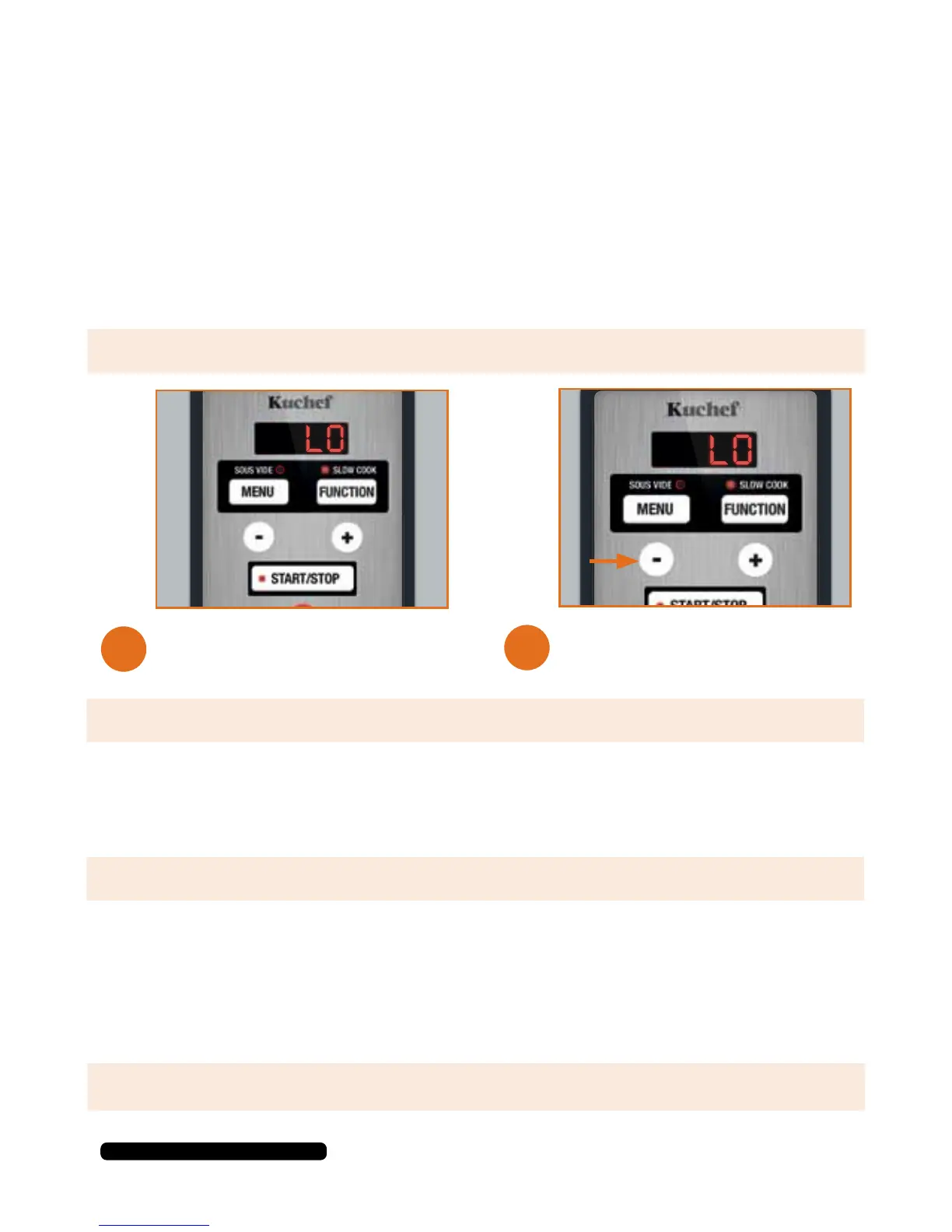
Press the MENU button until the
SLOW COOK light illuminates.
Choose your cooking setting by
pressing the + or – buttons to
select HI or LO.
4.
5.
NOTE: Ensure ingredients do not exceed MAX line.
NOTE: The default temperature will be LO.


 To Next Page