Getting Started (Cont.)
A
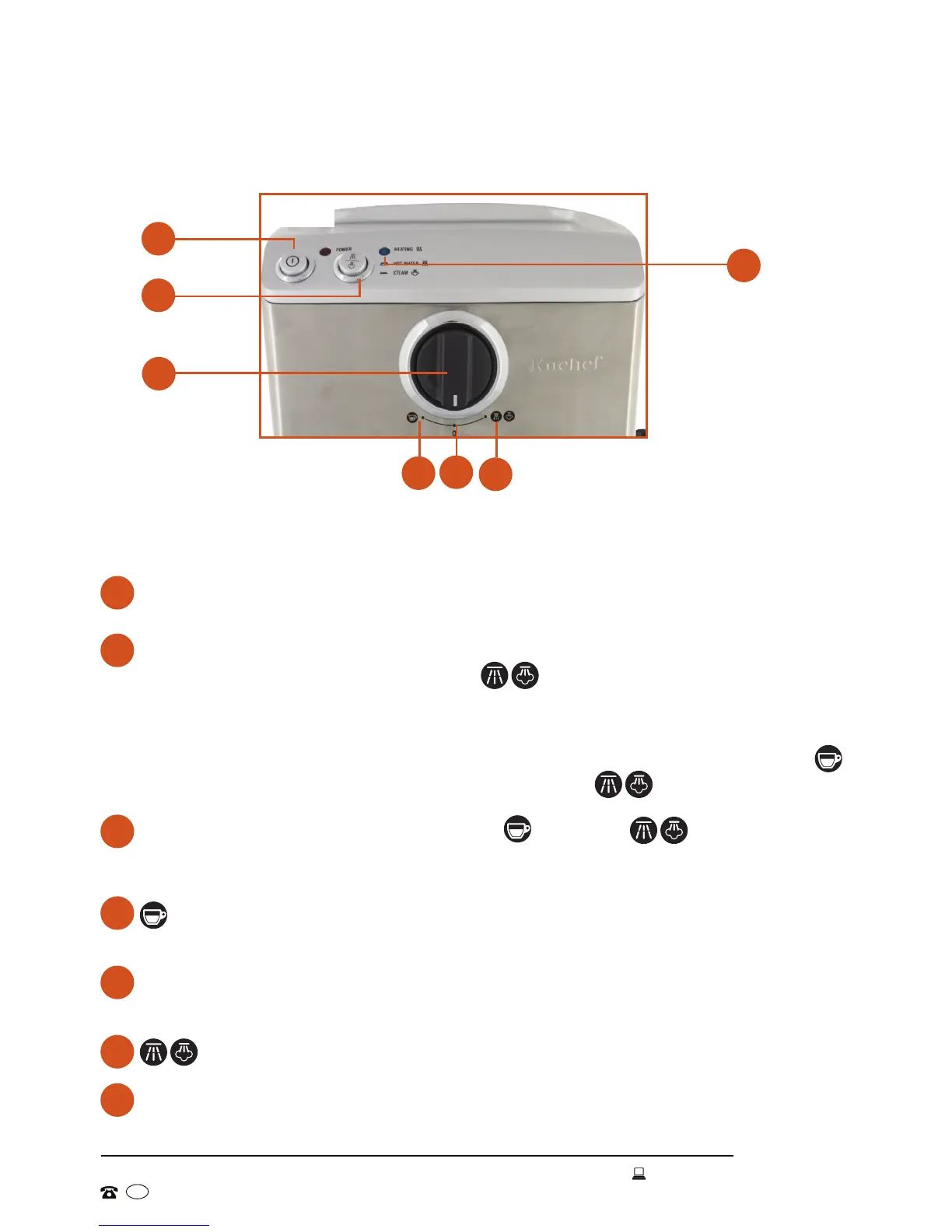
Press the ON/OFF button to switch on the espresso machine. The red
POWER and blue HEATING indicator lights will illuminate.
B
Press down the HOT WATER/STEAM selector to produce steam for milk
frothing. With the function dial set to , steam will now be emitted from
the steam nozzle.
With the button released, the machine will produce hot water, which can be
drawn through either the espresso outlet (when the function dial is set to )
or the steam nozzle (with the function dial set to
).
C
The FUNCTION dial has three settings ( <-- 0 –-> ). As soon as
the dial is turned from its neutral [ 0 ] position, either the steam wand or
espresso outlet will open and emit steam or hot water.
D
Pump switched on – dispensing water/espresso via the espresso
outlets
E
0
Pump switched off – neutral position – water/espresso or steam
flow stopped
F
Dispensing hot water or steam via the steam wand
G
The blue HEATING indicator will illuminate while the machine is heating up
and extinguish when it has reached the correct operating temperature.
C
D
E
Control panel
A
B
G
F
The espresso machine is easy to operate with just two main controls (Fig. 1):
Fig.1


 To Next Page