Set up using wired connection
If you used Wi-Fi to configure the Kuma Connect, you can
connect to the Wi-Fi signal directly. You do not need to set up
the wired connection. This step can be skipped.
Confirm that your computer is [automatically obtain IP address]
Please connect your computer network cable to the LAN interface
of this product or connect to the default WiFi of this product.
1. Open the computer - right click Network - properties - change
adapter settings.
2. For wired
connection, right-click [local connection] (wireless
connection, click [WLAN]).
Select [attribute];
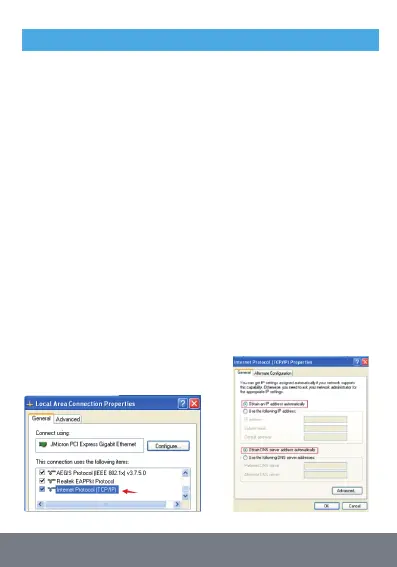
3. Double click [Internet Protocol version 4 (TCP / IPv4)] in the
connection item of the property dialog box.
(see the left figure below);
4. In the Internet Protocol version 4 dialog box, the confirmation
option is [obtain IP address automatically].
[obtain DNS service address automatically] (as shown in the right
figure below), click [OK].


 To Next Page