

EasyManua.ls Logo

KUMA Connect Lite - User Manual

KUMA Connect Lite
12 pages
Print Icon
To Next Page IconTo Next Page
Loading...
Connect Lite, Play and Pro
Quick Start Guide
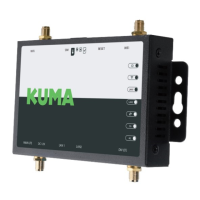
Please note: the 4 x supplied antennas are labelled LTE
and WiFi and MUST be connected to the correct ports on
the device, also labelled.
Ver 5.12.2021.04v1
LTE antennas X2 WIFI antennas X2
Question and Answer IconNeed help?

Do you have a question about the KUMA Connect Lite and is the answer not in the manual?

Summary

SIM Connection

Set Up Using Wired Connection

Configuration Parameters

Change Wi-Fi Network Name and Password

Guide to changing the device's Wi-Fi network name (SSID) and password.

Frequently Asked Questions - FAQs

Forgot Username;Password: How to Reset Device

Instructions on how to reset the Kuma Connect device to factory settings.

Troubleshooting: Wi-Fi Signal Not Visible

Troubleshooting steps for when the device's Wi-Fi signal is not visible.

Accessing Management Page via IP Address

Solutions for accessing the Kuma Connect management interface via its IP address.

Description of Lights and Labels

Indicator Light Explanations

Explanation of indicator lights for 4G, 3G, Internet, LAN, Wi-Fi, and Power.
Important Safety and Usage Notes

Adding an APN for Internet Connection

Antenna Connections and Labels

Specifications

KUMA Connect Lite Specifications

General IconGeneral
BrandKUMA
ModelConnect Lite
CategoryAmplifier
LanguageEnglish