The KUMA BIKES K5248 LCD is a display unit designed for e-bikes, providing various function modes to enhance the riding experience. This user guide outlines its appearance, functions, operation, user settings, and troubleshooting.
Function Description
The K5248 display offers a comprehensive set of functions to meet diverse riding needs. Key features include:
- Battery Power Indication: Displays the current battery charge level as a percentage bar.
- Speed Indication: Shows real-time speed, including maximum speed and average speed.
- Distance Tracking: Provides single trip distance (TRIP) and total odometer (ODO) readings.
- Walk Assist & Headlight Indication: Features a walk assist mode for pushing the e-bike by hand and an indicator for headlight status.
- Error Code Indication: Automatically displays error codes if the e-bike's electronic control system encounters a fault, aiding in diagnosis.
- PAS Level Selection: Allows riders to switch between 0-5 PAS (Pedal Assist System) levels, adjusting motor output power accordingly. Level 1 is the lowest output, and Level 5 is the highest.
Important Technical Specifications
- Material and Color: The K5248 products are constructed from PC material and an aluminum alloy stem.
- Operating Temperature: Designed to function normally within a temperature range of -20°C to 60°C, ensuring good mechanical performance.
- Dimensions: The display unit has specific dimensions (unit: mm) as shown in the manual's diagrams, with approximate measurements of 54.80mm (width), 141.45mm (height), and 47.76mm (depth).
- Leakage Current: When the display is off, the leakage current from the battery is less than 1µA.
- PAS Levels: Default range of PAS levels is 0-5.
- Wheel Size Settings: Settable values include 16, 18, 20, 22, 24, 26, 700C, and 28 inches.
- Speed Limit Setting: The maximum speed setting can be adjusted from 12km/h to 40km/h, with a default of 32km/h.
- Display Unit Setting: Supports both Metric (km/h) and Imperial (Mile/h) systems, with Metric as the default.
- Auto Shut Down Time: Adjustable from 5 minutes to 60 minutes, with a default of 5 minutes.
Usage Features
Normal Operation:
- On/Off: To power on, long press the "MODE" button and enter the password "8888" (or "6688" as a universal password if forgotten). To power off, long press the "MODE" button again. The display will automatically shut down if the e-bike is not used for more than 10 minutes.
- User Interface: Upon startup, the display shows real-time speed, PAS level (lower right), single trip distance (TRIP) and odometer (ODO) in the middle, and battery percentage at the top. Short pressing the "MODE" button switches between riding data (TRIP/ODO, MAX/AVG Speed).
- Walk Assist Mode: Press and hold the "DOWN" button for 2 seconds to activate walk assist mode, which propels the e-bike at a constant speed of 6km/h. This function is intended for pushing the e-bike by hand, not for riding.
- PAS Level Selection: Use the "UP" or "DOWN" buttons to adjust the PAS level.
- Headlight Control: Long press the "UP" button to turn the headlight on or off.
User Settings:
To enter the setting interface, ensure there is no speed, then press and hold the "UP" and "DOWN" buttons simultaneously for 2 seconds. Use the "MODE" button to navigate through settings and long press "MODE" to save and exit.
- Backlight Brightness: Adjust backlight brightness using "UP" and "DOWN" buttons.
- Wheel Size Setting: Select the appropriate wheel diameter (16, 18, 20, 22, 24, 26, 700C, 28 inch) to ensure accurate speed and mileage display.
- Speed Limit Setting: Set the maximum speed limit between 12km/h and 40km/h.
- Display Unit Setting: Choose between Metric (km/h) and Imperial (Mile/h) units.
- Auto Shut Down Time Setting: Configure the idle time before the display automatically shuts down (5-60 minutes).
- Password Setting:
- Password Enable: Enable or disable the POWER ON password option.
- Password Modification: Change the power-on password.
Maintenance Features
- Error Code Indication: The display provides error codes (e.g., 21: Current Abnormal, 22: Throttle Abnormal, 23: Motor phase problem, 24: Motor Hall defect, 25: Brake Failed, 30: Communication Abnormal) to help identify and troubleshoot system failures. In case of an error code, users are advised to contact an e-bike maintenance station.
- Version Information Interface: Displays the software version number, which is useful for future display maintenance and support.
Notes for Users:
- Always ensure safety during use. Do not attempt to disconnect connectors while the battery is powered on.
- Avoid hitting the display.
- Do not remove the waterproof sticker, as this may compromise waterproof performance.
- Refrain from modifying system parameters to prevent display malfunction.
- If an error code appears, have the display repaired by a professional.
Quality Assurance and Warranty Scope:
- Warranty Period: King-Meter provides a 24-month warranty from the factory departure date for faults arising from normal operation due to quality defects.
- Exclusions: The warranty does not cover:
- Opened shell.
- Damaged connectors.
- Scratched or damaged shell after leaving the factory.
- Scratched or broken display lead wire.
- Faults or damages caused by force majeure (e.g., fire, earthquake, natural disasters).
- Products exceeding the warranty period.

 Need help?
 General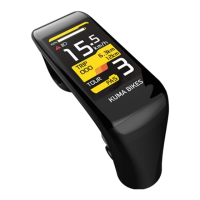

 To Next Page