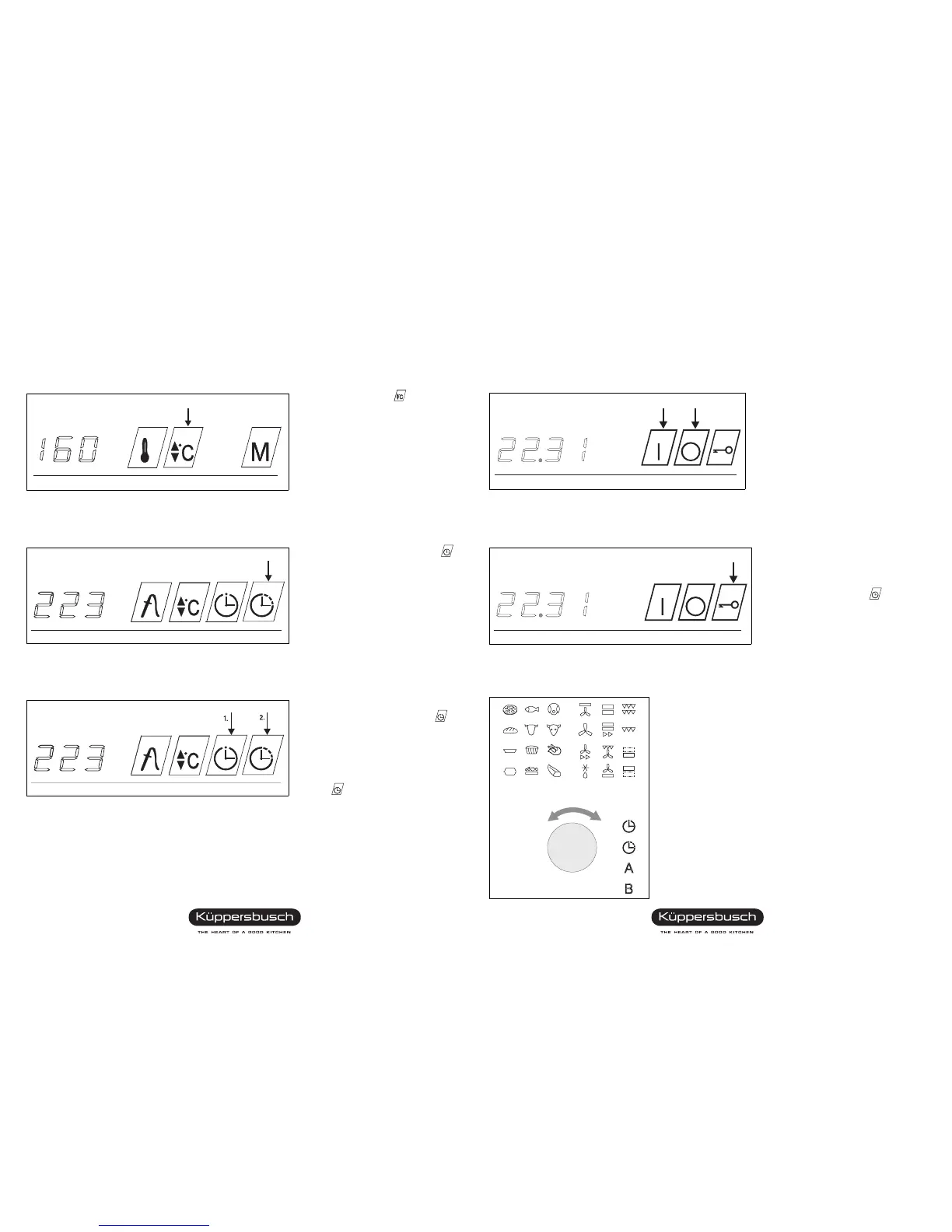
Changing preset temperature
Press setting button and
set the temperature with the control
knob.
Setting and changing the cooking time
Keep button automatic cut-out
depressed and set the cooking time
with the control knob.
Setting the cooking time with preselection time
1. Setting preselection time:
Press button minute minder
and set the preselection time with
the control knob.
2. Setting the cooking time:
Press the button automatic cut-
out and set the cooking time
with the control knob.
After expiry of the set preselection time the oven is switched on automatically.
After expiry of the preset cooking time the oven is switched off automatically.
Brief instructions for EEB 970.0
Using the oven (More detailed explanations in the operating manual)
Switching on and off
Touch oven ON button ).
The symbols for the heating, baking
and roasting programs are backlit in
green.
Touch oven OFF button
( .
The symbols of the programs go off.
Activating and cancelling children’s safety feature
Activation: Press key button? ,
the following three control lights flash:
ON button
),
Automatic cut-out button
,
Core temperature sensor button !.
Cancelling: Press buttons of the
three flashing control lights.
Selecting a program
Select a program with the control knob
(turn to right or left).
The symbol of the program selected lights up red.
Program starts automatically.
When you select a program, you run through all the
programs, also the additional programs.
ON
OFF
970.0 k GB




 To Next Page