EasyManua.ls Logo

KYE Systems Corp. Genius SP-S110 - User Manual

KYE Systems Corp. Genius SP-S110
19 pages
Print Icon
To Next Page IconTo Next Page
Loading...
Service Guide SP-S110
SERVICE GUIDE
KEY SYSTEM CORP
Version 1.0 Page 1 of 19
Question and Answer IconNeed help?

Do you have a question about the KYE Systems Corp. Genius SP-S110 and is the answer not in the manual?

Summary

Service Guide Introduction

Revision History

Details changes and version updates for the service guide.

Getting Started

Provides initial information and guidelines for using the service guide.

Handling Defective Returns

Overview of Defective Returns Process

Outlines the procedure for managing product returns and necessary repair steps.

Product Problem Troubleshooting

Lists and categorizes common issues encountered with the speaker system.

No Power or Unlighted LED Troubleshooting

Diagnosing and resolving issues where the product does not power on or the LED is off.

No Sound Troubleshooting

Steps to identify and fix problems related to the absence of audio output.

Noise Troubleshooting

Guidance for diagnosing and resolving audio noise or interference issues.

LED Indicator Troubleshooting

Steps to diagnose and fix issues where LED indicators are not functioning correctly.

Volume Switch Troubleshooting

Diagnosing and resolving problems with the volume control switch.

Headphone Jack Troubleshooting

Steps to diagnose and fix issues related to the headphone jack functionality.

Technical Specifications

Block Diagram

Exploded Views

Active Speaker Components

Diagram illustrating the assembly and parts of the active speaker unit.

Passive Speaker Components

Diagram illustrating the assembly and parts of the passive speaker unit.

Part Lists

Active Speaker Parts

List of reference numbers, descriptions, and part numbers for the active speaker.

Passive Speaker Parts

List of reference numbers, descriptions, and part numbers for the passive speaker.

Important Notes

Schematic Diagram

Overview

This document is a service guide for the SP-S110 speaker system, providing comprehensive information for troubleshooting, maintenance, and technical specifications. It is designed to assist technicians and users in understanding and resolving potential issues with the device.

Function Description:

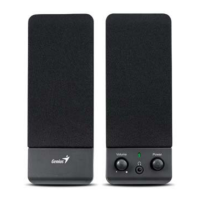
The SP-S110 is a speaker system designed for audio output. It comprises an active speaker and a passive speaker, working in conjunction to deliver sound. The active speaker houses the primary electronics, including the amplifier (TDA2822), power supply, and controls, while the passive speaker connects to the active unit to extend the stereo sound. The system features a volume control, a power indicator LED, and a headphone jack for private listening. The block diagram illustrates the signal flow, showing the input from a 3.5mm stereo plug, passing through volume control, amplification, and finally to the speakers and headphone output. The power supply section converts AC input to the necessary DC voltage for the amplifier and other components.

Important Technical Specifications:

The SP-S110 speaker system has several key technical specifications:

  • Rated Output Power: 0.45 W at 10% Total Harmonic Distortion (THD), with a tolerance of ±5%. This indicates the typical power output under specified distortion levels.
  • Sensitivity (1KHz): 380 mV at rated output power, with a tolerance of ±20mV. This measures how efficiently the speaker converts an electrical signal into sound.
  • Max Input Level: Not specified at 1% THD, with a tolerance of ±10%. This refers to the maximum input signal the amplifier can handle before reaching 1% distortion.
  • Frequency Response (1KHz -3dB):
    • Low: 140 Hz ±20
    • High: 60 KHz ±5 This range indicates the frequencies the speaker system can reproduce effectively.
  • Signal-to-Noise Ratio (S/N): 57 dB at rated output power, with a minimum requirement of ≥55 dB. A higher S/N ratio indicates less background noise relative to the audio signal.
  • Channel Unbalance: 0.2 dB at reference output power, with a maximum allowance of ≤0.5 dB. This ensures that the left and right channels have similar output levels.
  • Channel Separation: 45 dB (with one channel input, other channel shorting), with a minimum requirement of ≥40 dB. This specification indicates how well the left and right channels are isolated from each other, preventing crosstalk.
  • Hum Noise (Volume Max, Input Shorting): 1.5 mV, with a maximum allowance of <2 mV. This measures the low-frequency electrical noise present when the volume is at maximum and no input signal is applied.
  • Hum Noise (Volume Min, Input Shorting): 0.5 mV, with a maximum allowance of <1 mV. This measures the hum noise when the volume is at minimum.

Usage Features:

The SP-S110 is a straightforward speaker system designed for ease of use. It connects to an audio source via a 3.5mm stereo plug. The active speaker features a volume control knob for adjusting the audio output level and a power switch, which also incorporates an LED indicator to show the power status. A headphone jack is included on the active speaker, allowing users to connect headphones for private listening, which typically mutes the speakers. The system is powered by an AC input, which is then transformed and rectified internally.

Maintenance Features:

The service guide provides detailed information for maintaining and troubleshooting the SP-S110. It outlines a systematic approach to handling defective returns, starting with problem verification, analysis of malfunction causes, and rectification methods.

Key maintenance procedures and troubleshooting steps include:

  • No power, LED unlighted: This issue can stem from a dry-soldered secondary wire of the transformer, a defective or damaged diode (D1-D4), or a poor connection/defective power switch. Solutions involve repairing or replacing the affected components.
  • No sound: Potential causes include a damaged, dry-soldered, or short-circuited PCB; an abnormal or damaged power supply for the TDA2822 IC (U1); or a damaged VR1 (volume control). Rectification involves repairing, resoldering, or replacing the relevant parts.
  • Noise: This can be caused by a non-functioning, dry-soldered, or damaged filter capacitor; an abnormal power supply for the TDA2822 IC; a broken or dry-soldered PCB; vibration from too long lead wires of driver units; damaged/short-circuited driver units; or a poorly connected VR. Solutions include repairing, checking, or replacing components.
  • LED indicators no light when working: This could be due to a damaged LED1, a broken PCB copper foil, or a defective/dry-soldered R7. The solution is to check and replace the faulty parts.
  • Volume switch no use: This issue points to a dry-soldered or broken PCB, or a defective VR1. Checking and replacing the component is recommended.
  • Headphone jack no use: The problem is typically a poor connection in the PS1 JACK. The solution involves checking and replacing the connection.

The guide also provides an exploded view of both the active and passive speakers, along with a comprehensive part list, including part numbers for each component (e.g., cloth cover, screws, driver unit, transformer, knob, button, PCBA). This is crucial for identifying and ordering replacement parts.

Important Notes for Maintenance:

  • Packing requirements for PCB assembly: PCB assemblies are sophisticated electronic circuit boards and require careful packing when sent by post. Each PCB assembly should be placed in a separate static-protecting bag to prevent damage from static electricity. Reliable external packing is also essential to prevent loss or damage during transit.
  • Shortage of spare parts: If spare parts are scarce, it is recommended to salvage necessary parts from other speaker systems awaiting repair to maximize the number of functional units.

The service guide emphasizes a structured approach to repair, ensuring that technicians follow recommended sequences to rectify problems efficiently and effectively.

KYE Systems Corp. Genius SP-S110 Specifications

General IconGeneral
BrandKYE Systems Corp.
ModelGenius SP-S110
CategorySpeakers
LanguageEnglish

Related product manuals