
 Need help?
Do you have a question about the KYE Systems Corp. Genius SP-S350 and is the answer not in the manual?
Explains symbols and cautionary notes used in the guide.
Lists important safety measures for handling and maintaining the speakers.
Provides a flowchart for processing defective speaker returns.
Details common issues like no sound, no power LED, or volume malfunction and their solutions.
Shows the exploded parts of the main speaker unit.
Shows the exploded parts of the satellite speaker unit.
Guidelines for packing PCB assemblies for safe postal shipment.
Advice on handling situations with insufficient spare parts for repairs.
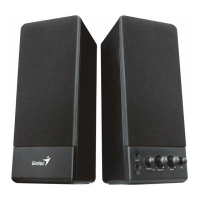
The KYE Systems Corp. SP-S350 is a speaker system designed to provide audio output, featuring a compact and functional design suitable for various audio applications. This service guide outlines the procedures for handling defective returns, providing a comprehensive overview of troubleshooting, repair, and maintenance for the device. The system is comprised of a host unit and satellite speakers, indicating a stereo audio setup.
The primary function of the SP-S350 speaker system is to amplify and reproduce audio signals. It receives an audio input, processes it through an internal amplifier, and outputs the sound through its speakers. The system includes controls for adjusting the audio output, such as volume and tone, allowing users to customize their listening experience. A 3D audio enhancement feature is also integrated, which can be toggled on or off, suggesting an attempt to create a more immersive soundstage. The power conditioning unit ensures a stable power supply to the amplifier and other internal components, contributing to consistent performance. The system is designed to be user-friendly, with straightforward connections for audio input and power. The inclusion of a power LED indicator provides visual feedback on the device's operational status.
The SP-S350 is designed for ease of use, offering basic controls for audio customization. The "Volume" control allows users to adjust the overall loudness of the audio output, while the "Tone" control enables modification of the sound's tonal characteristics, likely affecting bass and treble frequencies. The 3D ON/OFF switch provides an option to engage or disengage a spatial audio effect, which can enhance the perceived depth and breadth of the sound. The system accepts a standard audio input (AUDIO IN), making it compatible with a wide range of audio sources such as computers, MP3 players, or other media devices. The AC IN connection indicates that the device operates on mains power, providing a consistent power source for sustained operation. The design, as depicted in the exploded views, suggests a two-speaker setup (host and satellite), typical for stereo sound reproduction. The host unit appears to house the main circuitry and controls, while the satellite speaker extends the stereo image.
The service guide provides detailed instructions and flowcharts for diagnosing and rectifying common problems, making it a valuable resource for maintenance and repair. The "How to Handle Defective Returns" chapter outlines a systematic approach to troubleshooting, starting with verifying problems, proceeding with necessary tests, analyzing malfunction causes, and deciding on rectification methods. This structured process ensures efficient and effective repair.
Key maintenance features and troubleshooting steps include:
In summary, the KYE Systems Corp. SP-S350 is a stereo speaker system designed for audio playback with basic controls for volume, tone, and a 3D effect. Its service guide is meticulously structured to support comprehensive maintenance and repair, offering systematic troubleshooting, component identification, and crucial safety guidelines, ensuring the longevity and reliable operation of the device.
 General
| Brand | KYE Systems Corp. |
|---|---|
| Model | Genius SP-S350 |
| Impedance | 4 Ohm |
| Configuration | 2.0 |
| Power source | AC |
| Input Impedance | 10k Ohm |
| Dimensions (each speaker) | 210 x 150 x 150 mm |
| Type | Active speakers |


 To Next Page