When to change the filters
The LCD screen displays countdown usage on the amount of liters filtered by Filter 1 and Filter 2.
When it reaches 70L on either filter, the system will tell you to change that filter. As a built-in
precautionary measure, if the filter is not changed before the counter reaches 0, the KYK ionizer will
auto-shutdown until a filter change is made.
2
nd
filter 1
nd
filter
How to change the filters
Turn off the power and water supply of the product.
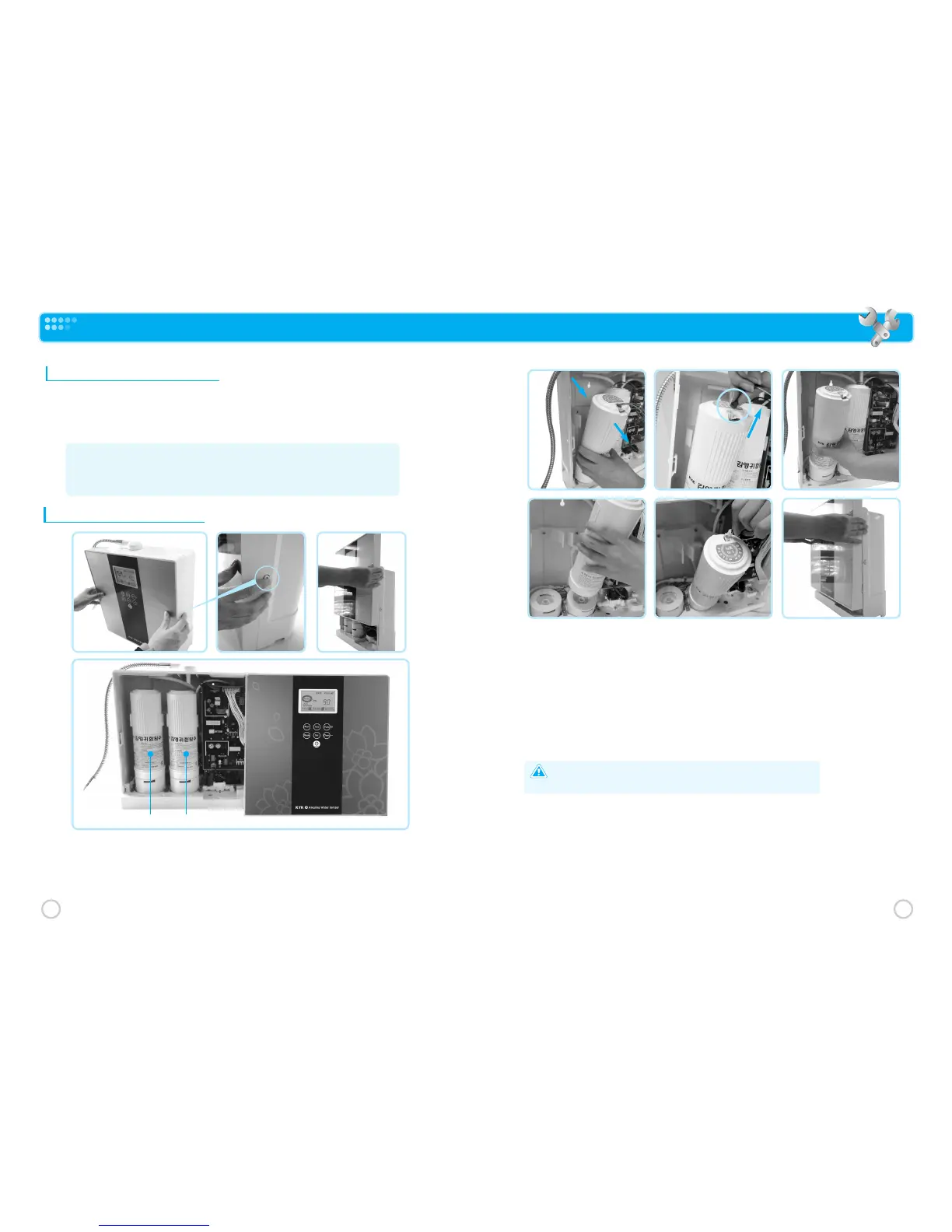
Remove the front cover of the product. Simply push the circular hook on both sides of the
product simultaneously to open the front cover, lift the front cover to about 1/3 height and place
it aside. You should see the filters inside- 1
st
filter (right), 2
nd
filter (left).
Take out the old filter to be replaced by pulling it forward. Unhook the electric wire connected to the
filter sensor located on top of the filter.
(Filter sensing sensor chip is attached on the filter upper part and it is taken out when raise up after
pressing the chip front part.)
Hold the filter and turn it to the right (OPEN), then pull out. The old filter can now be taken out of the
product.
Please remove the safety seal of the new filter. Insert the new filter bottom side first, push in, then turn
it to the left (CLOSE)
Caution:
Make sure that the O-ring is seated properly and isn’t damaged.
If it isn’t seated right or is damaged, there may be water leakage.
Connect the electric wire to the filter monitoring sensor.
Put back the front cover of the product by sliding it in from the top. The new filter has been replaced.
Turn on the power and water supply of the product. Touch the “ON/OFF” button on the front cover.
The product will do a self-cleaning process for about 20 seconds. When it turns to standby, touch the
“ON/OFF” button again and let the water flow for about 2~3 minutes. The filter replacement procedure is
complete and the water is ready to drink!
※Warning! If your water ever smells bad or the flow rate is severely reduced, you will need
to change the filters even though the display shows remaining filter life.
This will happen in the case of overly contaminated or hard water.
If your supply water is really bad, you’ll need to install pre-filters.
33
32
How to change the filters



 To Next Page