3-211
Enhancement device setup procedure > Optional device installation
[CONFIDENTIAL]
(4-2) Output (4-2) Hole Punch Unit for 4000 Sheet Finisher (PH-7A/7C/7D)
1
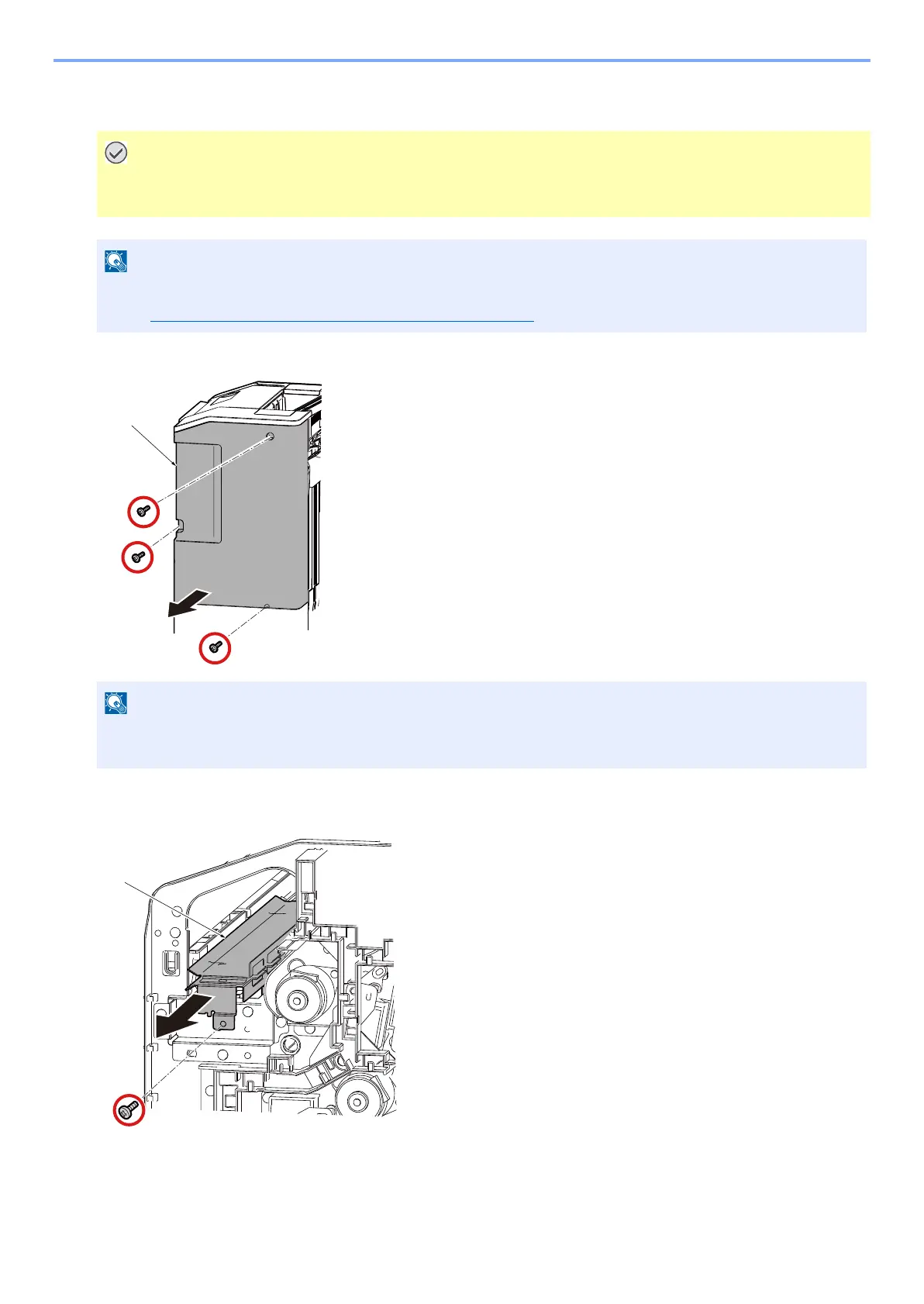
Remove rear upper cover [A] (Screw x3). The screw will use in step 13.
2
Pull the guide [A] out (Screw x1). The guide [A] and screw will not be used in this
installation again.
• Main power switch of main unit has to be turned off and power cable has to be unplugged before install Punch
Unit (PH-7A/7C/7D).
• PH-7A/7C/7D has to be installed first before DF-9100 installation.
• See Hole Punch Unit for 4000-sheet Finisher (PH-7A/7C/7D)
for unpacking.
• In case of installing finisher (DF-9100) and bridge kit (AK-9100), the screws will be used in step 149 of
installation guide for it.
[A]
[A]



 To Next Page