EasyManua.ls Logo

La Crosse Technology 308-1711BL - User Manual

La Crosse Technology 308-1711BL
6 pages
Print Icon
To Next Page IconTo Next Page
Loading...
Wireless W
eather Station
Model: 308-1711BL
DC:013118

Other manuals for La Crosse Technology 308-1711BL

Question and Answer IconNeed help?

Do you have a question about the La Crosse Technology 308-1711BL and is the answer not in the manual?

Summary

Power Up and Battery Status

Low Battery Indicator

Indicates when batteries need replacement for outdoor and indoor sensors.

Station Settings

Date and Time Configuration

Guide to setting the year, month, date, and 12/24 hour format.

Temperature Unit Selection

Option to select temperature display in Fahrenheit or Celsius.

Temperature Alerts Management

Setting Temperature Alerts

Instructions for entering alert set mode using buttons to adjust and confirm.

Sounding Alert Behavior

Details how alerts ring, flash, and stop when temperature is out of range.

Arming and Disarming Alerts

Steps to arm or disarm temperature alerts using specific buttons.

Button Functionality Overview

Navigation and Setting Controls

Explains functions of TIME/DATE, ALERTS, and ARROW buttons for settings and alerts.

Alarm and Sensor Operations

Details how to set time alarms, silence alarms, and search for the sensor.

Temperature Data Viewing

Describes how to view Heat Index, Dew Point, minimum, and maximum temperatures.

Product Specifications and Features

Moon Phase Information

Explanation of the Moon Phase feature based on the lunar calendar and date settings.

Technical Specifications

Details temperature/humidity ranges, power requirements, battery life, and dimensions.

FCC Compliance Statement

FCC Regulatory Information

Statement on compliance with FCC limits for Class B digital devices and interference.

Summary

Power Up and Battery Status

Low Battery Indicator

Indicates when batteries need replacement for outdoor and indoor sensors.

Station Settings

Date and Time Configuration

Guide to setting the year, month, date, and 12/24 hour format.

Temperature Unit Selection

Option to select temperature display in Fahrenheit or Celsius.

Temperature Alerts Management

Setting Temperature Alerts

Instructions for entering alert set mode using buttons to adjust and confirm.

Sounding Alert Behavior

Details how alerts ring, flash, and stop when temperature is out of range.

Arming and Disarming Alerts

Steps to arm or disarm temperature alerts using specific buttons.

Button Functionality Overview

Navigation and Setting Controls

Explains functions of TIME/DATE, ALERTS, and ARROW buttons for settings and alerts.

Alarm and Sensor Operations

Details how to set time alarms, silence alarms, and search for the sensor.

Temperature Data Viewing

Describes how to view Heat Index, Dew Point, minimum, and maximum temperatures.

Product Specifications and Features

Moon Phase Information

Explanation of the Moon Phase feature based on the lunar calendar and date settings.

Technical Specifications

Details temperature/humidity ranges, power requirements, battery life, and dimensions.

FCC Compliance Statement

FCC Regulatory Information

Statement on compliance with FCC limits for Class B digital devices and interference.

Overview

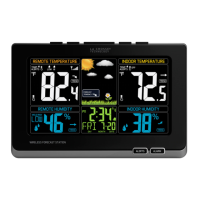
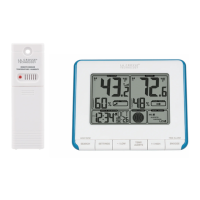
This document describes the La Crosse Technology Wireless Weather Station, model 308-1711BL (DC:013118), which provides indoor and outdoor temperature and humidity readings, along with time, date, and moon phase information.

Function Description:

The weather station consists of a main display unit and a remote sensor. The remote sensor measures outdoor temperature and humidity, transmitting this data wirelessly to the main station. The main station displays both indoor and outdoor temperature and humidity, along with minimum and maximum temperature records, temperature trends, and temperature alerts. It also features a clock with an alarm, a calendar, and a moon phase display.

Important Technical Specifications:

  • Indoor Temperature Range: 32°F to 122°F (0°C to 50°C)
  • Indoor Humidity Range: 10%-99% RH
  • Outdoor Temperature Range: -40°F to 140°F (-40°C to 60°C)
  • Outdoor Humidity Range: 10%-99% RH
  • Power Requirements:
    • Station: 2 AA batteries (not included)
    • Sensor: 2 AA batteries (not included)
  • Battery Life:
    • Station: Over 24 months
    • Sensor: Over 24 months
  • Dimensions:
    • Station: 5.40" L x 1.68" W x 4.40" H (13.72 cm L x 4.28 cm W x 11.18 cm H)
    • Sensor (TX141TH-Bv2): 1.57” L x 0.79" W x 5.12" H (4.0cm L x 2.0cm W x 13.0cm H)

Usage Features:

  • Power Up: Insert 2 AA batteries into the remote sensor and 2 AA batteries into the main station.
  • Initial Setup: Set the time, date, and other preferences. The weekday is automatically set once the year, month, and date are configured.
  • Sensor Placement: Once the sensor is reading to the station, place it outside in a shaded location for accurate readings.
  • Settings Menu: Hold the TIME/DATE button to enter the settings menu. Use the ARROW buttons to adjust values (Year, Month, Date, 12/24 Hour format, Hour, Minutes, Fahrenheit/Celsius) and TIME/DATE to confirm.
  • Temperature Alerts:
    • Set Alerts: Hold the TEMP ALERTS button to enter set mode. Use ARROW buttons to adjust and TEMP ALERTS to confirm.
    • Sounding Alerts: When an alert is triggered, the corresponding alert icon will flash, and the alarm will ring for five seconds every minute until the temperature is out of the alert range. Press any button to stop the alert, though the icon will remain.
    • Arm/Disarm Alerts: Press and release TEMP ALERTS to select an alert. Use the UP ARROW button to arm and the DOWN ARROW button to disarm temperature alerts.
  • Time Alarm:
    • Set Alarm: Hold TIME ALARM to set the alarm time. Use ARROW buttons to adjust and TIME ALARM to confirm.
    • View/Activate/Deactivate Alarm: Press TIME ALARM once to view the alarm time. Press again to activate or deactivate the alarm; an alarm bell icon will show when active.
    • Silence Alarm: When the alarm sounds, press TIME ALARM to silence it for 10 minutes.
  • Heat Index & Dew Point: Hold the HEAT/DEW BUTTON to search for the sensor. Press and release it to view Heat Index and Dew Point readings.
  • Minimum/Maximum Readings:
    • Press DOWN ARROW (MIN) to view minimum temperature readings.
    • Press UP ARROW (MAX) to view maximum temperature readings.
    • Note: MIN/MAX readings automatically reset daily at 12:00 midnight.
  • Moon Phase: The moon phase feature is based on the lunar calendar and is controlled by the time and date set on the weather station. It displays various phases including New Moon, Small Waxing Crescent, Large Waxing Crescent, First Quarter, Small Waxing Gibbous, Large Waxing Gibbous, Full Moon, Large Waning Gibbous, Small Waning Gibbous, Last Quarter, Large Waning Crescent, and Small Waning Crescent.

Maintenance Features:

  • Low Battery Indicator:
    • If a battery icon appears in the Outdoor Temperature section, replace the batteries in your outdoor sensor.
    • If a battery icon appears in the Indoor Temperature section, replace the batteries in your main station.

FCC Statement:

The device complies with Part 15 of the FCC Rules for Class B digital devices, ensuring reasonable protection against harmful interference in residential installations. Users are advised to reorient or relocate the receiving antenna, connect the equipment to a different circuit, increase separation between equipment and receiver, or consult a dealer/technician if interference occurs. The device must not be co-located or operated with any other antenna or transmitter. Operation is subject to two conditions: (1) the device may not cause harmful interference, and (2) it must accept any interference received, including undesired operation. The manufacturer is not responsible for interference caused by unauthorized modifications.

La Crosse Technology 308-1711BL Specifications

General IconGeneral
BrandLa Crosse Technology
Model308-1711BL
CategoryWeather Station
LanguageEnglish

Related product manuals