
 Need help?
Do you have a question about the La Crosse Technology 617-89577 and is the answer not in the manual?
Information on the clock's power source, including AC adapter and CR2032 backup battery.
Step-by-step instructions to reset the clock to its original factory default settings.
How to select high or low backlight and adjust low brightness using the dimmer wheel.
Details on the clock's mood light feature, including how to turn it on or off.
Confirmation that the clock exclusively displays time in a 12-hour format.
Guide to setting dual alarms, choosing wake-up sound, volume, and activating/deactivating alarms.
How to turn off sounding alarms for 24 hours and use the snooze function effectively.
Instructions for manually setting the clock's hour, minute, and snooze time duration.
How to tune the FM radio, adjust volume, scan for stations, and store presets.
Steps for manually storing favorite radio stations and listening to saved presets.
Instructions for setting the FM radio to turn off automatically after a selected time period.
Details on using the USB port to charge external devices, including power output and remarks.
Explanation of the backup battery's role in preserving time and settings during power outages.
Guidance on resolving distorted clock displays, including checking for protective films.
This document provides a comprehensive guide for the 617-89577 alarm clock, detailing its functions, usage, and maintenance. The clock offers a range of features designed to enhance daily routines, from timekeeping and alarm settings to a built-in FM radio and a USB charging port.
The clock operates on a 5.0-volt AC power adapter and includes a CR2032 battery for backup. The backup battery is crucial for maintaining time and settings during power outages, though it does not power the alarm or display. A fresh CR2032 battery can provide backup for approximately one week. For initial setup or troubleshooting, a "Clock Factory Restart" procedure is outlined. This involves removing both the battery and AC power, pressing any button at least 20 times to clear all memory, allowing the clock to sit without power for at least 10 minutes, and then reinserting the AC power cord. This ensures a clean slate for operation. If the display appears distorted or shows numbers on a new clock, it's recommended to check for thin plastic scratch guard films on the screen, which should be peeled off.
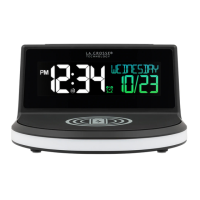
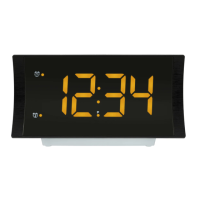
The clock exclusively displays time in a 12-hour format. It features an "Adjustable Backlight" with both high and low settings, selectable by pressing the "Zz AUTO SCAN" button. For the low setting, a dimmer wheel on the side of the clock allows for fine-tuning the brightness. A "Mood Light" located below the clock provides a gentle orange glow, which can be turned on or off using the "LIGHT ON-OFF" button.
To manually set the time, the "Manually Set Time: Program Menu" guides users through the process. Pressing the "SET/MEM" button initiates the hour setting, where the hour digits flash. The "LIGHT ON-OFF" or "+" button adjusts the hour, with a "PM" LED indicating afternoon time. There is no AM indicator. Subsequent presses of "SET/MEM" allow adjustment of minutes, followed by snooze time selection (from 5 to 60 minutes). The settings are stored by pressing "SET/MEM" again or after approximately 10 seconds of inactivity.
The alarm clock boasts a dual time alarm function, allowing users to set two separate alarms. To set alarms, hold the "SET ON-OFF" button to enter the Alarm Settings. The "LIGHT ON-OFF" or "+" button adjusts values, and holding it allows for rapid adjustment. Pressing and releasing "SET ON-OFF" confirms the setting and moves to the next item. The alarm settings order includes Alarm 1 Hour, Alarm 1 Minutes, Alarm 1 Wake sound (buzzer or radio), and if radio is selected, Alarm 1 HI/LO (volume). The same sequence applies to Alarm 2. To activate or deactivate Alarm 1 and/or Alarm 2, press the "SET ON-OFF" button. An orange LED light next to the '1' or '2' indicates an active alarm. When an alarm sounds, pressing the "SET ON-OFF" button once will stop it for 24 hours. The "Snooze" function, activated by pressing the "Zz AUTO SCAN" button when an alarm is sounding, silences the alarm temporarily, with the alarm resuming after the selected snooze duration. If a second alarm activates during the first alarm's sounding or snooze mode, the second alarm takes precedence, resetting the first alarm for the next day.
The clock includes an FM radio. To use it, extend the antenna for optimal reception. Pressing the "RADIO SLEEP" button turns on the radio, with "ON" briefly displayed. The "LIGHT ON-OFF" or "+" button selects stations, and holding it initiates a search for the next clear station. To adjust the volume (levels 1-16), press "VOL SET" to view the volume setting, then use the "LIGHT ON-OFF" or "+" button. Pressing "RADIO SLEEP" again turns off the radio.
For convenience, the radio offers "Auto Scan and Store Preset Stations." With the radio on, holding the "Zz AUTO SCAN" button automatically scans and sets up to 20 stations. Users can also "Manually Store Preset Stations." After turning on the radio, use the "LIGHT ON-OFF" or "+" button to select a station. Holding "SET/MEM" until "P01" flashes stores it as Preset 1. This process can be repeated for up to 20 preset stations. To "Listen to Preset Stations," turn on the radio, then press "SET/MEM" followed by "LIGHT ON-OFF" or "+" to cycle through the stored presets.
The "Radio Sleep Timer" allows users to fall asleep to the radio. When the radio is on, holding "RADIO SLEEP" displays "05" (5 minutes). Repeatedly pressing "RADIO SLEEP" cycles through sleep times: 05, 10, 15, 30, 45, 60, 75, 90 minutes, or OFF. The clock automatically reverts to the time display after a few seconds. To check the remaining sleep time, hold "RADIO SLEEP." To deactivate the radio and sleep function before the set time elapses, press "RADIO SLEEP."
A "USB Charge Port" is integrated into the clock. This is a power-output charging port and does not power the alarm clock itself. It's designed to charge smart phones, cameras, or other devices when the alarm clock is plugged into a power outlet using the included 5V adapter. Users connect their external device's USB charging cable (not included) to the port. Charging times will vary, and the port provides a maximum current of 2A, suitable for 2A devices or self-regulating devices. It's important to note that USB charging will temporarily turn off when the clock searches for the atomic time signal, resuming once WWVB reception is completed.
 General
| Model | 617-89577 |
|---|---|
| Display Type | LCD |
| Snooze Function | Yes |
| Backup Battery | Yes (CR2032) |
| Features | Indoor Temperature Display, Calendar |
| Snooze | Yes |



 To Next Page