Settings Menu Order
• Language
• Greeting
• 12/24 Hour Time
• Hour
• Minutes
• Year
• Month
• Date
• Fahrenheit/Celsius
• Pressure Units (InHg/hPa)
• Pressure Number Setting*
• Wind Speed Units (MPH or KMH)
• Wind Direction (Letters or Degrees)
* Pressure: The default pressure reading is 29.92
INHg (1013 hPa). The station will acclimate on
it’s own if the pressure number is not adjusted
manually.
Weekday: Weekday will set automatically after year,
month, & date settings are adjusted.
3
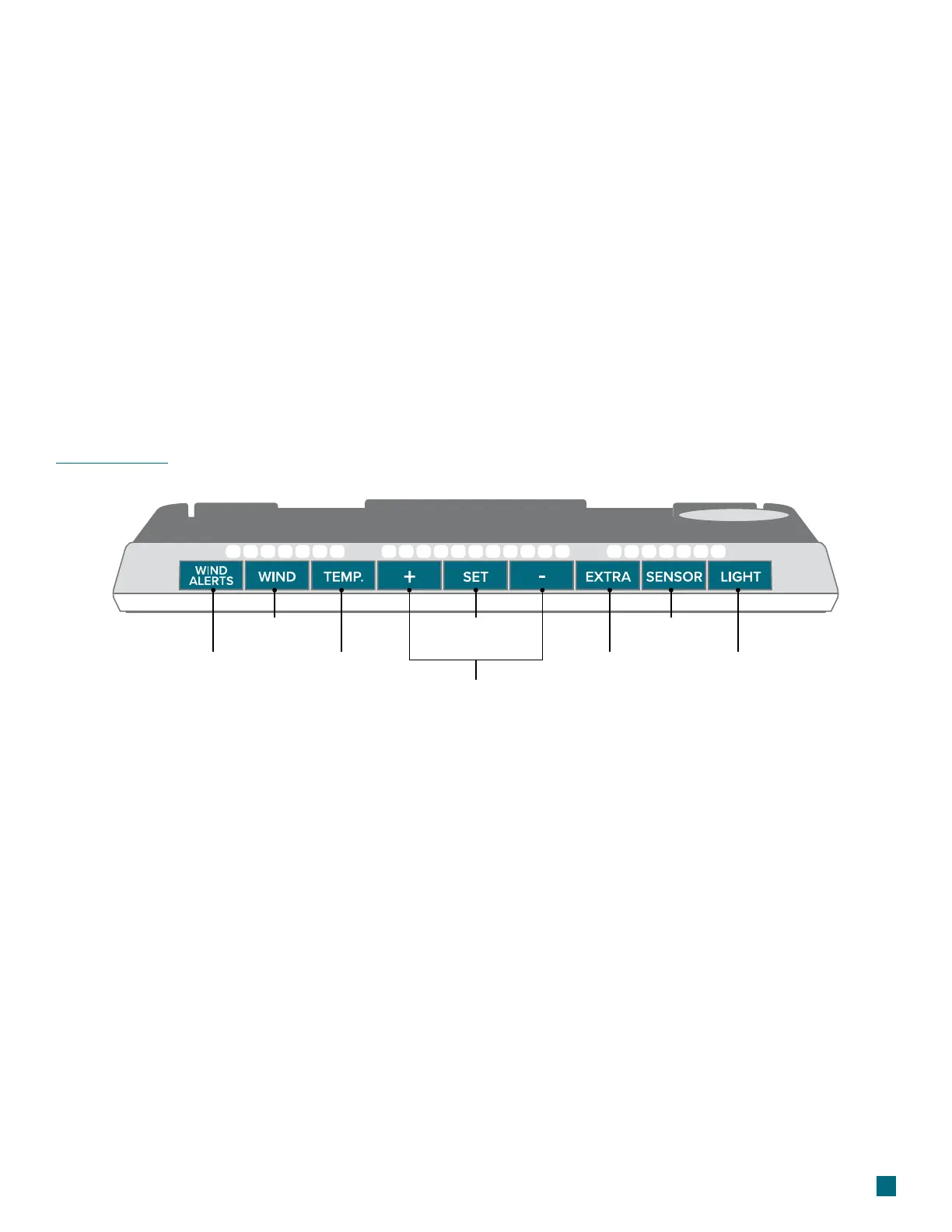
Buttons
1. WIND ALERTS
Hold to enter Wind Alert
Settings. Press to turn Wind
Alert on/o.
2. WIND
Press to view Wind Speed
History. While viewing,
hold the MINUS button to
delete the history reading.
3. TEMP.
Press to view Temperature
and Humidity History.
While viewing, hold
MINUS button to delete
the history reading.
6. EXTRA
Press to toggle through
extra sensors and pressure.
Hold to add sensors. While
viewing, hold the MINUS
button delete the sensor.
4. SET
Hold to enter Settings
Menu.
7. SENSOR
Press to view sensor ID
numbers. While viewing,
hold the MINUS button to
delete the sensor.
5. PLUS/MINUS (+/-)
Use to adjust values.
8. LIGHT
Press to adjust backlight.
Hold to enter Auto-Dim
settings.
1
3
2
6 8
7
4
Language Options: English, Spanish, French,
and German (Translation Available for Menus &
Calendar)


 To Next Page