WIRELESS TEMPERATURE STATION WITH COMFORT METER
6 | PAGE
HI/LO TEMPERATURE AND HUMIDITY RECORDS
1. From normal display, press and release the + HIGH button to view outdoor and indoor HI Records.
2. From normal display, press and release the - LOW button to view outdoor and indoor LO Records.
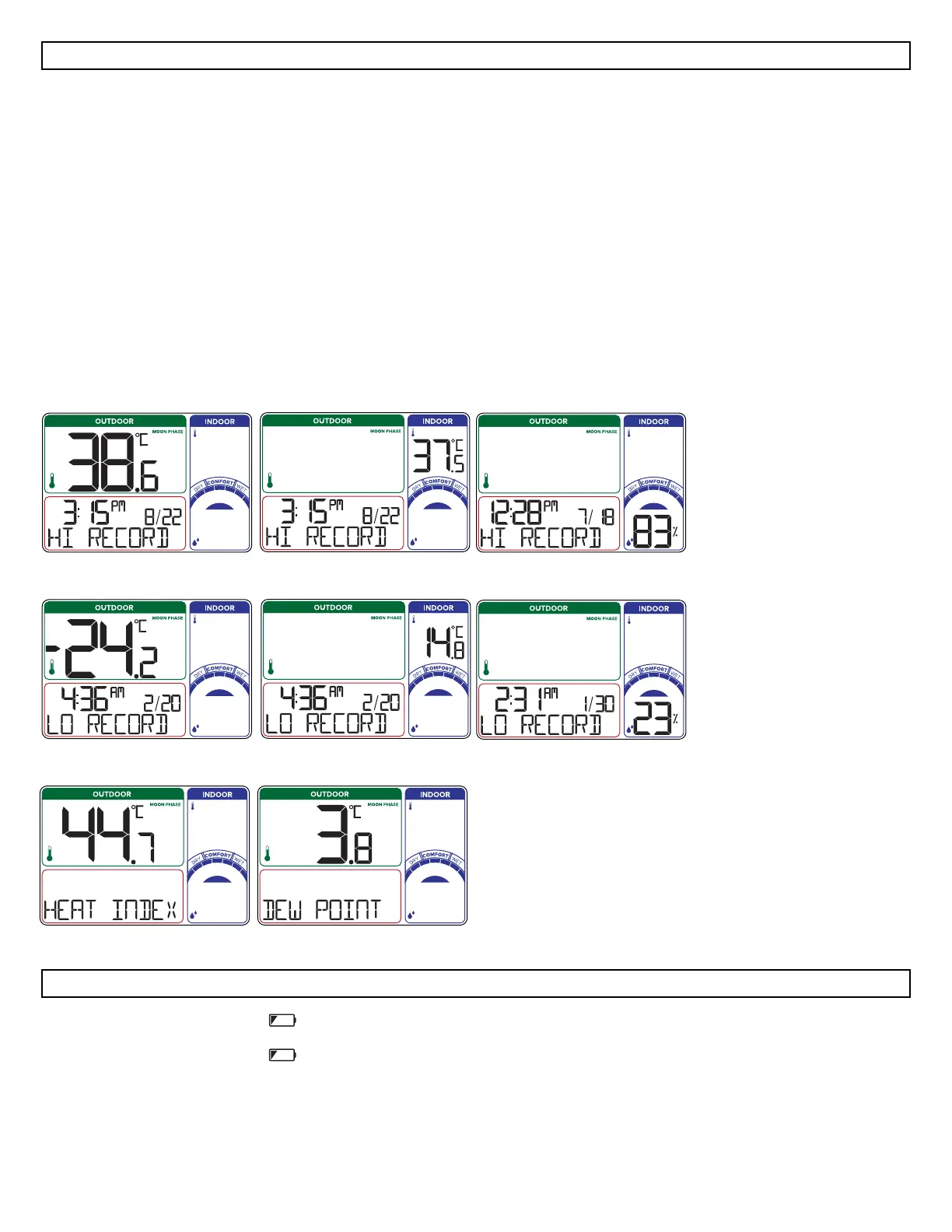
Viewing order:
• Outdoor HI Temp
• Indoor HI Temp
• Indoor HI Humidity
• Outdoor LO Temp
• Indoor LO Temp
• Indoor LO Humidity
Reset HI | LO Readings (each will reset individually):
• Press the + HIGH or - LOW button to view individual readings.
• Hold the - LOW button for five seconds to reset the individual value.
• HI/LO reading will reset to current temperature or humidity and current time and date.
Outdoor HI Temperature Record
M
D
M
D
M
D
Indoor HI Humidity RecordIndoor HI Temperature Record
Outdoor LO Temperature Record Indoor LO Humidity RecordIndoor LO Temperature Record
D
M
D
M
D
Outdoor Heat Index Outdoor Dew Point
LOW BATTERY INDICATOR
• When the Low Battery Indicator shows by the outdoor temperature, replace batteries in the sensor.
• When the Low Battery Indicator shows by the indoor temperature, replace batteries in the station.






 To Next Page