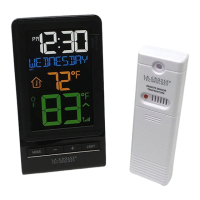
The La Crosse Technology Wireless Color Temperature Station (Model: T85258) is a device designed to monitor both indoor and outdoor temperatures with a clear, color display. It provides essential weather information and offers various user-friendly features for setup, display, and maintenance.
Function Description:
The primary function of this device is to display current indoor and outdoor temperatures. It also shows the time, date, month, and year. The station includes a remote sensor (TX141-Bv2) that wirelessly transmits outdoor temperature data to the main unit. A key feature is the temperature trend arrow, which indicates whether the temperature has increased, decreased, or remained stable over the past three hours. The device also records daily HI/LO temperatures for both indoor and outdoor environments, resetting these records automatically at midnight.
Important Technical Specifications:
- Indoor Temperature Range: 32°F to 122°F (0°C to 50°C)
- Outdoor Temperature Range: -40°F to 140°F (-40°C to 60°C)
- Wireless Transmission Range: Over 300 ft. (91 meters) in open air (RF 433MHz)
- Power (Weather Station):
- Primary: 5-volt AC power adapter (included, AC6#: GPU280500150WA00)
- Optional: 2-AA, IEC, LR6 batteries (not included)
- Power (TX141-Bv2 Sensor): 2-AA, IEC, LR6 batteries (not included)
- Battery Life: 24 months with reputable battery brands
- Dimensions:
- Station: 5.98" H x 3.24" W x 2.16" D (152 x 82.5 x 54.9 mm)
- Sensor: 5.11″ H x 1.57" W x 0.82" D (129.8 x 40 x 20.8 mm)
- Patents: Protected under U.S. Patents: 5,978,738 | 6,076,044 | RE43903
Usage Features:
- Initial Setup:
- Insert 2 "AA" batteries into the TX141-Bv2 temperature sensor.
- Insert the 5 Volt AC adapter into a wall outlet and then into the temperature station.
- Optionally, insert 2 "AA" batteries into the temperature station for backup power.
- After 5 minutes, place the sensor outside in a shaded location.
- LCD Icons: The display features various icons including Indoor Temperature, Low Battery (for station and sensor), Temperature °F/°C, Outdoor Temperature, Temperature Trend (3 hours), and Sensor Reception.
- Weekday or Date Display: Pressing the MODE button toggles between displaying the weekday or the month, date, and year. The chosen display will remain active.
- Backlight HI/LO/OFF: When powered by the AC adapter, the backlight brightness is adjustable (HI/LO/OFF) by pressing the LIGHT button. When operating on batteries alone, pressing the LIGHT button activates the backlight for 10 seconds.
- Settings Mode: Hold the MODE button for 3 seconds to enter settings. Use the + or - buttons to adjust values and MODE to confirm. The LIGHT button exits settings at any time. Settings include Language (English, Spanish, French), Beep ON/OFF, 12/24 hour time format, Hour, Minutes, Year, Month, Date, and Fahrenheit/Celsius. The day of the week automatically sets when year, month, and date are configured.
- HI/LO Temperatures Records: The station automatically records daily HI/LO temperatures for indoor and outdoor environments, resetting at midnight.
- Viewing HI/LO Records: Press and release the + button to cycle through Outdoor HI, Outdoor LO, Indoor HI, and Indoor LO temperatures.
- Sensor Reception: Hold the - button for 3 seconds to search for the sensor. The signal reception icon will flash during the search and become solid upon connection. If no signal is found within 3 minutes, the icon will flash.
- Temperature Trend Arrow: Indicators update every 30 minutes, reflecting temperature changes (2°F/1°C) over the past 3 hours. An upward arrow indicates an increase, a horizontal arrow indicates no change, and a downward arrow indicates a decrease.
Maintenance Features:
- Mounting the Temperature Sensor: Mount the outdoor sensor on a north-facing wall or in any well-shaded area, preferably under an eave or deck rail, ensuring it is mounted vertically.
- Restarting the Device (if outdoor readings show dashes):
- Bring the sensor within five feet of the station.
- Remove batteries from both the sensor and the station.
- Press any button 20 times.
- After 15 minutes, reinsert batteries into the sensor and then into the station.
- Wait 15 minutes for a strong connection to establish.
- Place the sensor back in its shaded outdoor location.
- Manually Resetting HI/LO Records: When HI or LO temperatures are displayed, hold the + button for 5 seconds to reset all temperature records.
- Low Battery Icon: An orange battery icon by the indoor temperature indicates low batteries in the temperature station. A green battery icon by the outdoor temperature indicates low batteries in the outdoor sensor. Replace batteries promptly when these icons appear.
- General Care and Maintenance:
- Do not mix old and new batteries, or different types of batteries (Alkaline, Standard, Lithium, Rechargeable).
- Always use the correct size and grade of batteries.
- Replace all batteries of a set at the same time.
- Clean battery contacts and device contacts before installation.
- Ensure correct battery polarity (+ and -).
- Remove batteries from equipment not in use for an extended period.
- Promptly remove expired batteries.
The La Crosse Technology Wireless Color Temperature Station is designed for ease of use and reliable temperature monitoring, providing essential information at a glance with its clear display and intuitive controls.

 Need help?
 General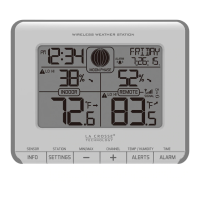







 To Next Page