Initial Setup
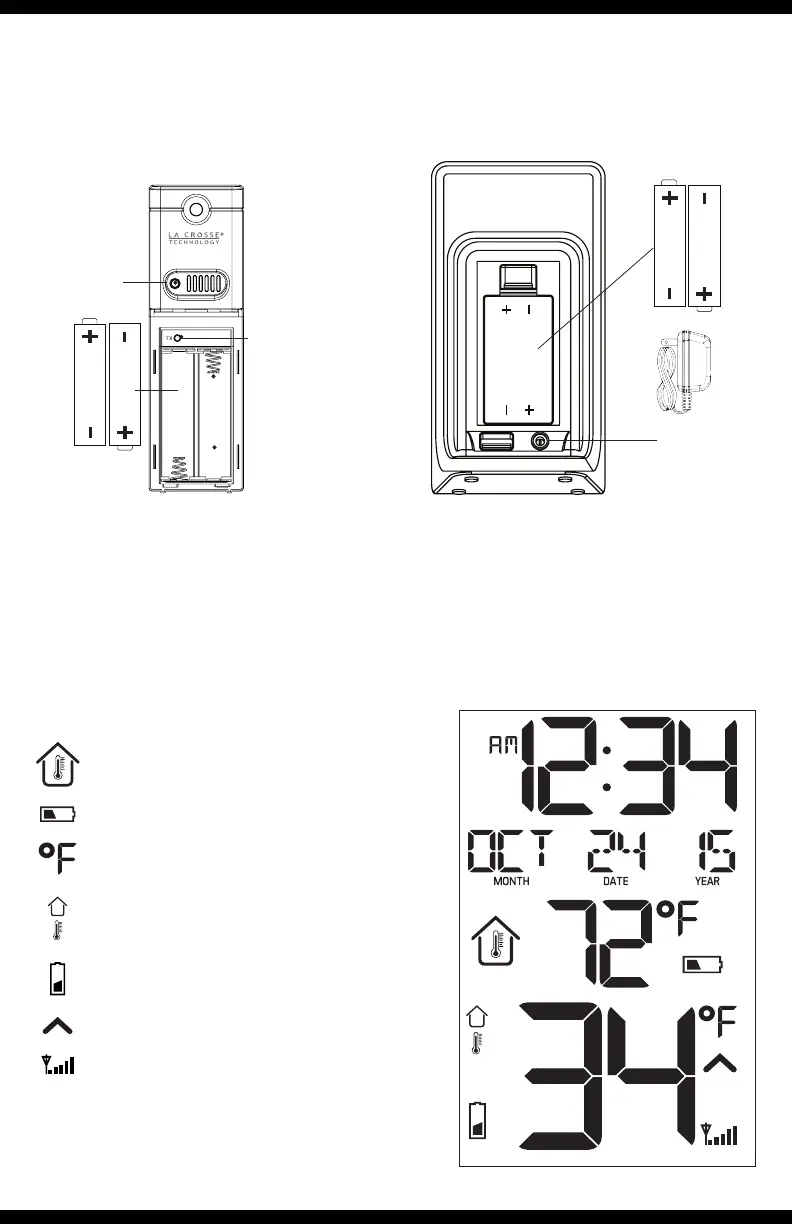
1. Insert 2 “AA” batteries into the TX141-Bv2 temperature sensor.
2 “AA”
Batteries
LED
TX
Button
2. Insert 5 Volt AC adapter into the wall outlet, then into the
temperature station.
3. Insert 2 “AA” batteries into the temperature station (optional).
2 “AA”
Batteries
AA
AA
5 Volt
AC Adapter
LCD Icons
Indoor Temperature Icon
Low Battery Indicator for Station
Outdoor Temperature Icon
Temperature Trend (3 hours)
Low Battery Indicator for Sensor
Sensor Reception Icon
Temperature °F/°C
AA
AA
4. After 5 minutes place sensor outside in a shaded location.
Page | 1 Wireless Color Temperature Station T85258








 To Next Page