www.lacrossetechnology.com/support Page|5
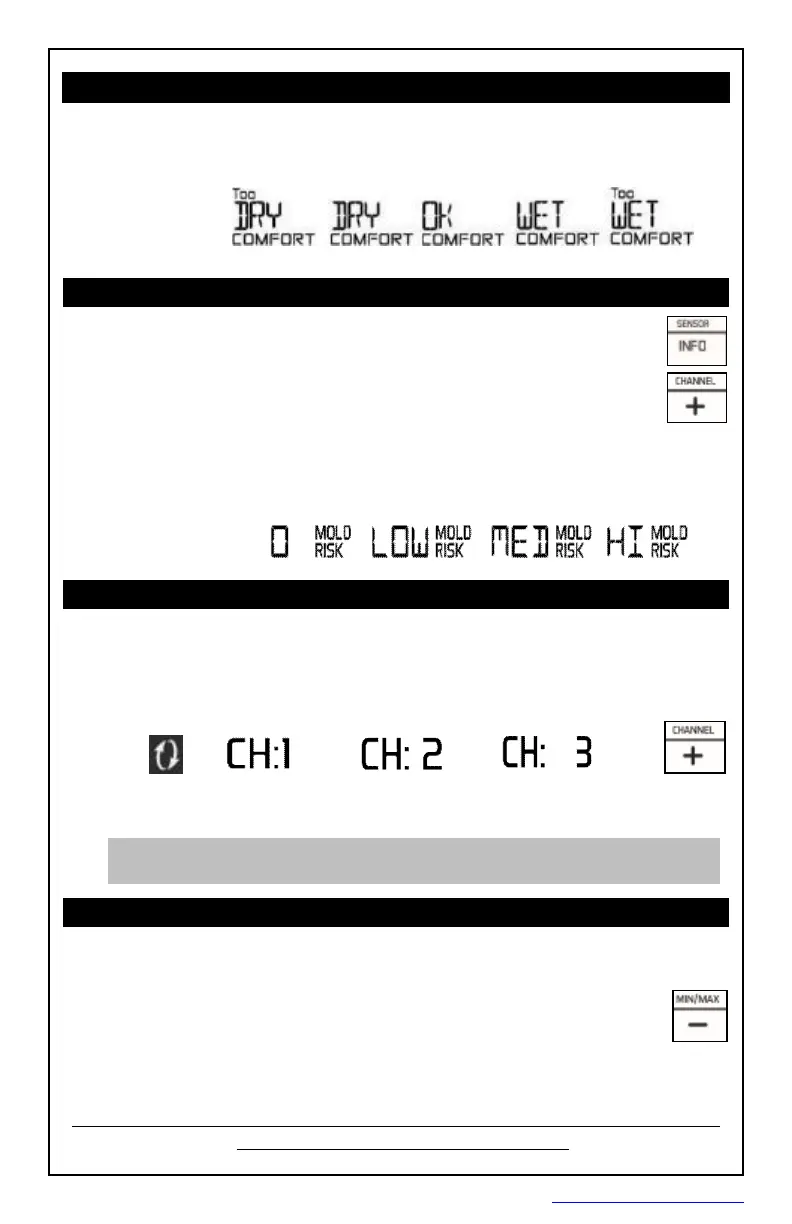
Indoor/RemoteComfortDisplays
Theindoorcomfortdisplayisbasedoffofthehumidityreadbythe
forecaststation.Theremotecomfortdisplayisbasedoffthehumidity
readbytheremotesensor(s).Theforecaststationwilldisplayoneoffive
indicators:
HeatIndex/DewPoint/MoldRisk
Pressthe INFO buttonrepeatedlytotogglebetween:
• HeatIndex(outdoor)
• DewPoint(outdoor)
• MoldRisk(indoor/outdoor)
HeatIndex,DewPointandMoldRiskindicatorsareavailableforupto
threeremotelocations(whenusingmultiplesensors).
Whenusingmultiplesensorspressthe + buttontoviewreadingsona
differentchannel.
RemoteSensorChannels-AutoScroll
• Pressthe + buttontotogglebetweenremotesensorchannelswhen
multiplesensorsareused.
•
Theforecaststationwillautomaticallyrotatethroughthechannelsfor
allconnectedsensors.
• Pressandreleasethe
+ buttontolocktheforecaststationintoone
channel.Thenviewchannelsindividuallywithapressofthe + button.
Note: Whenmultipleremotesensorsareused,HeatIndex,Dew
PointandMoldRiskwillbeavailableforeachremotesensor.
View/ResetMIN/MAXValues
Thestationautomaticallyresetsminimumandmaximumvaluesdailyat
midnight(12:00AM).
• Pressandreleasethe
- buttontoviewminimumand
maximumvalues
.
• Holdthe - buttontomanuallyresetminimumandmaximumvalues.
1-25%
26-39% 40-75%
76-83%
84-99%
Auto
Scroll
Icon
PDF 文件使用 "pdfFactory Pro" 试用版本创建 www.fineprint.cn









 To Next Page