Alarm Clock Settings
BASICS
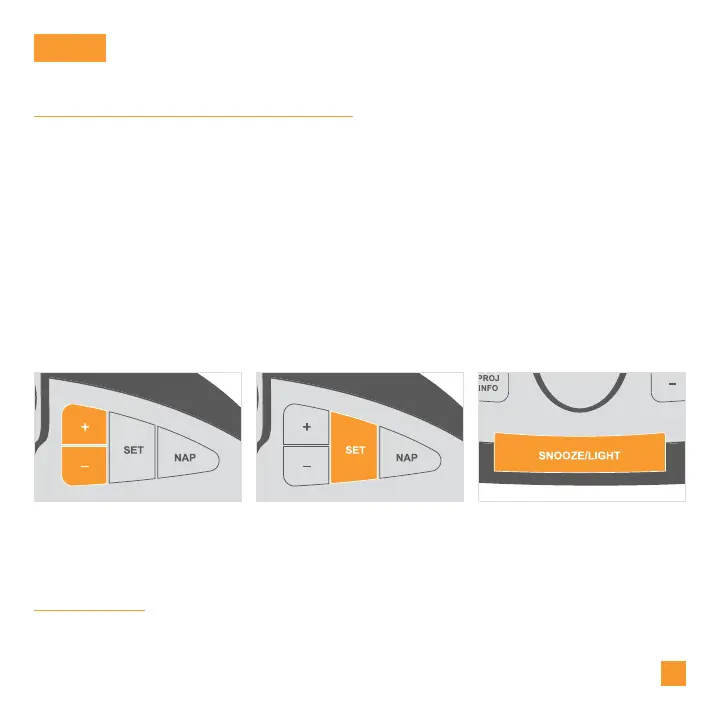
Use the +/- buttons on the
top of the Alarm Clock to
adjust the values.
Press the SET button to
confirm selection and move
to next step.
You may exit the Settings
Menu at any time by pressing
the SNOOZE/LIGHT button.
Settings Menu Order
Greeting • Language • 12/24 Hour Time • Hour • Minute • Year • Month
Date • Calendar Order (Month/Date or Date/Month) • Fahrenheit/Celsius
Thank You
1.
2.
When the Alarm Clock is first powered on, it will begin searching for your
outdoor sensor, which should connect shortly.
To manually set your time, date, and other settings, hold the SET button to
enter the Settings Menu.
Notes: Weekday will set automatically after year, month, & date settings are adjusted.
If you’re connected to the Wi-Fi, the time and date will automatically update from the
Internet. See pages 3-4 for more information.
05



 To Next Page