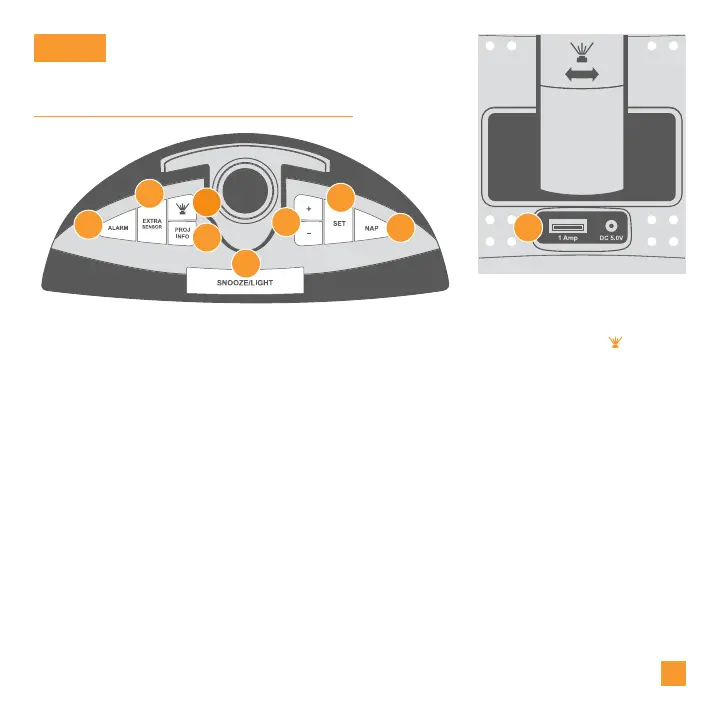
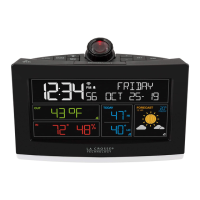
Buttons & Ports
BASICS
1. ALARM
Press to activate/deactivate
alarm. Hold to enter Alarm
Settings Menu.
3. PROJECTION ( )
Press to adjust projection
intensity.
5. SNOOZE/LIGHT
Press to snooze sounding alarm,
adjust backlight, or hold to enter
Auto-Dim Settings.
7. SET
Press to view Wi-Fi status.
Hold to enter Settings Menu.
2. EXTRA SENSOR
Press to toggle between alarm
time, nap timer duration, internet
outdoor temperature*, or add-
on sensor data. Hold to add
additional sensors.
4. PROJ INFO
Press to toggle through
projection options. Hold to
alternate projection between
available options.
6. PLUS/MINUS (+/-)
Use to adjust values, hold to
change values quickly. Hold
+/- buttons together to clear
and search for a new Wi-Fi
connection.
8. NAP 9. USB CHARGING PORT
Press to start Nap Countdown
Timer. Hold to set Nap Timer
duration.
Using your own USB cable,
conveniently charge 1 Amp
devices.
06
1
2
3
4
5
6
7
8
*Your Alarm Clock must be connected to Wi-Fi to receive Internet data. Internet data updates 4-6 times a day.
Back of Alarm Clock
9



 To Next Page