EasyManua.ls Logo

La Crosse Technology WT-5431 - User Manual

La Crosse Technology WT-5431
18 pages
Print Icon
To Next Page IconTo Next Page
Loading...
WT-5431
433 MHz
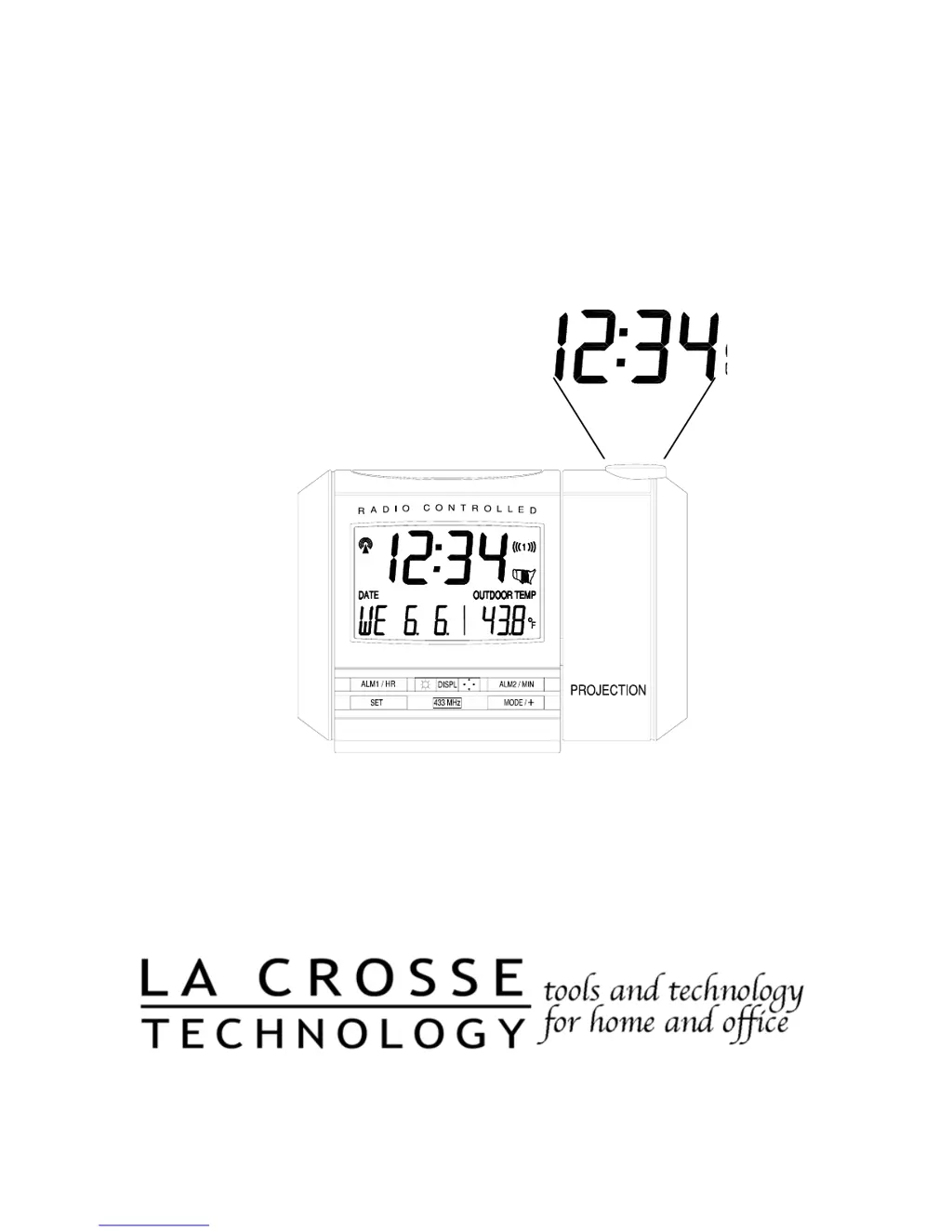
Radio Controlled Projection Alarm
Instruction Manual

Questions and Answers

  • J
    John JohnsonJul 28, 2025
    Why does my La Crosse Technology WT-5431 Alarm Clock show 'OFL' in the outdoor temperature?
    • B
      Breanna SmithJul 29, 2025
      If the La Crosse Technology Alarm Clock displays “OFL” in the outdoor temperature LCD, it could be due to several reasons. The remote temperature might be out of range, so try moving it closer. Ensure the batteries are working correctly. Interference from external sources like cordless phones could also be the cause. If the issue persists, further assistance may be needed.
  • C
    Charlene GreeneAug 2, 2025
    How to improve WWVB signal reception on La Crosse Technology WT-5431?
    • K
      kathleenphillipsAug 2, 2025
      To improve the reception of the WWVB signal on your La Crosse Technology Alarm Clock, try these steps: 1. Face the front of the projection alarm towards Ft. Collins, Colorado. 2. Wait overnight for the signal to be received. 3. Ensure the alarm clock is at least 6 feet away from electrical devices like TVs or computers. 4. Remove the batteries for five minutes, reinsert them, and leave the unit alone overnight without pressing any buttons. 5. Try leaving the batteries in but unplug the AC adapter overnight.
  • J
    Jeffrey JimenezAug 6, 2025
    How to fix a faint projection on La Crosse Technology WT-5431 Alarm Clock?
    • S
      Sheri NguyenAug 6, 2025
      If the projection on your La Crosse Technology Alarm Clock is faint, you can try the following: 1. Change the intensity setting. 2. Use the AC adapter. 3. Darken the surroundings. 4. If not using the AC adapter, use fresh batteries.
  • R
    Robert LawsonAug 10, 2025
    What to do if “--.-” appears in outdoor temperature LCD on La Crosse Technology WT-5431?
    • A
      alexanderpatrickAug 11, 2025
      If “--.-” appears in the outdoor temperature LCD of your La Crosse Technology Alarm Clock, try checking the batteries in the remote. If you replace the batteries in the remote, you must restart the unit. Remove all batteries, and then follow the start-up procedure.
  • A
    Anthony TaylorAug 15, 2025
    Why is the hour incorrect on my La Crosse Technology Alarm Clock?
    • P
      Patricia WalkerAug 15, 2025
      If the hour is incorrect but the minute and date are correct on your La Crosse Technology Alarm Clock, make sure the correct time zone and daylight saving time settings are selected.
  • J
    Juan MillerAug 19, 2025
    What to do if LCD is faint on La Crosse Technology WT-5431?
    • M
      Misty PatelSep 12, 2025
      If the LCD on your La Crosse Technology Alarm Clock is faint, try replacing the batteries.
  • K
    Kevin SchmidtAug 23, 2025
    What does 'OFL' mean on my La Crosse Technology WT-5431 indoor temperature display?
    • C
      Chad KingAug 25, 2025
      If “OFL” appears in the indoor temperature LCD of your La Crosse Technology Alarm Clock, it means the current surrounding temperatures are outside the measuring range. Move the unit to an area with a warmer or cooler surrounding temperature.

Summary

Quick Set-Up Guide

Detailed Set-Up Guide

Battery Installation

Instructions for installing batteries in the remote sensor and projection alarm.

Program Mode

Guide to setting time zone, DST, snooze, time, date, and display modes.

Time and Date Setting

Procedures for manually setting the clock's time, date, and 12/24 hour format.

Features and Operations

Radio-Controlled Time and Date

Details on how the projection alarm receives and displays the time signal.

Projection of Time and;or Remote Temperature

How to configure the projection display for time, temperature, or both.

EL Backlight and Indoor Temperature

Information on the backlight and the internal sensor for indoor temperature display.

Remote Temperature and Time Alarm

How the remote sensor transmits outdoor temperature and setting the dual alarms.

Changing Display Mode

How to cycle through different display modes for date, seconds, and temperature.

Mounting the Remote Temperature Sensor

Maintenance and Care

Troubleshooting

Specifications

Warranty Information

La Crosse Technology WT-5431 Specifications

General IconGeneral
TypeDigital Alarm Clock
Display TypeLCD
Time Format12/24 Hour
BacklightYes
Temperature DisplayYes
Alarm FeaturesSnooze
Power SourceBattery

Related product manuals