16 IPX Series Quick Start Guide 17
Global
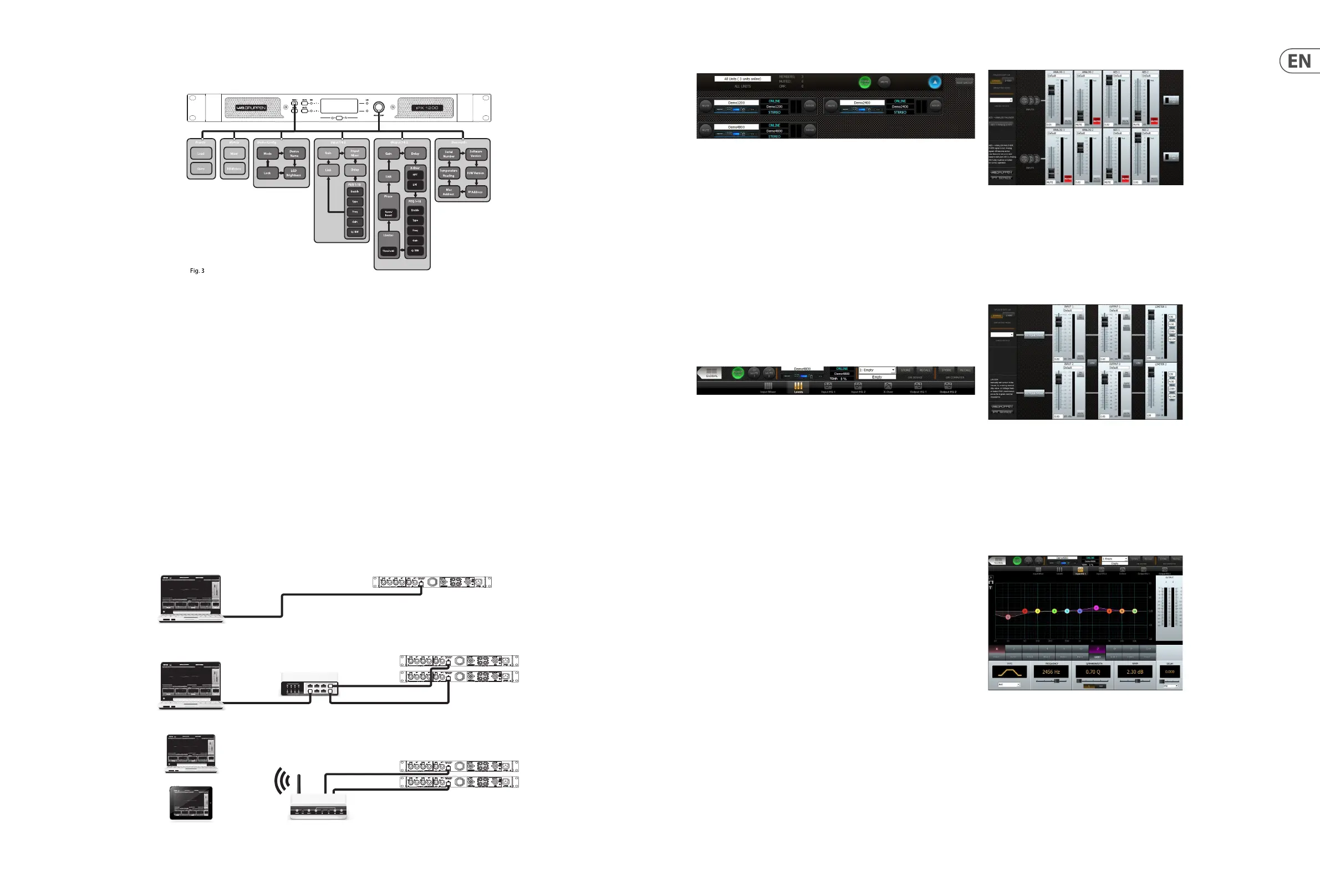
The Global view shows all devices on the network and accesses the following
functions:
• Naming devices (ampliers) and groups
• Forming groups of devices
• Creating and deleting groups
• Muting ampliers individually or in groups
• Power On/O individually or in groups
• Monitoring of output levels
• Devices selected for a group are controlled simultaneously from any of the
device UI:s in that group.
Device Header
The device header panel appears at the top of each conguration window
for a selected device. The header panel accesses the following functions and
information:
• Return to Global
• Power on/o
• Output mute (per channel)
• Device name
• Online/Oine indication
• IP address
• Temperature reading
• Current preset
• Preset store and recall (device or computer)
Input Mixer
The Input Mixer view accesses the following functions:
• Device set-up (stereo or 2-way mode)
• Input mixing
• AES3 to analog failover on/o
Levels
The Levels view accesses the following functions:
• Input Mix Bus Levels
• Output levels
• Output limiters
• Linking of inputs and outputs.
Input EQ
Input E Q view is selectable per channel. Input EQ accesses the following
functions:
• Parametric equalizer (up to 10 bands)
• Output level status
• Input delay (up to 2 sec)
Front panel configuration
Input mixing and routing, as well as all DSP parameters, may be congured using the Menu and Back buttons and the Adjust/Set rotary encoder (see Fig. 3 below):
IPX Controller software and network conguration
Software and App Downloads and Installation
For download of the IPX Controller software for Mac and PC, please visit
www.labgruppen.com. Instructions for installation are available via this link.
The IPX Controller app for iPad Is available from Apple in the App Store.
Network conguration
A network of IPX ampliers may be congured using standard, o-the-shelf
Ethernet router and shielded Cat-5 cabling. If the router is WiFi enabled, the IPX
amplier network will be accessible using an iPad or laptop computer running
IPX Controller software.
The IPX network employs a star topology only. Each amplier must be connected
individually to the router.
Network conguration is automatic. Each amplier is identied by a unique
IP address, which is shown in the Global view and the device header panel of
IPX Controller.
Input mixing/routing and DSP conguration using IPX Controller
All input mixing /routing functions and DSP conguration parameters are accessible and adjustable using IPX Controller software. The device header panel appears at
the top of each conguration window for a selected device.
Wireless RouteriPad / Tablet
iPad
PC or Mac Computer
(direct connection may require
crossed cable or MDI/X capable NIC)
Network Router
PC / Mac
PC / Mac
shielded CAT-5E
shielded CAT-5E
shielded CAT-5E






 To Next Page