Edition 3 April 2012 Mars/Mars Pro Service Manual
Page 29/59
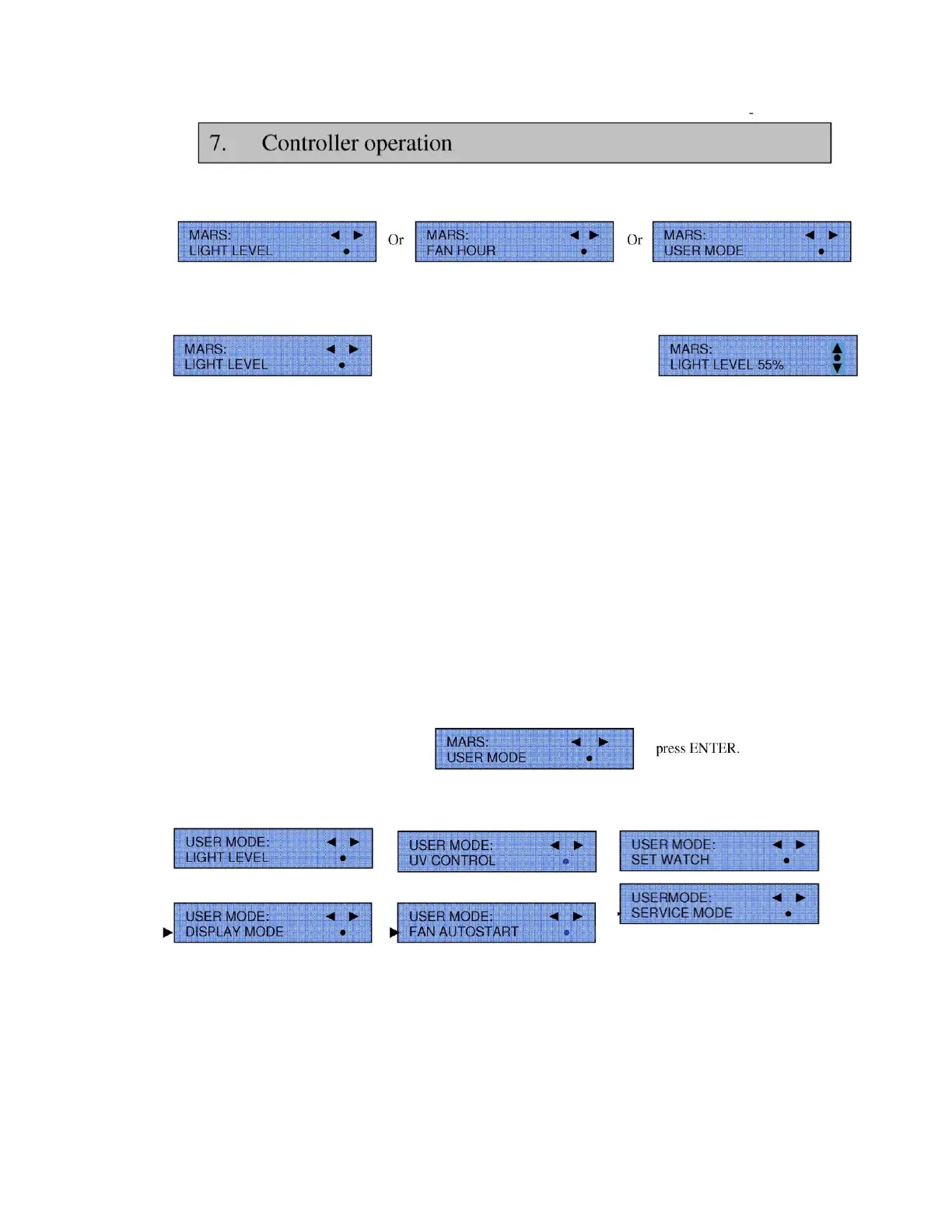
From this menu, by pressing Button 8, the display will show either:
Press the black ENTER button●, to enter any of these menus and to see the sub menus below. For example:
ENTER =
By now pressing buttons 7 ▲or 0▼ the light level can be adjusted up or down. Once the level is
selected then press the ENTER button ● again to accept it. If the ENTER button is not pressed with 6 seconds then the
display will revert back to normal start menu display.
7.3 Sub menu options:
Each sub menu has more sub menu options and by scrolling through the display they can be shown as follows:
For clarity the following symbols will be used in this text to indicate which button to press:
ENTER = ●
Scroll up = ▲
Scroll down = ▼
Scroll left = ◄
Scroll right = ►
To enter the sub menus, select
This will then give the following sub menu options:
►
►






 To Next Page