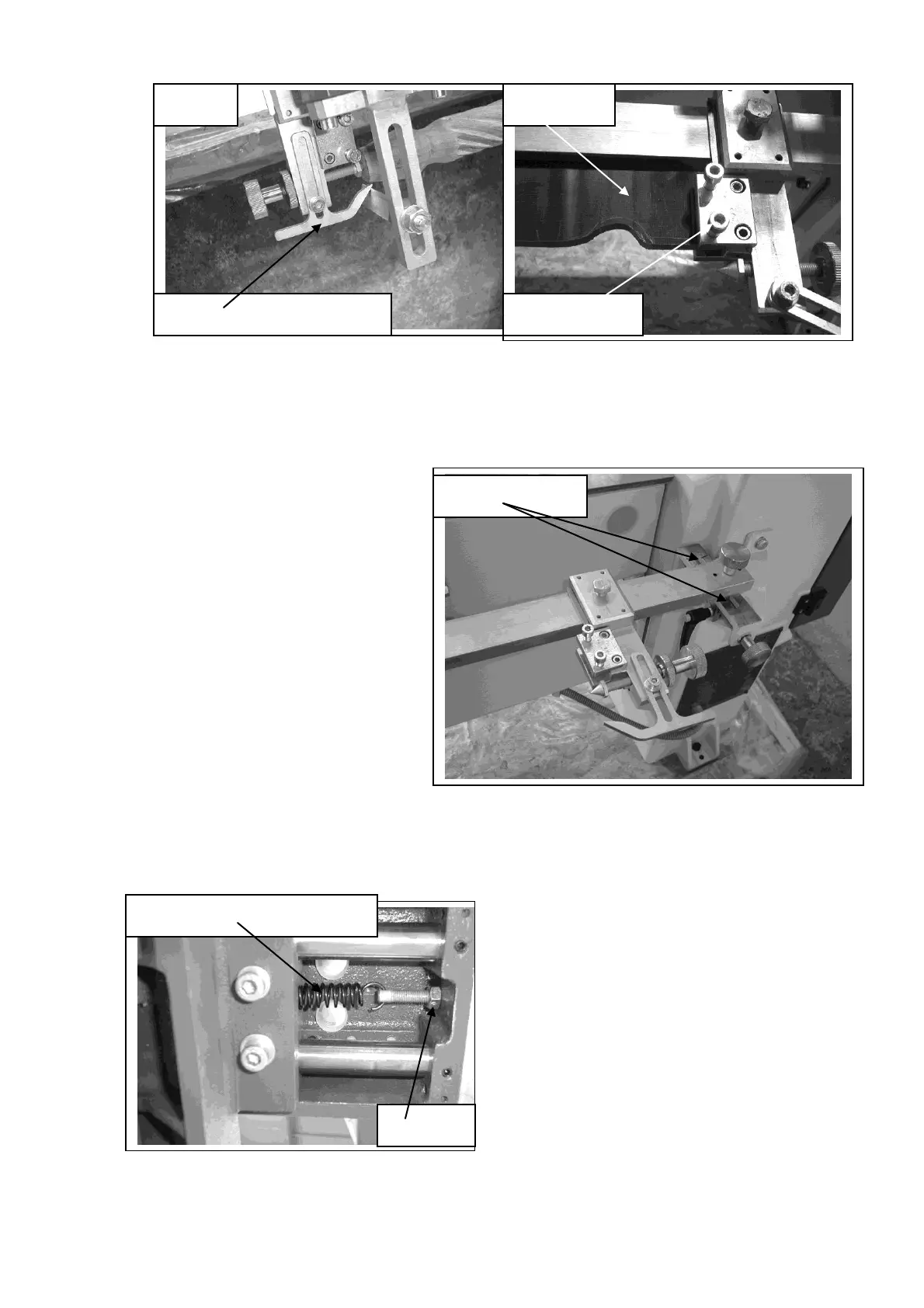
Fit the template as shown and tighten the clamp screws.
Fit a master fit between centers and lock the screw with the lock ring.
Once the master or template is in position adjust the lead in / lead out bracket so that
the follower has a smooth transition at the ends of the master and the template.
The main copy bar will have to be
set parallel to the axes of the lathe
[center line of the spindle].
The simplest way to achieve this is
to place a round piece of wood
between centers. Adjust the main
copy bar so that the copy follower is
running along it. Then cut the wood
with the copy attachment. Once the
wood has been turned, measure it at
both ends and adjust the main bar
until the wood being turned is the
same dimension at both ends. Once
the bar is parallel, scribe [scratch] a
line and fill with a permanent marker
on both support bracket both sides of
the main copy bar support block. You can then use these marks a quick reference
whenever you have to set up a new job.
The follower is controlled by a spring,
which is located under the copy saddle
at the back of the lathe. The spring
pressure can be adjusted and comes
factory set to suite most templates and
masters. If you require to adjust the
spring pressure, loosen both lock nuts,
adjust the screw, and re tighten the
lock nuts. Screwing the screw out will
increase the follower pressure.
Lead in / lead out bracket
Copy saddle control spring


 To Next Page