13
CONTROL PANEL GCCO-SII
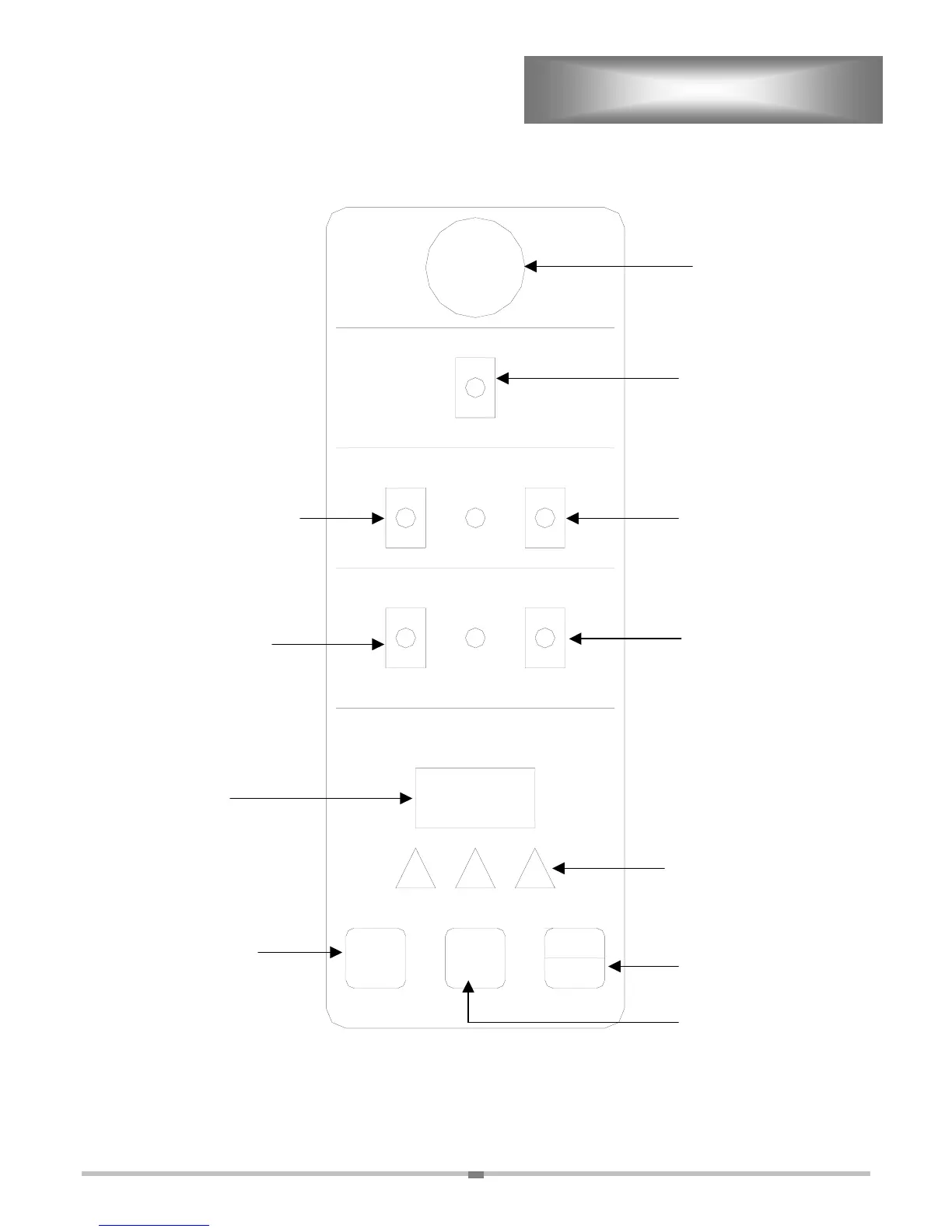
Power switch.
Light switch. Inspection light only.
Push toggle switch to the up
position to inspect product. Switch
will automatically return to the off
position.
Pulse fan switch. Pulse fan
setting will only turn the fan
on when the oven is calling
Dual speed switch.
Toggles the fan between
high and low speed.
Cook N Hold switch.
Oven will automatically
drop to 140°F when oven
timer stops timing down.
LED Display.
Adjustment Arrows.
Adjusts the LED display
for time and temp.
Temp Button. Press
to set desired temp.
Timer Button. Press to
set desired time.
Start/Stop Button. Starts
and sto
s the timer.
Vent Knob.
TEMP/TIME
PULSE FAN HI-SPEED
FAN
LOW-SPEED
LIGHT
ON
OFF
COOK N HOLD
TEMP TIMER
START
STOP
BUZZER
8 8 8



 To Next Page