2.2. Install the UPS
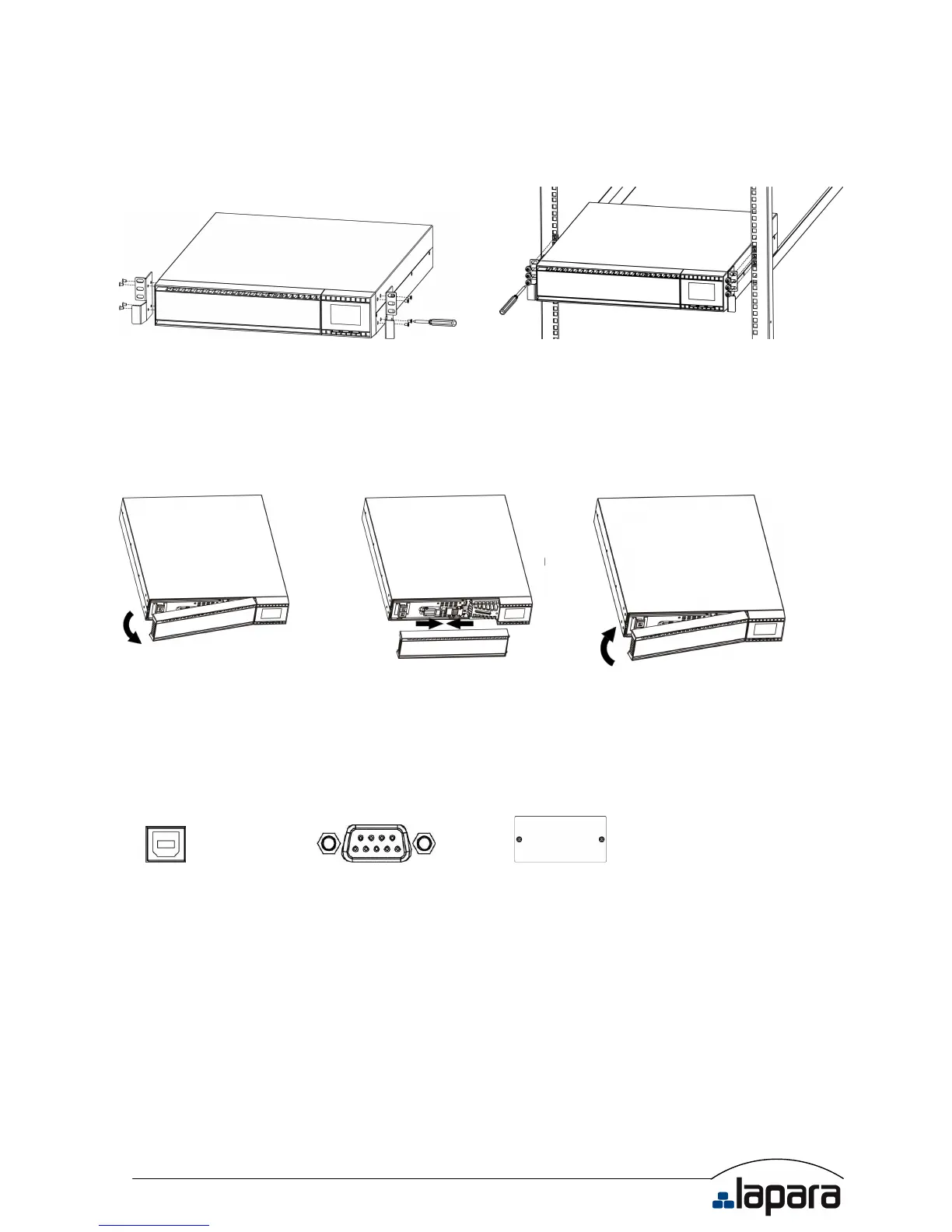
This UPS can be mounted in the 19” rack chassis. Please follow below steps to position this
UPS.
Step 1 Step 2
2.3. Setup the UPS
Step 1: Connect battery wires
For safety consideration, the UPS is shipped out from factory without connecting battery wires.
Before install the UPS, please follow below steps to re-connect battery wires first.
Step 1 Step 2 Step 3
Remove front panel. Connect the AC input and
re-connect battery wires.
Put the front panel back to the
unit.
Step 2: Communication connection
Communication port:
USB port RS-232 port Intelligent slot
To allow for unattended UPS shutdown/start-up and status monitoring, connect the
communication cable one end to the USB/RS-232 port and the other to the communication
port of your PC. With the monitoring software installed, you can schedule UPS
shutdown/start-up and monitor UPS status through PC.
The UPS is equipped with intelligent slot perfect for either SNMP or AS400 card. When
installing either SNMP or AS400 card in the UPS, it will provide advanced communication and
monitoring options.
PS. USB port and RS-232 port can’t work at the same time.


 To Next Page