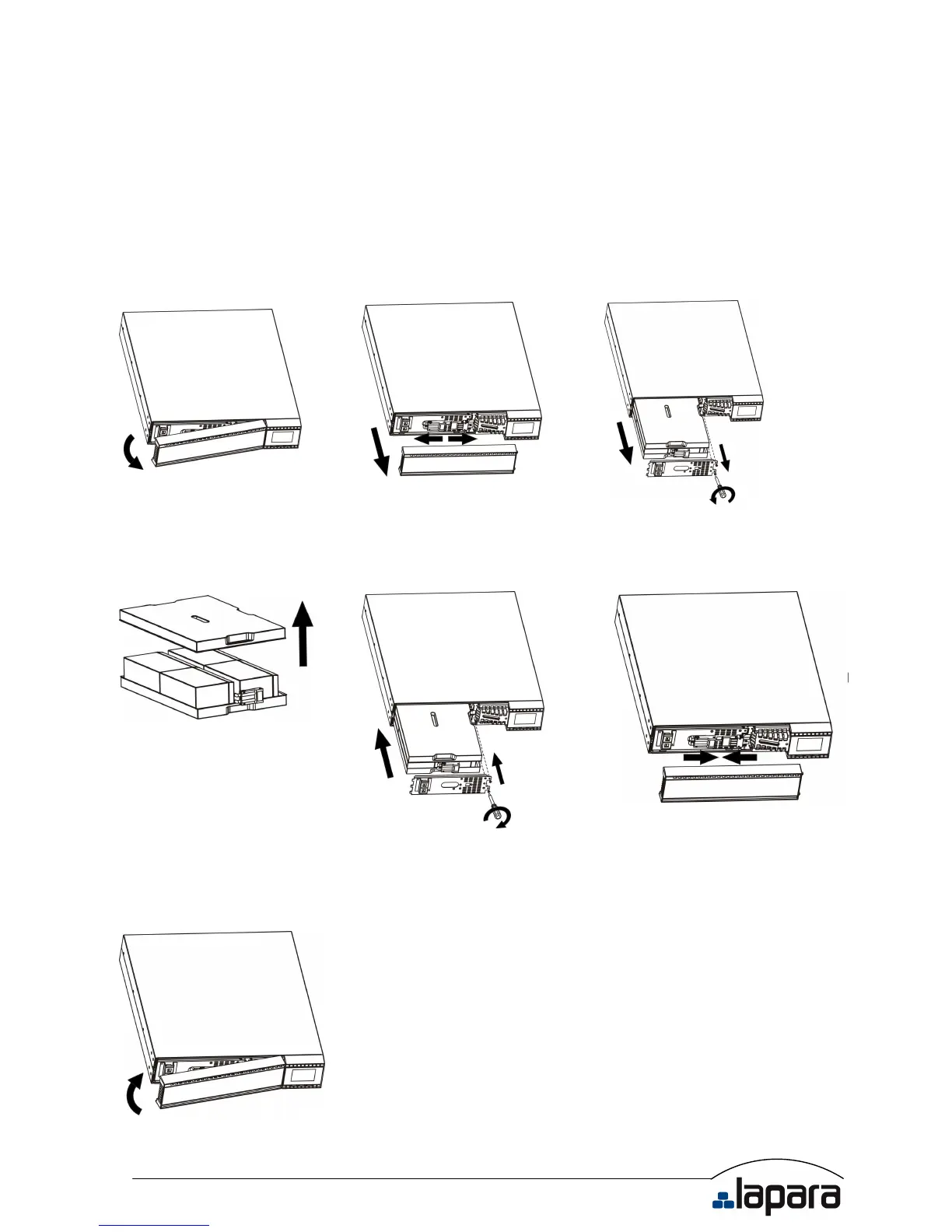
2.4 Battery replacement
NOTICE: This UPS is equipped with internal batteries and user can replace the batteries
without shutting down the UPS or connected loads.(hot-swappable battery design)
Replacement is a safe procedure, isolated from electrical hazards.
CAUTION!! Consider all warnings, cautions, and notes before replacing batteries.
Note: Upon battery disconnection, equipment is not protected from power outages.
Step 1 Step 2 Step 3
Remove front panel. Disconnect battery wires. Pull out the battery box by
removing two screws on the front
panel.
Step 4 Step 5 Step 7
Remove the top cover of battery
box and replace the inside
batteries.
After replacing the batteries, put
the battery box back to original
location and screw it tightly.
Re-connect the battery wires.
Step 8
Put the front panel back to the unit.


 To Next Page