CHARGING
Before using, fully charge the speaker using the supplied USB cable. Plug it
into any USB charging port eg. Laptop, Computer, AC Charger, Car Charger,
etc. A solid red LED indicates that the speaker is charging.
POWER ON/OFF
Turn the speaker ON or OFF by sliding the switch.
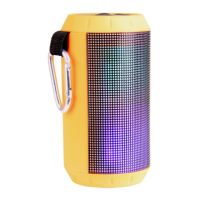
LIGHT MODE
Press to turn light show ON, OFF or Interactive.
BLUETOOTH® PAIRING
Note: The speaker will always default to Bluetooth pairing mode unless an
external audio device or storage has been connected.
- Turn the speaker ON. (By default the first mode will be Bluetooth mode and the
indicator light will be flashing.)
- Enable the Bluetooth function on your mobile device and search for
the Bluetooth speaker (SPK-BT540LED).
- Pair and connect to the speaker.
Note: If prompted, enter the pairing code 0000.
PLAYING MUSIC
- Press the PLAY/PAUSE button to start or stop music playback.
- Press the NEXT / V+ or the PREVIOUS / V- button to choose songs.
- Long pressing the NEXT / V+ or the PREVIOUS / V- button to adjust the
volume.


 To Next Page