28
13
12
Zero
μm
DIR
Fe
NO
AVG
100
100.0
1
Zero
μm
DIR
Fe
NO
AVG
100
100.0
1
Reset to factory settings
The measurement device can be reset to the factory settings and the basic
calibration settings in order to delete all measured values, settings and
calibration values.
To do so, follow these steps:
1. Switch off measuring device
2. Press the keys „ON/OFF“ and „ZERO“
at the same time.
3. Let go of the „ON/OFF“ key and keep
„ZERO“ pressed.
ESDQRS@QSHMFBNMÖQLSGDQDRDSAXQDRONMCHMF
either „Yes“ or „No“ to the prompt.
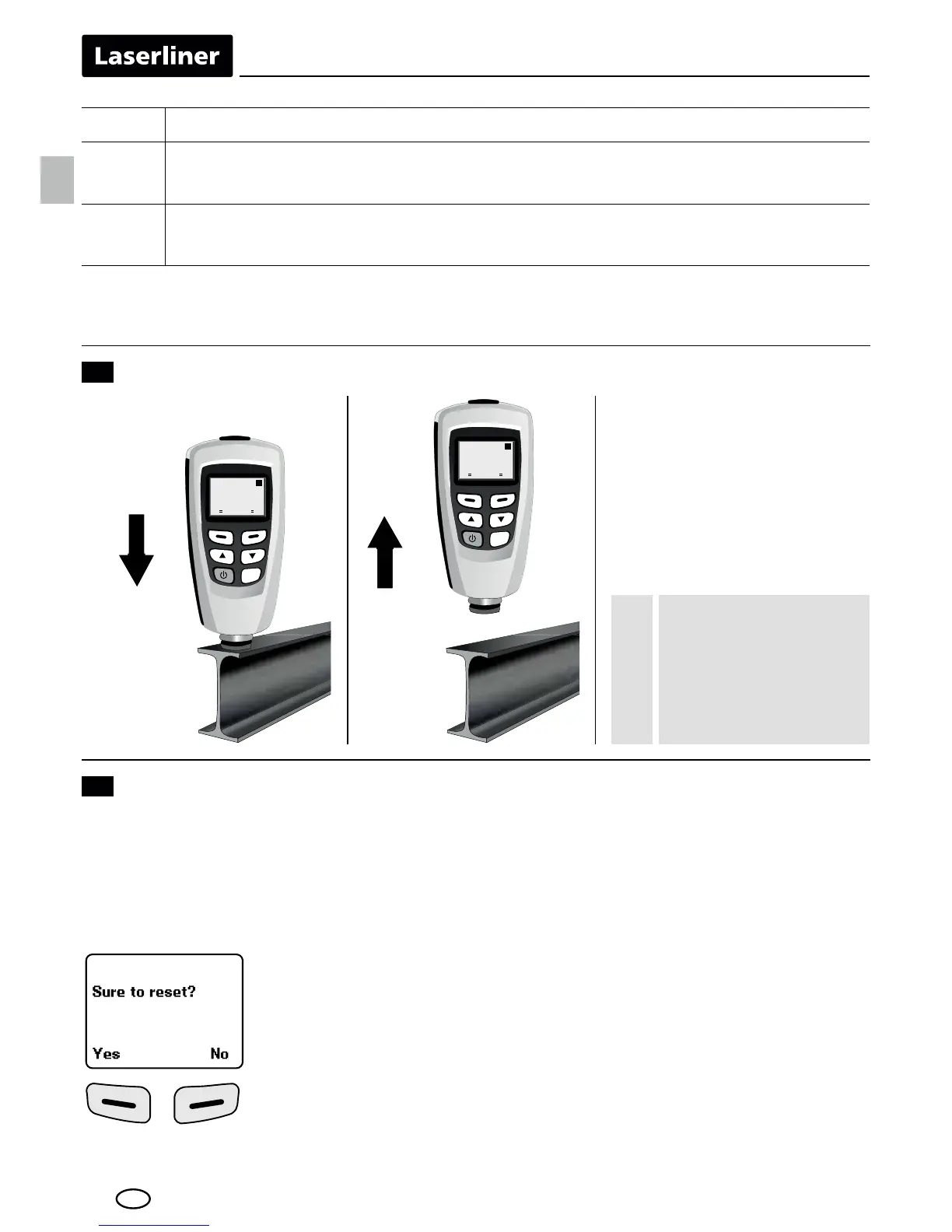
Performing measurement
During measure-
ment, keep the
device as straight,
tangential and still
as possible.
!
Two-point calibration (cal 2)
11 Repeat steps 7-10
(„cal 2“ and „zero y“ appear on the display)
Complete one-point or two-point calibration:
Menu > Calibration > Disable > ESC
3NHMBQD@RDSGDB@KHAQ@SHNM@BBTQ@BXQDOD@SRSDOR@SKD@RSSGQDDSNÖUD
SHLDRTRHMFSGDR@LDQDEDQDMBDÖKLRSG@SVDQDTRDCOQDUHNTRKX
EN





 To Next Page