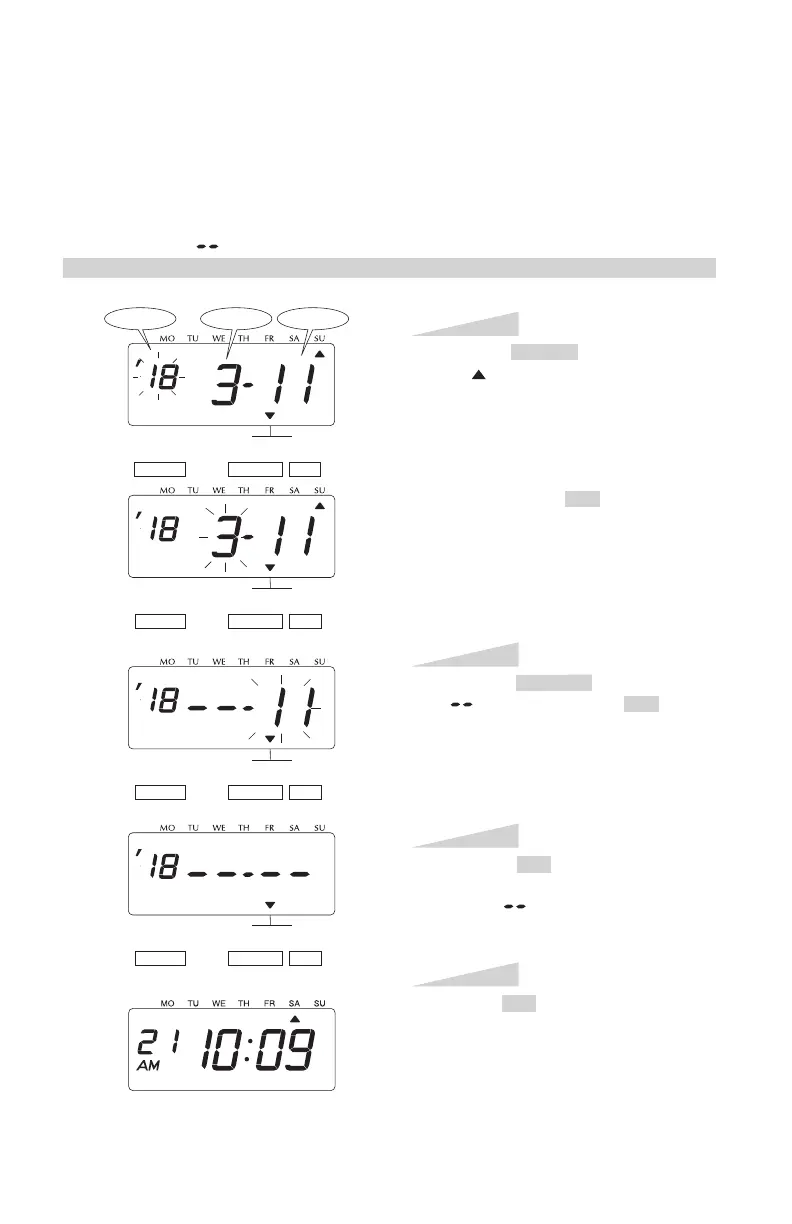
DELETING THE DAYLIGHT SAVING TIME SETTING
Press the SELECT button and position
the " " mark at the "D.S.T. START".
At that moment, the "Year" flashes. (The
flashing means it can be changed.)
Next, press the SET button. At that
moment, the flashing changes from
"Year" to "Month".
Step 1
D.S.T.
START
SELECT CHANGE
SET
D.S.T.
START
Press the CHANGE button to set at
" ". And then press the SET button.
At that moment, the flashing changes
from "Month" to "Date".
Step 2
Press the SET button again. At that
moment, the flashing changes from
"11" to " ".
Step 3
Press the SET button once again.
Now the D.S.T. deleting has been
completed. Replace the cover and lock.
IMPORTANT: If you do not complete
Step 4, the clock will not print.
Step 4
Year
Date
Month
SELECT CHANGE
SET
D.S.T.
START
SELECT CHANGE
SET
D.S.T.
START
SELECT CHANGE
SET
To delete and cancel the daylight saving time setting, change the display of "Month" of the
starting setting to " ".
Example: Change March 11, 2018 of "D.S.T. START" and delete daylight saving time setting.



 To Next Page