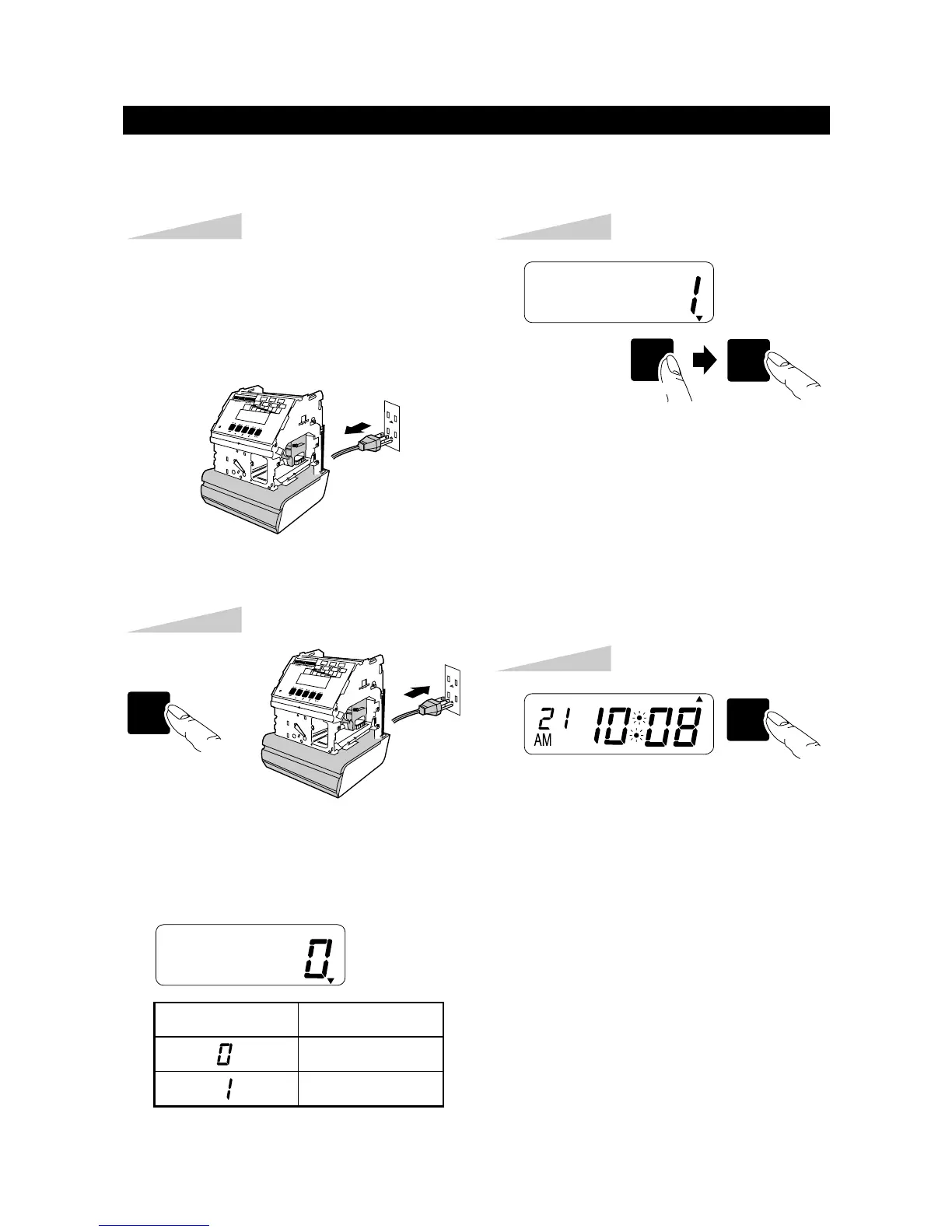
Step 1
Plug the AC cord out from the AC outlet.
Confirm the LCD disappeared.
If optional Ni-Cd battery is used, it
should be taken off.
At the time of chenging the date, the number is automatically reset to "0".
Press the [SW2: MINUTE/DAY] key
until the correct number on the LCD.
Press the [SW1: SET] key after checking
the desired number on the LCD.
Step 3
TU WE TH FR SA SUMO
Press the [SW1: SET] key again.
Step 4
SW1
SET
TU WE TH FR SA SUMO
Step 2
Plug the AC cord into the AC outlet
while pressing the [SW5: MODE] key.
Then " 0 " is mentioned on the LCD.
SW5
MODE
TU WE TH FR SA SUMO
Display Number reset
N / A
YES
and
OFF
ON
SW1SW2
SET
MINUTE
DAY
NUMBER RESET
11


 To Next Page