SETTING THE PASSWORD
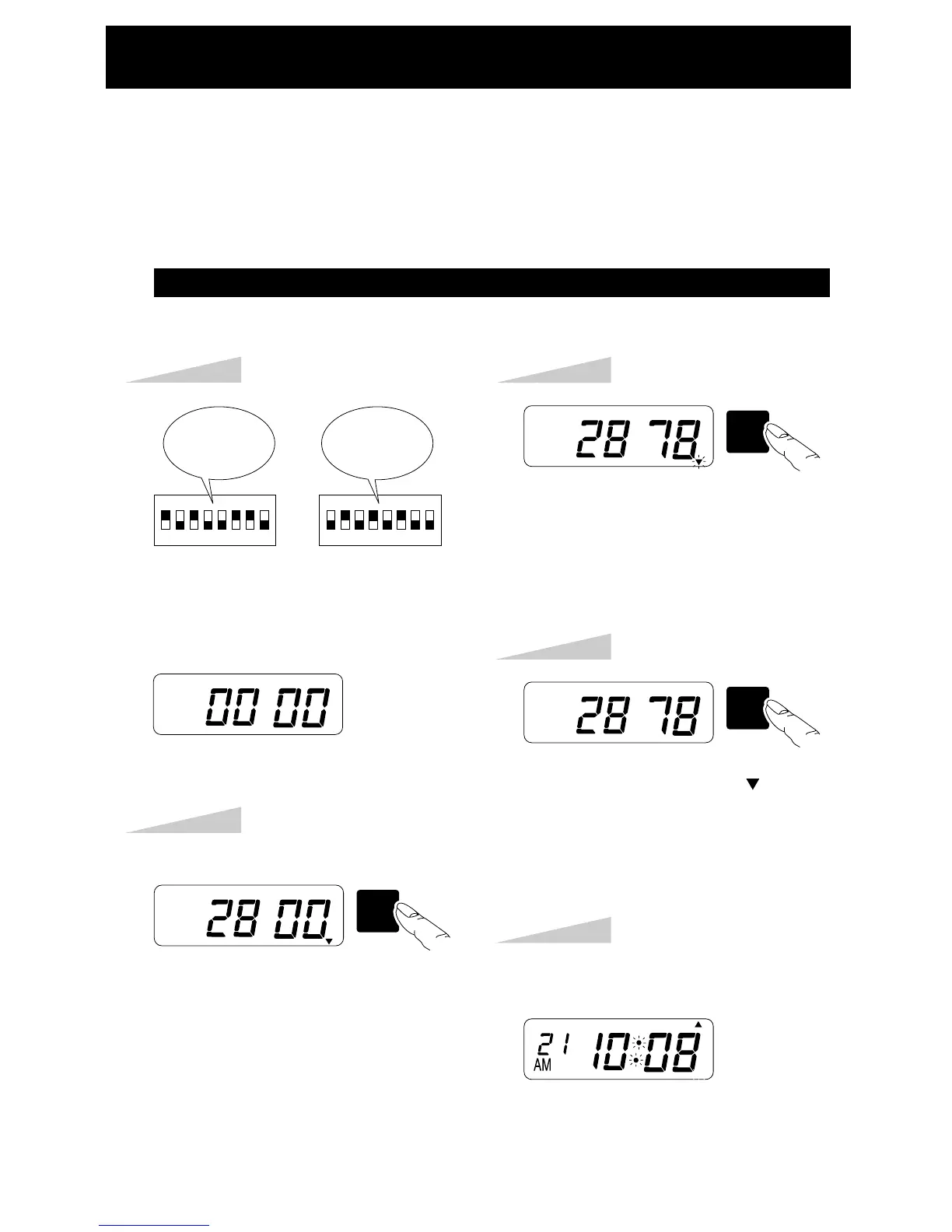
Step 1
SW3
HOUR
MONTH
Step 2
Press the [SW3: HOUR/MONTH] key
and assign the desired numbers to first
two digits.
TU WE TH FR SA SUMO
When the password is set, you are asked to enter it. If the password you entered does not
coincide with the setting, you can not change the setting values.
You may set a password by any 4-digit number from 0001 to 9998.
Note a number "00 00" and "99 99" can not be used as a password.
12345678 12345678
DIPSW1 DIPSW2
Set DIPSW 1-2, 4, 5, 8 and DIPSW 2-1,
3, 5, 7, 8 to ON. Then display shows
"00 00".
Example: Password "2878"
SW2
MINUTE
DAY
TU WE TH FR SA SUMO
Step 3
Press the [SW2: MINUTE/DAY] key
and assign the desired numbers to the
last two digits.
SW1
SET
TU WE TH FR SA SUMO
Step 4
Press the [SW1: SET] key. " " located
right-below on the LCD will disappear
that confirms password setting.
Step 5
TU WE TH FR SA SUMO
Set DIP SW1, and 2 as desired position.
DIPSW
1-2, 4, 5and
8: ON
DIPSW
2-1, 3, 5, 7
and 8: ON
REGISTERING THE PASSWORD
13


 To Next Page