Programming Cables
User Guide
© 2009-2019 Lattice Semiconductor Corp. All Lattice trademarks, registered trademarks, patents, and disclaimers are as listed at www.latticesemi.com/legal.
All other brand or product names are trademarks or registered trademarks of their respective holders. The specifications and information herein are subject to change without notice.
FPGA-UG-02042-26.2 5
1. Features
Support for all Lattice programmable products
1.2 V to 3.3 V programming (HW-USBN-2B)
1.2 V to 5 V programming (All other cables)
Ideal for design prototyping and debugging
Connect to multiple PC interfaces
USB (v.1.0, v.2.0)
PC Parallel Port
Easy-to-use programming connectors
Versatile flywire, 2 x 5 (.100”) or 1 x 8 (.100”) connectors
6 feet (2 meters) or more of programming cable length (PC to DUT)
Lead-free/RoHS compliant construction
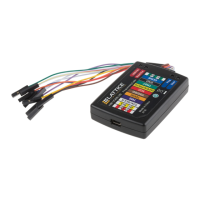
Figure 1.1. USB Cable – HW-USBN-2B
2. Programming Cables
Lattice Programming Cable products are the hardware connection for in-system programming of all Lattice devices.
After you complete your logic design and create a programming file with the Lattice Diamond®/ispLEVER® Classic
development tools, you can use Diamond Programmer or ispVM™ System software to program devices on your board.
The ispVM System/Diamond Programmer software automatically generates the appropriate programming commands,
programming addresses and programming data based on information stored in the programming file and parameters
you set in Diamond Programmer/ispVM System. Programming signals are then generated from the USB or parallel port
of a PC and directed through the programming cable to the device. No additional components are required for
programming.
Diamond Programmer/ispVM System software is included with all Lattice design tool products and is available for
download from the Lattice web site at www.latticesemi.com/software.


 To Next Page
 Loading...