22
BATTERY PACK AND CHARGER
CHARGING THE BATTERY PACK
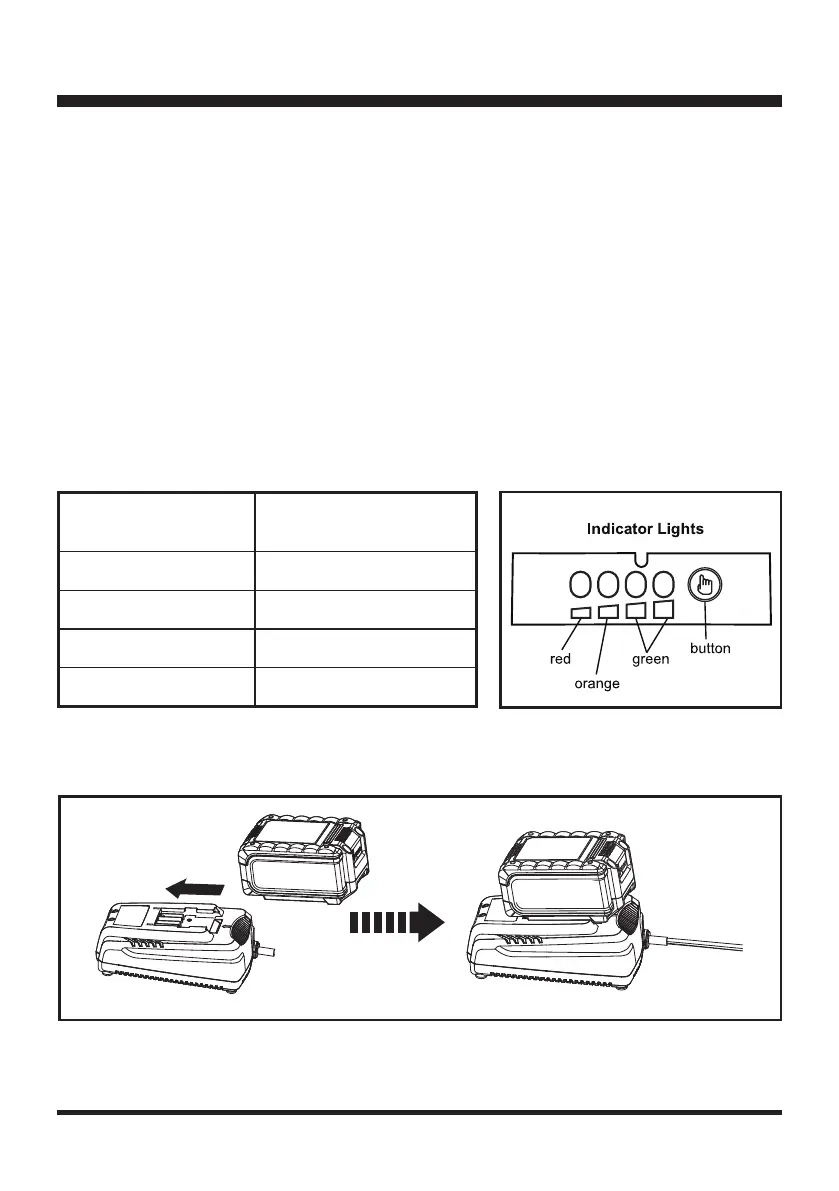
Fig. 13
LEDs on Battery
(Continuous Lighting)
Battery Capacity
4 LEDs (inc 2 green)
Fully charged.
3 LEDs (inc 1 green)
≥50%
2 LEDs (orange & red)
≥25%
1 LED (red only)
<25% (Recharge required).
b) If the temperature range is correct and ashing red LED light continues, then remove and reinstall
the battery pack. If the LED status repeats a second time, try to charge another identical battery. If
the battery charges normally, dispose of the defective battery pack (see Environmental Safe Battery
Disposal section).
c) If the ashing red light continues after installing the second battery (ensure the battery temperature is
normal), the charger may be defective. Replace with a new one.
6. After continuous or repeated charging cycles without interruption, the charger may warm up. This is normal
and does not indicate a technical defect of the battery charger.
BATTERY LED PANEL
1. The panel consists of 4 LEDs on the battery. Press and hold the button, then release it, the LEDs will show
you the charge levels.
2. The battery’s charge level can be checked either when the battery is attached on the machine or removed
from the machine.









 To Next Page