6
Taking Pictures
1. Tap the Camera icon in the camera software
main menu.
2. Press the L or R button to take a picture.
Viewing Photos
You can view your child’s photos through the handheld or through the
LEAPFROG
®
Connect Application.
•Toviewphotosonthehandheld,tapontheGalleryicononthehome
menu screen or on the camera software main menu screen. Select the
photo to view by tapping the side arrows to scroll through the gallery. To
scroll faster through photos, press on the arrow and hold it for 5 seconds.
•YoucanalsoviewphotosintheLEAPFROGConnectApplicationonyour
computer. See the Managing Photos through LEAPFROG Connect section
for more information.
Deleting Pictures
1. To delete photos from the handheld, tap on the Gallery icon on the home
menu screen or on the camera software main menu screen.
2. Select the photo to delete and tap on the Trash icon.
Tips on taking Pictures:
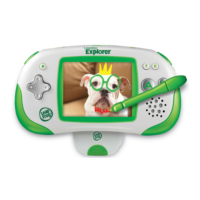
•Thereisnoautomaticzoom.Toenlargetheobjectintheviewnder,move
the camera and handheld closer to the object.
•Holdthehandheldsteadywhiletakingthephotountiltheimageis
captured on the screen.
•Yourchildshouldholdthehandheldwiththeviewingscreenfacinghim/
her and the camera lens facing away from him/her.
NOTE:
•Upto1,000photoscanbestoredontheLEAPSTEREXPLORER
™
handheld; however, the exact number is determined by the amount of
video also stored on the handheld.
•Ifyoudeletephotosfromthehandheldyouwillnotbeabletoretrieve
them.
•AllnewphotosandvideoswillbecopiedtotheLEAPFROGConnect
Application on your computer when you connect the LEAPSTER
EXPLORER handheld. Please see the LEAPFROG Connect section of this
document for more information.
Camera





 To Next Page