UHF Digital Hybrid Wireless
®
Rio Rancho, NM
19
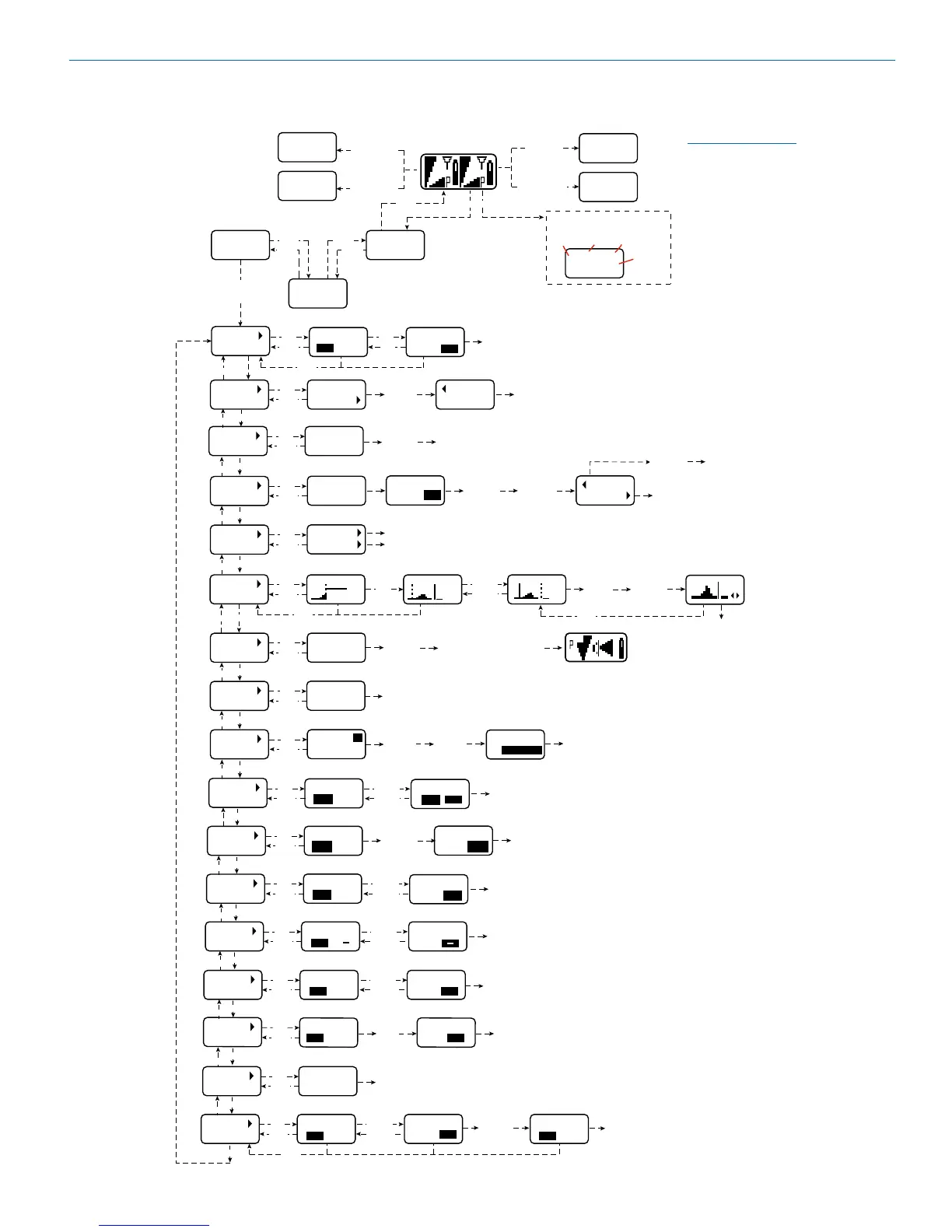
Navigating the LCD
NOTE: Press the
BACK button from
the Main Window
to briefly display
the external power
supply voltage.
NOTE: This setting does not appear
when the MIXMODE is set to DIRECT
NOTE: To reset the timer, set the TXBAT mode to anything
other than 9VT or AAT, then back to the desired mode.
SETUP
(item)
1
80
652.800
2AF
657.500
MENU
BACK
BACK
MENU
Receiver 1
Pilot Tone
ON\OFF
Hold MENU and
hold DOWN
Hold MENU
and hold UP
Mute Audio on
Receiver 1
Mute Audio on
Receiver 2
Press
UP/DOWN
to select
MENU
BACK
Setup Screen
Main Window
Receiver 1
Receiver 2
Press UP/DOWN to
change frequency
Press UP/DOWN to change frequency
When DIVMODE is set to RATIO the
frequency screen will look like this.
Receiver 2
Pilot Tone
ON/OFF
Hold MENU and
press UP
momentarily
Hold MENU and
press DOWN
momentarily
26 :
26 :
Press
UP/DOWN
to adjust
RECEIVER 1
00
00
00
RECEIVER 2
SEL
BACK
SEL
SEL
LEVEL LEVEL
00
BACK
LEVEL
SETUP
UP
R 26 :
80
652.800
Ratio
Mode
Block
Freq hex code
Freq MHz
SEL
BACK
DEFAULT
SETUP
Ratio
Switched
RESET– –
DEFAULT
Press
DOWN to
continue
SURE?
ARE YOU
Press
MENU/SEL
to reset
DOWN
SEL
BACK
SMARTUNE
SETUP
DOWN
UP
UP
DOWN
SEL
BACK
IR SYNC
SETUP
UP
SEL
BACK
SEL
SCANNING
STOPS
Press
SEL to
select
receiver
Press
UP/DOWN
to scroll
frequency
Press both
UP and
DOWN to
ZOOM
Press
UP/DOWN to
scroll
frequency
DOWN
25
25
D7
BACK
BACK
SCAN
SETUP
UP
DIVMOD
RATIO
Press
UP/DOWN
to select
NOTE: Main Window will look like
this when the RATIO DIV mode is
selected.
DOWN
SEL
BACK
DIVMODE
SETUP
UP
DOWN
SEL
BACK
TALKBACK
SETUP
UP
SEL
BACK
COMPAT
RECEIVER 1
Press
UP/DOWN
to select
receiver
COMPAT
SETUP
DOWN
SEL
BACK
RECEIVER 1
RECEIVER 2
TUNING
a
NOR
Press
SEL to
select
receiver
DOWN
UP
DOWN
SEL
BACK
STEPSIZE
SETUP
UP
DOWN
SEL
BACK
RECEIVER 1
RECEIVER 2
SmtNR
FUL
NOR
Press
SEL to
select
receiver
SmtNR
FUL
NOR
SmtNR
SETUP
UP
DOWN
PHASE
SETUP
SEL
BACK
PHASE
PHASE
RECEIVER 1
RECEIVER 2
Press
UP/DOWN
to select
Press
SEL to
select
receiver
+
+
UP
DOWN
TXBAT
SETUP
SEL
BACK
TXBAT
TXBAT
RECEIVER 1
Press
UP/DOWN
to select
Press
SEL to
select
receiver
9V
9V
9V
9V
UP
DOWN
TONE
SETUP
SEL
BACK
TONE?
RECEIVER 1
RECEIVER 2
Press
UP/DOWN
to select
Press
SEL to
select
receiver
00+05
Tone will be enabled
when level is set with
the UP/DOWN buttons
TONE?
00+05
LVL 1K
RECEIVER 1
00+05
BACK
TUNING
SETUP
TUNE
SMART
1
BAND
TX
1
B1
Press
UP/DOWN
to select
band
Press
MENU/SEL
to start
scanning
SYNC
OK
1
Press
DOWN to IR
sync TX 1
Press
MENU/SEL
to continue
Follow
prompts to
scan and set
up TX 2
NOTE: Fewer
screens are
shown when
to RATIO
SYNC
1
2
Press UP to sync TX 1
Press DOWN to sync TX 2
TALKBACK
OFF
Press
UP/DOWN
to select
NOTE: An error message will appear if a setting on the
transmitter cannot be enabled by the SYNC procedure
1
2
NA HYBR
Press
MENU/SEL
to highlight
mode
COMPAT
RECEIVER 2
MODE E
Press
UP/DOWN
to select
mode
Press
UP/DOWN
to select
mode
STEPSIZE
100
25
Press
MENU/SEL
to highlight
receiver
Press
UP/DOWN
to select
step size
Press
UP/DOWN
to select
mode
MIXTRIM
SETUP
SEL
BACK
MIXTRIM
00
MIXTRIM
00
+05
Press
UP/DOWN
to select
value
00
Press
SEL to
select
receiver
MIXMODE
SETUP
SEL
BACK
MIXMODE
Press
UP/DOWN
to select
MIXBOTH
DOWN
UP
UP
STEPSIZE
100
25
8A
25
5E
25
TUNING
a
NOR
DOWN
LOCALE
SETUP
SEL
BACK
LOCALE
Press
UP/DOWN
to select
--
NOTE: This function appears in
menu only on Band C2 units.
DOWN
UP



 To Next Page