LECTROSONICS, INC.4
Operating Instructions
Selecting the Compatibility Mode
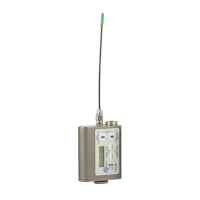
The UM400a, UM450, and LMa can be used with Lectrosonics 400 Series
Digital Hybrid, 200 Series analog, 100 Series analog and some non-Lec-
trosonics analog wireless receivers. Contact the factory for details on the
non-Lectrosonics models that can be used. The transmitter must be set to
the operating mode of the matching receiver, which is done using the supplied
screwdriver and a battery. The UM400a and UM450 are functionally identi-
cal, while the LMa lacks the manual low-frequency rolloff control. The LMa
has an output of 50mW, the UM400a has 100mW output, and the UM450 has
250mW output.
NOTE: The unit is supplied from the factory in the Hybrid mode.
1) Ensure the battery is good.
2) Turn off the transmitter.
3) With a small screwdriver (included), set the Frequency Select Switches to
CC. (for Change, Change).
4) Power up the unit briefly – just long enough for the LED’s to light up and
then turn it off - about one second.
5) Change the Frequency Select Switches to one of the following settings:
• To set Lectrosonics 100 Series mode: 1,1
• To set Lectrosonics 200 Series mode: 2,2
• To set Mode 3*: 3,3
• To set Lectrosonics Hybrid mode: 4,4
• To set IFB mode: 5,5
• To set Mode 6*: 6,6
* contact the factory for details
6) Turn the unit on, wait about one second and turn off again.
7) Change the Frequency Select Switches to 0,0.
8) Turn on the transmitter to complete the operation.
The LEDS will blink to indicate the selected compatibility mode. Im-
mediately after power up, all LEDS will blink together red, then green,
followed by the audio level LEDs (-20 and -10) blinking to indicate the
mode.
The -20 and -10 LEDs will blink:
•Oncefor100Seriesmode
•Twotimesfor200Seriesmode
•ThreetimesforMode3
•Fourtimesfor400mode
•FivetimesforIFBmode
•SixtimesforMode6
At powerup the transmitter will confirm the current compatibility mode
with the number of blinks listed here. This setting will remain the same
until you reset it with the procedure listed above.


 To Next Page