cartographie / cartografía / mappatura / kartierung / arrangering mapping
1. 2.
Eseguire il “Mapping” delle luci sull’albero
permette di accedere agli eetti avanzati
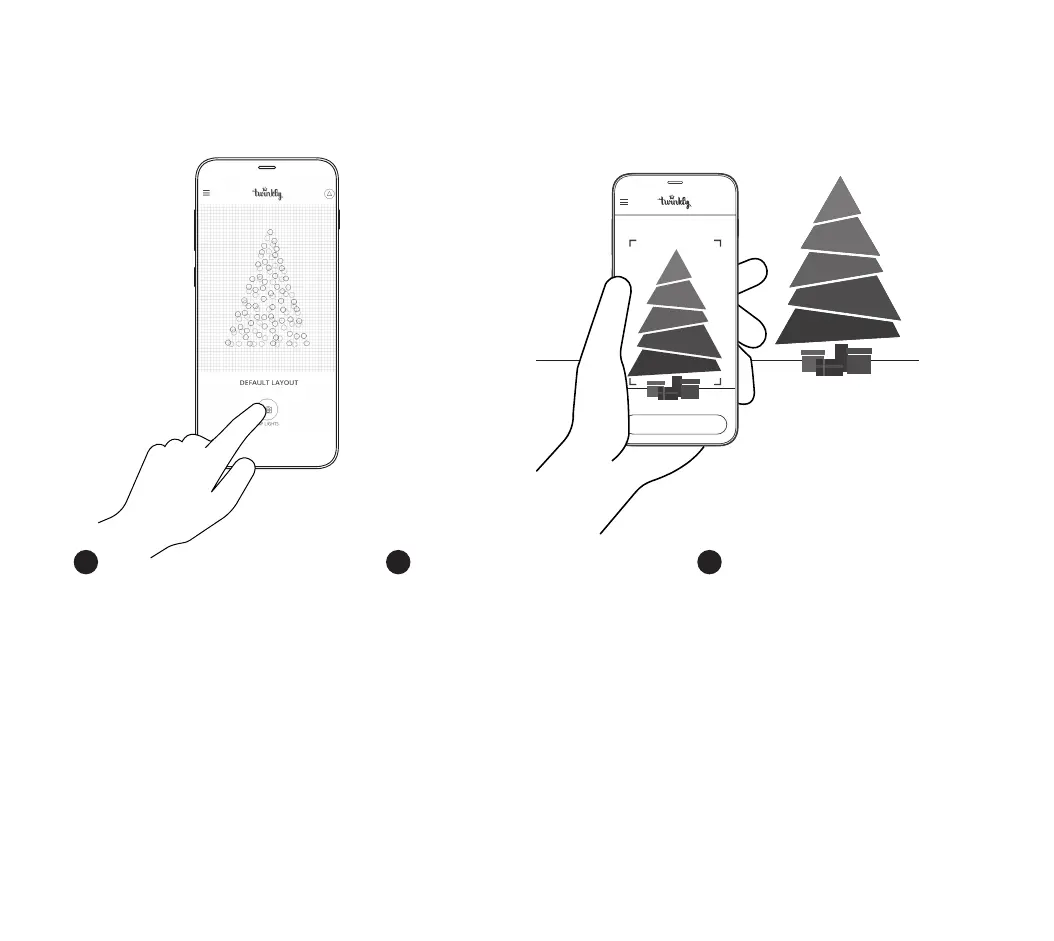
1. Apri Layout e tocca il pulsante “Map Lights”
2. Inquadra il tuo albero da una distanza di 1.5-
2.5m
3. Tocca “Start Mapping” (i LED assumono diversi
colori durante il processo)
4. Completato con successo il processo, torna alla
Galleria Eetti e divertiti con gli eetti calibrati!
IT
“Mapping” les lumières sur votre arbre
vous donne accès à des eets avancés
1. Ouvrez Layout et appuyez sur le bouton “Map
Lights”
2. Cadrez l’arbre à une distance de 1,5-2,5 mètres
3. Appuyez sur le bouton “Start Mapping” (toutes
les LED produisent des couleurs RVB diérentes
au cours du processus)
4. Une fois le processus terminé avec succès,
retournez dans la galerie d’eets et protez des
eets avancés
FR
“Mapping” the lights on your tree gives
you access to advanced eects
1. Open Layout and tap the “Map Lights” button
2. Frame the tree from a distance of 1.5-2.5
meters
3. Tap the “Start Mapping” button (all LEDs make
dierent RGB colors during the process)
4. Once the process is completed successfully, go
back to the Eect Gallery and enjoy advanced
eects
EN
m ap pi n g



 To Next Page