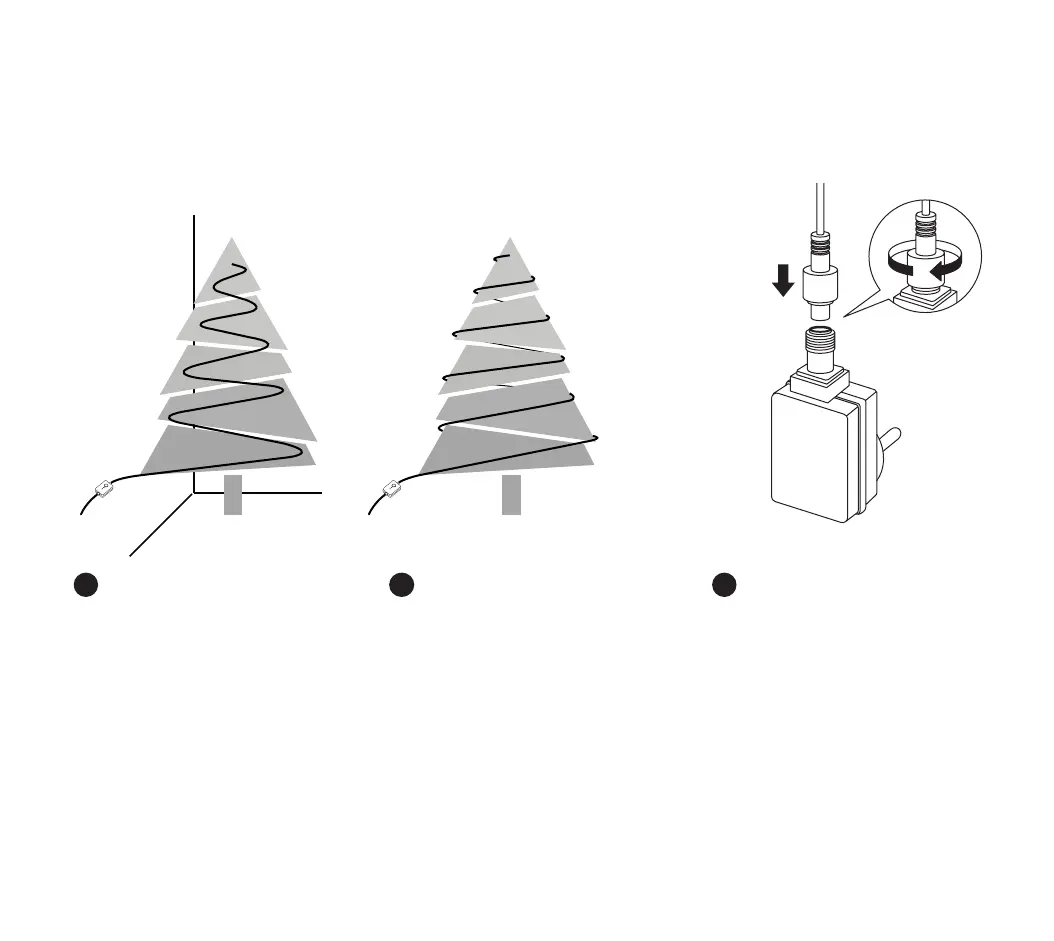
configuration physique / configuración física / fysieke opstelling /
installazione fisica / physikalische einrichtungsetup
1. 2.
physical setup
1. Decora il tuo albero con Twinkly Strings. Disponi
la treccia a serpentina o a spirale per ottenere il
miglior risultato. Inizia dal basso verso l’alto, da
sinistra a destra
2. Collega la treccia all’alimentatore
3. Attacca l’alimentatore ad una presa di corrente.
Le luci si accendono
Pulsante: cambia eetti/reset
LED Verde: accensione
LED Blu: attività (lampeggiante), connesso a WiFi
(sso)
IT
1. Décorez votre arbre avec des cordes Twinkly. Dis-
poser comme une serpentine ou une spirale pour
de meilleurs résultats. Commencez toujours de bas
en haut, de gauche à droite.
2. Connectez la chaîne Twinkly à l’adaptateur d’ali-
mentation
3. Branchez l’adaptateur secteur dans une prise
secteur et voyez les lumières s’allumer
Bouton: changer l’eet / réinitialiser
LED verte: Puissance
LED bleue: Fonctionnement (clignotement), wi local
connecté (xe)
FR
1. Decorate your tree with Twinkly Strings. Arrange
as a serpentine or spiral for best results. Always
start from bottom to top, from left to right.
2. Connect the Twinkly String to the power adapter
3. Plug the power adapter in a AC outlet and see
the lights turn on
Button: change eect/reset
Green LED: Power
Blue LED: Operation (blink), local wi connected
(steady)
EN



 To Next Page