5
4
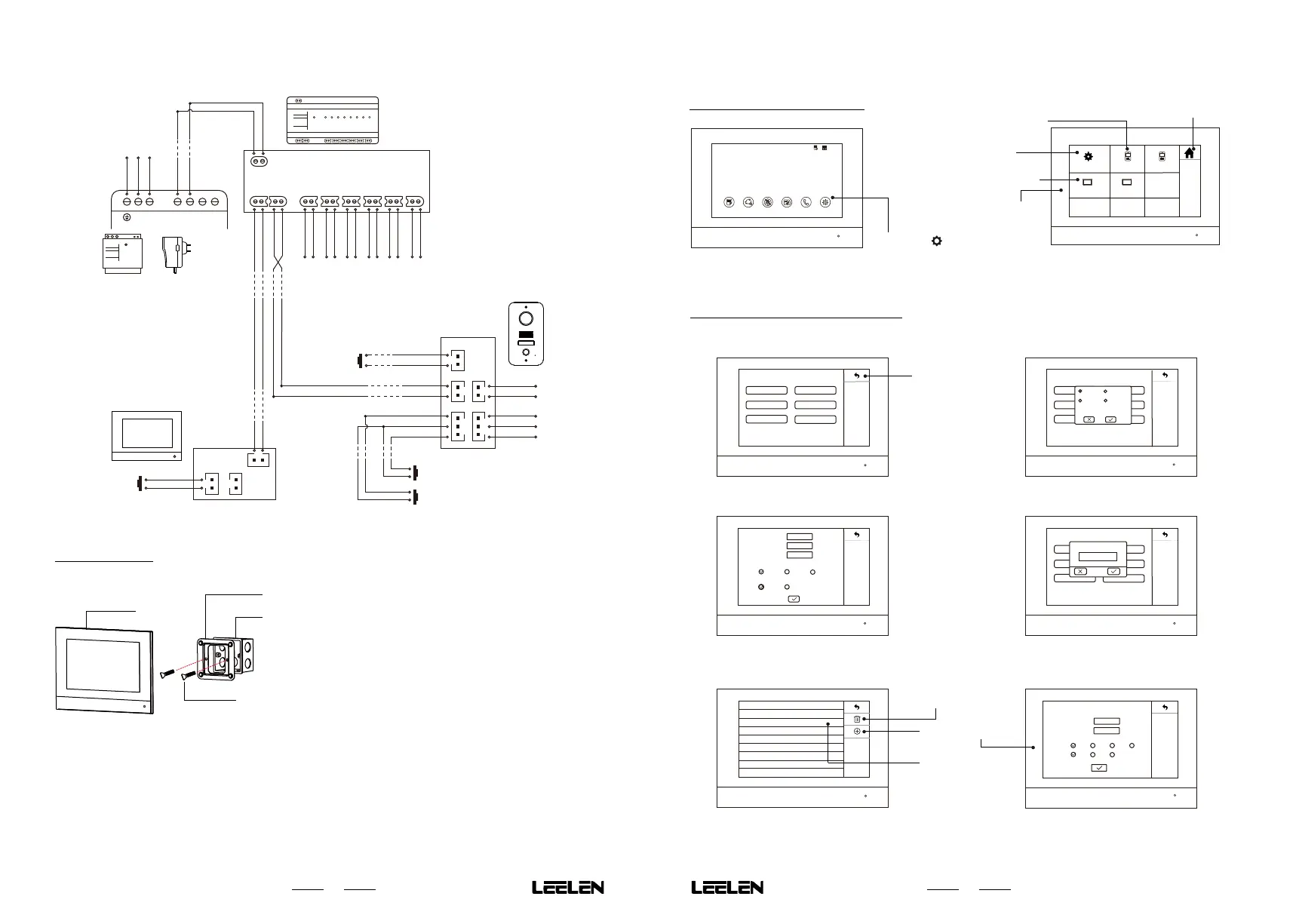
B. Standard Installation
COM
NC
NO
Power Control
Output
(Lock1)
Gnd
Door2 Open
Door1 Open
Door1 Open
Detector
Door2 Open
Detector
Switch-
Switch Output
(Lock2)
Switch+
Bus -
Bus+
Gnd
Exit Port
Outdoor Station
Bus
-
Bus+
DoorBell
DoorBell
DoorBell
Power
-
Power+
Indoor Station
Bus+
Bus-
Bus+
Bus-
N L
- -
+ +
N
L
Gnd
110/220V AC
~
Power
-
Power+
Power 1 2 3 4 5 6 7 8
EH2W-MD-D04-001
2-Wires Digital
Distributor
LAN : 10/100M
Bus : 10M
Power: 24VDC
2-Wire Digital Distributor
Bus+
Bus-
Bus+
Bus-
Bus+
Bus-
Bus+
Bus-
Bus+
Bus-
Connect to other Indoor/Outdoor Station
Bus+
Bus-
Power-
Power+
Exit Button
Power Supply
Power
or
Adaptor
3.3 Installation
Indoor station
ScrewM4*20PMC
Bracket
86-Box
Dimersion 86*86mm
1. Fix the bracket to the 86 box or wall
with the M4 * 20 screw.
2. Connect the wire to the equipment.
3. Put the indoor station on the bracket.
4.2 System Parameter Settings
4.2.1 Parameter Setting List
IPC
System Parameters
Language
Call Duration
Message
Time
Privacy
Return
4.2.2 Language Setting
IPC
System Parameters
Language
Message
Time
Privacy
Call Duration
IPC
IPC
English
Türk
français
Polski
4.2.3 Time Setting
Time Format置
Date
Time
Time Zone
Date Format
Y/M/D
2018/08/08
12:35
GMT+8
M/D/Y
D/M/Y
12H 24H
4.2.4 Call Duration Setting
IPC
System Parameters
Language
Call Duration
Message
Time
Privacy
IPC
Time
Call Duration(s)
45
Note: Call duration is 30s~120s,please set in the range.
4.2.5 Privacy Setting
No. Time
Repetition
1
2
21:00-07:00
13:00-14:00
Sun Mon Tues Wen
Sun Mon Tues
Add Privacy Time
Start Time
End Time
Repetition :
Sun
Mon
Tues
Wen
Fri
SatThur
21:00
12:35
Delete all privacy settings
Add a new privacy
Touch the record to
modify
4. Parameter Settings
4.1 Enter Setting Function
1. Touch the 「 」Icon.
1 1
Record Monitor Privacy Screen Lock Intercom Settings
08:22am
2018/08/08 Monday
Set system parameters
Set indoor station parameters
Set outdoor station parameters
Home
Outdoor Station1Outdoor Station2
Indoor Station1 Indoor Station2
System Parameters
Note: If the outdoor stations or the indoor stations is not
connected, the outdoor station settings icon and
the indoor station settings icon will be missing.
2. The indoor station shows the
setting list page.



 To Next Page