7
6
5. Description of the System Functions
5.1 System Functions
Function Description
Monitor
Support indoor station and mobile phone monitoring the outdoor station video and
IPC video.
Access control Open the door through intercom or swiping a card.
Alarm Door timeout alarm and device removal alarm.
Record and management
Support video recording with TF card and capturing without TF card.
Unlock by card Support swiping card to open the door.
Exit button terminals Support Exit Button to open the door.
4.3.3 Main Indoor Station Setting
Indoor Station Settings
About
Name Main Indoor Unit
Brightness Sounds
IP Settings
About
Wifi Settings
Main Indoor Station
Extension
4.3.4 Sounds Setting
Sounds
Volume
25%
50% 75% 100%
Ring
Ring1
Ring2 Ring3
Ring4
Ring5
4.3.5 Brightness Setting
Indoor Station Settings
About
Name Main Indoor Unit
Brightness Sounds
IP Settings
About
Wifi Settings
20% 40%
60%
80%
100%
4.3.6 IP Setting
Manual Setting
IP Address
Subnet Mask
Router
DNS
4.3.7 WiFi Setting
1/1
WiFi
Network Access WiFi List
4.3.8 About
Device Information
Hardware Version:
Software Version:
Upgradable Version:
Restore the factory settings
Web address:
4.3.1 Parameter Setting List
Indoor Station Settings
About
Name Main Indoor Unit
Brightness Sounds
IP Settings
About
Wifi Settings
4.3.2 Indoor Station Name
Indoor Station Settings
About
Name Main Indoor Station
Brightness Sounds
IP Settings
About
Wifi Settings
Input indoor station name
indoor station1
Ring duration(1~120s)
5
4.2.6 Message
IPC
System Parameters
Language
Ring Time
Message
Time
Privacy S
Message function
Default
Custom
Record the custom
message.
Play the custom
message.
Play the default
message.
4.2.7 IPC Setting
IPC
IPC1
IPC2 IPC3
IPC4
IPC5
Delete all IPCs
Add new IPC
Touch the icon
to modify
4.3 Indoor Station Parameter Settings
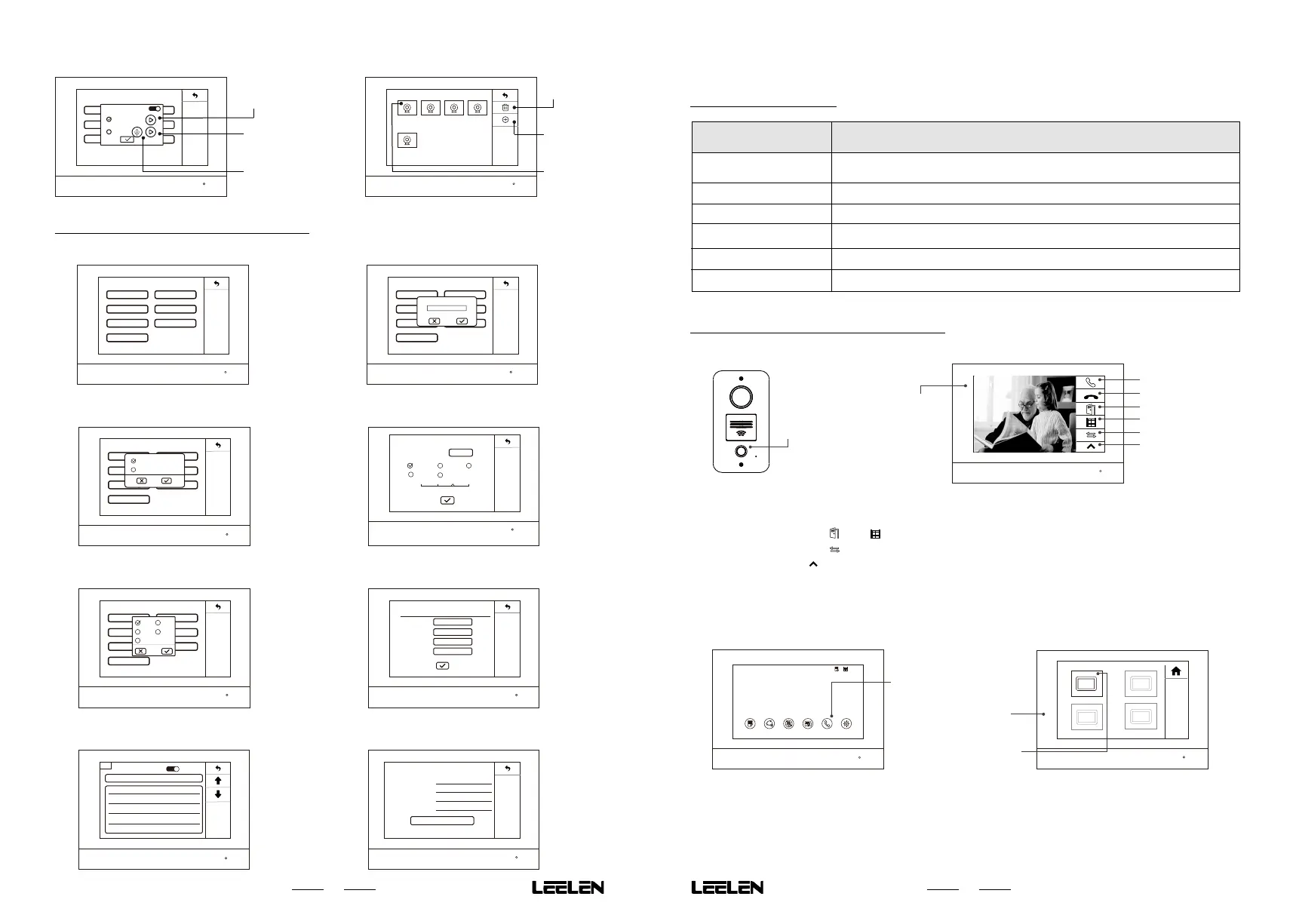
5.2 Call,Intercom and Leave Message
2. The indoor station shows the ring page.
1. The visitor press the call button.
5.2.2 Indoor Station to Indoor Station
Indoor Station 1 Indoor Station 2
Indoor Station 3 Indoor Station 4
1 1
Record Monitor Privacy Screen Lock Intercom Settings
08:22am
2018/08/08 Monday
1. User press the Intercom button.
2. The indoor station shows
the indoor station list.
3. User press the Indoor Station
icon which you want to call.
Hang up
Open the door 1
Open the door 2
Switch the IPC video
More
Answer
Note:
If the indoor station with a TF card, video will be recorded automatically when the bell rings. Otherwise, take a
photo snap.
In intercom, you can press
「 」or「 」to open the corresponding door.
In intercom,you can press
「 」to switch the monitor video,then you can view other monitoring video.
In intercom, press the
「 」to expand other function buttons.
For leave message, please check the description of 4.2.6 first.The visitor can press the call button to leave a
message after hearing message notice and press the call button to end talking after leaving a message.
5.2.1 Outdoor Station to Indoor Station
Indoor Station List



 To Next Page