12
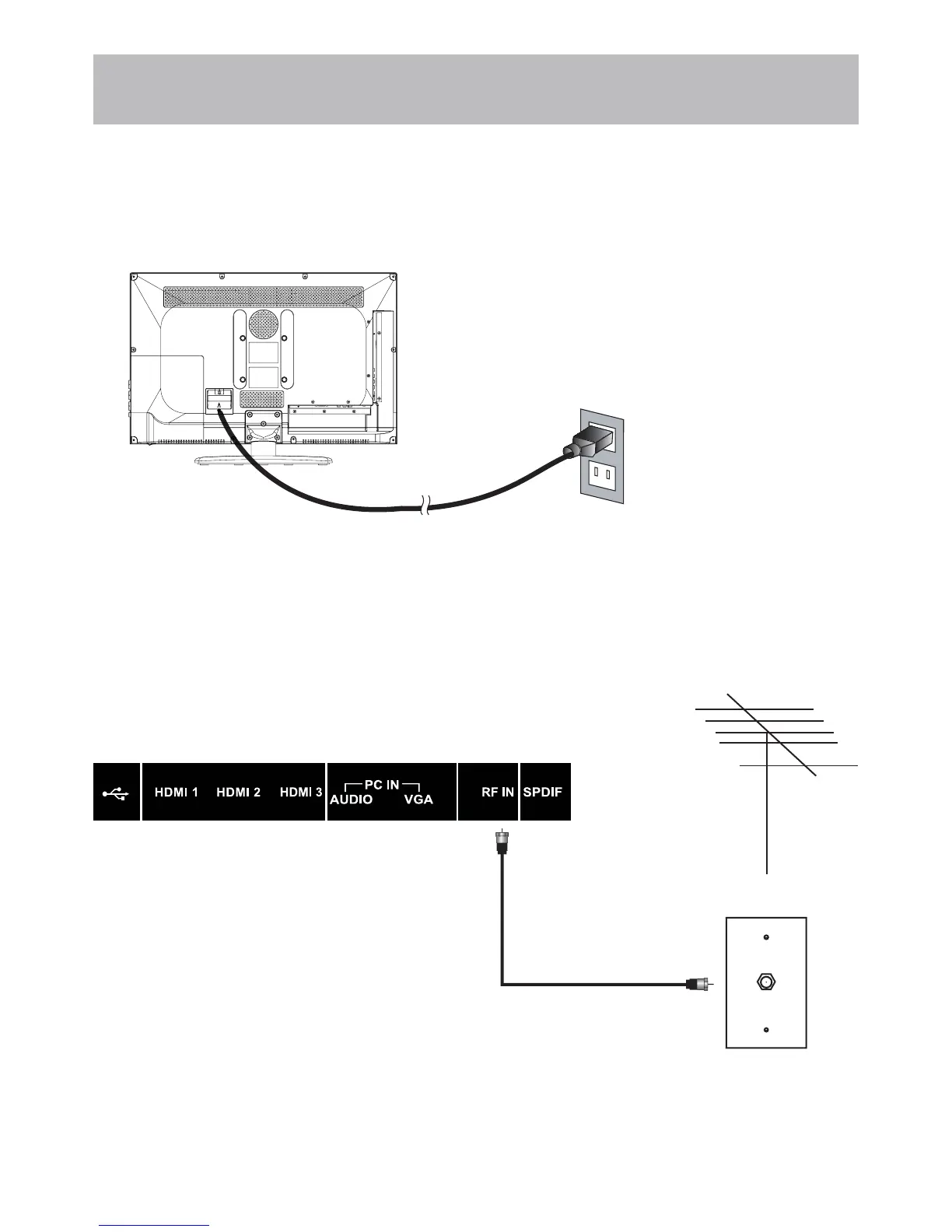
Coaxial / RF Cable (not included)
TV REAR PANEL
Ant. / Cable
Wall Outlet
Installation
Connection to Antenna & Cable /
Satellite Box
Connecting to POWER IN
5RRI$QWHQQD&DEOH2XWOHW,QVWDOODWLRQ
It is strongly recommended that the installation of a high quality roof top antenna, digital cable, or satel-
lite set top box be used in conjunction with your television for best broadcast reception. For indoor use, we
UHFRPPHQGDQ$SH['LJLWDODPSOL¿HG+'79DQWHQQD1RWHUHFHSWLRQLVGHWHUPLQHGE\\RXUUHJLRQDOORFDWLRQ
geographical terrain, distance from the local broadcast transmitter and strength of antenna.
How to connect with an indoor or rooftop
antenna
Connect the RF coaxial (75 ohm) cable from
your existing roof top / in door antenna, or wall
outlet. Finger tighten the Coaxial / RF Cable end
to the TV input on the rear panel.
See pages 18-19 for TV setup and Channel Auto
Scan.
Tune to TV programming directly from the
television tuner.
How to connect with power cord
Connect the power cord to a properly grounded AC outlet, then to your TV.
It is strongly recommended for best broadcast reception, to use digital cable, satellite, or a high quality roof
top antenna.
(ARC)



 To Next Page