Page 21
301 Fulling Mill Road, Suite G ©Copyright 2015 by Legrand,
Middletown, PA 17057 Inc All Rights Reserved.
(800) 321-2343 www.legrand.us
6.1.2 Add a WiFi to RFLC Bridge to Intuity
Step 1 - To add the WiFi to RFLC Bridge to the Intuity system, first House Bind and Group Bind
all RFLC devices in the home.
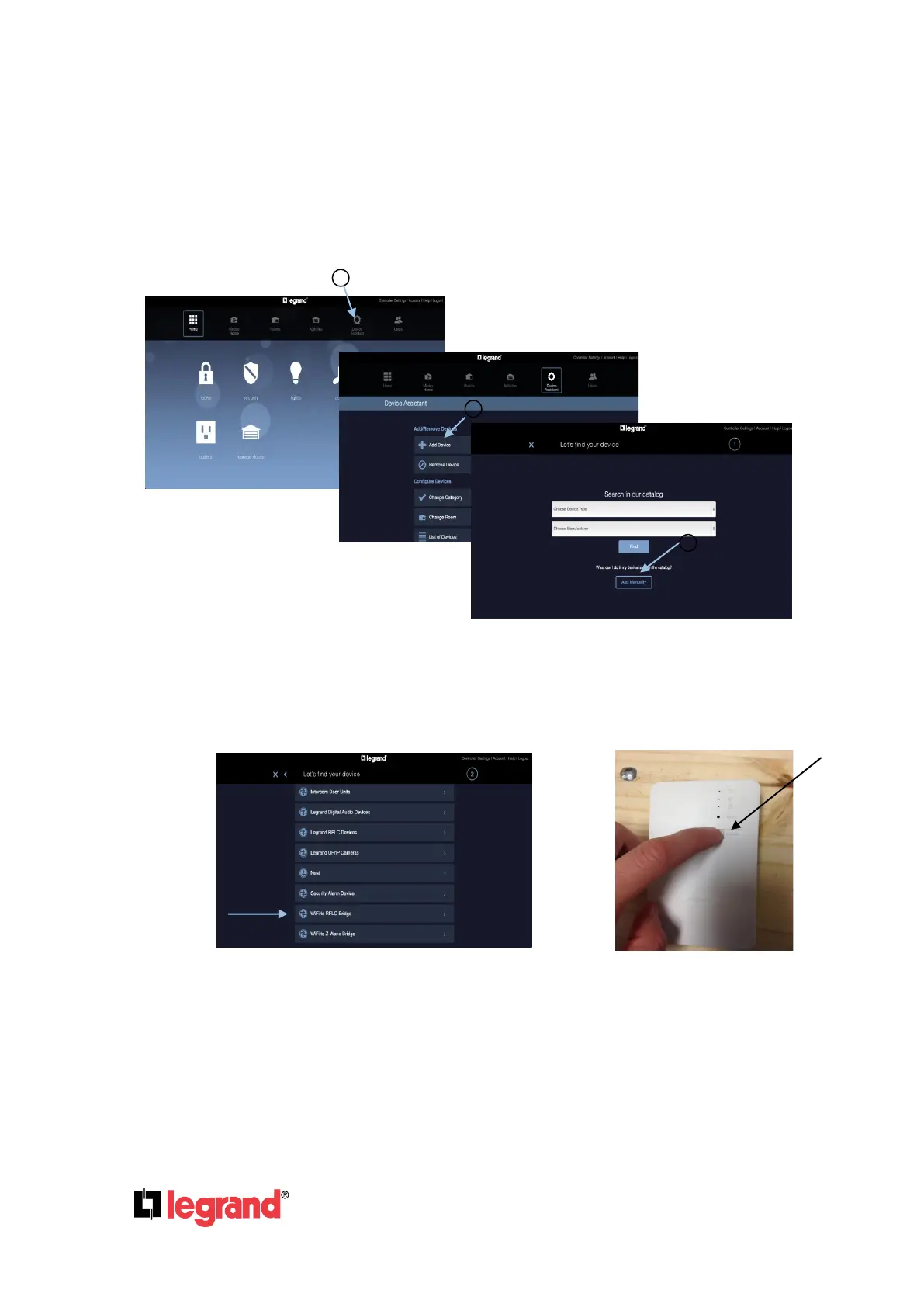
Step 2 - Open the home page of the browser and click on “Device Assistant” (1), then click “Add
Device” (2) and then click “Add Manually” (3).
Step 3 - Tap on the “WiFi to RFLC Bridge” Adapter and go to the physical RFLC Bridge and
press the Connect button.
Step 4 - Wait 5 seconds, and click the “Add” button. This will allow time for the WiFi Bridge to
announce itself on the network. The discovery process will automatically time out after 60
seconds. If the device does not discover, please wait for the timeout, then try again.



 To Next Page
 Loading...





