38
4. Installation
KEOR MOD 250
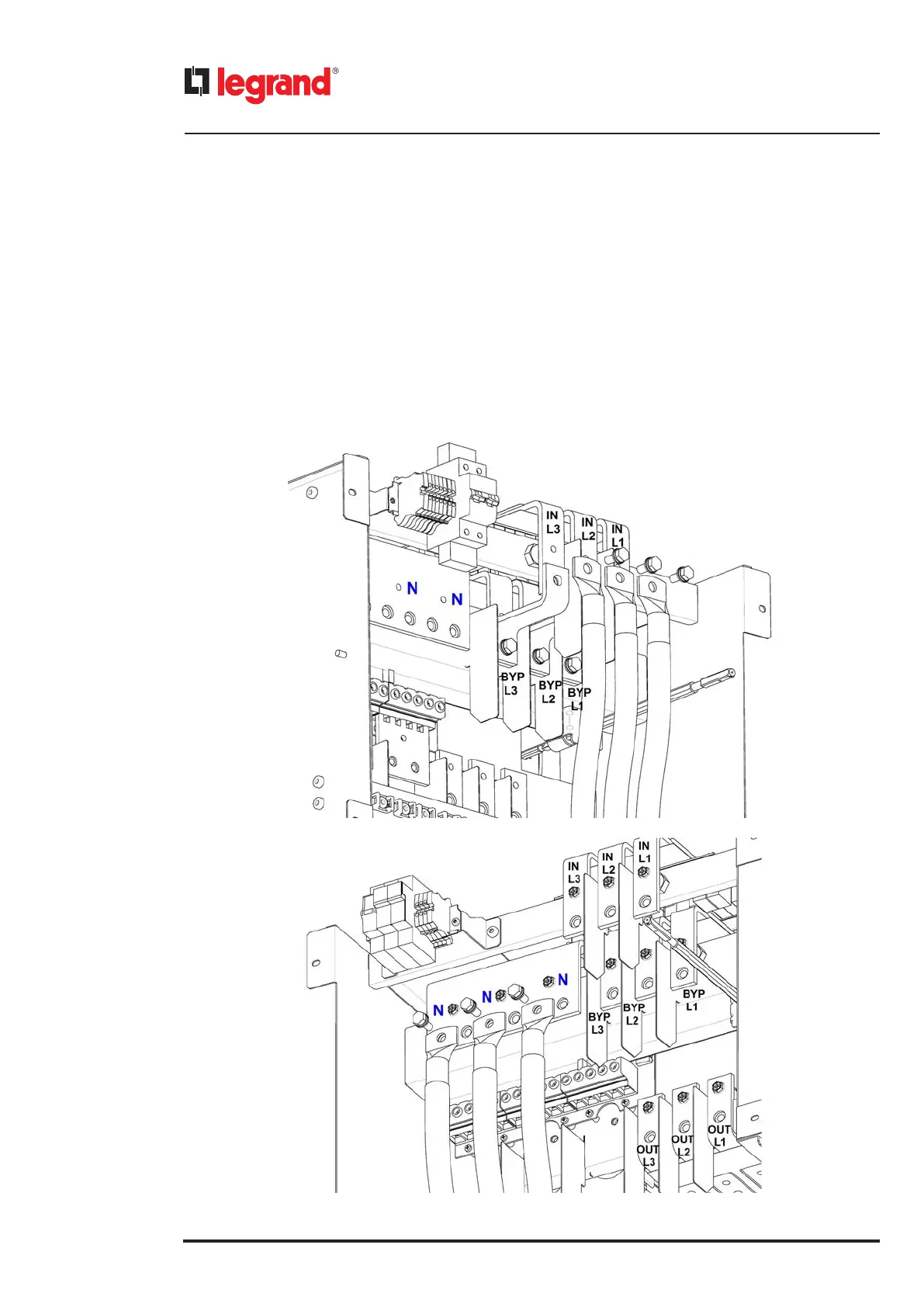
The default configuration has the input line in common with the bypass line through a metal jumper.
If no change is required, follow these steps:
- unscrew the three hex M10x35 screws that fix the jumper to the input terminal of the busbar;
- crimp the input and neutral cables with M10 eyelets;
- connect the input cables L1, L2, L3 to the metal jumper of the terminals IN L1, IN L2, IN L3 of the input busbar using the
three screws removed previously along with M10 flat washers and M10 grower washers. The grower washer must always
be put on top of the flat washer;
- do not change the phase sequence (L1, L2, L3);
- connect the input neutral cable to the neutral busbar with a hex M10x30 screw along with a M10 flat washer and a M10
grower washer. The grower washer must always be put on top of the flat washer.
KEOR MOD 250 – input cables installation with input line in common with bypass line



 To Next Page
 Loading...







