Group 8 Job editor Page 272
Release R2.0 LEIBINGER JET3
Please see point 4 of Figure 148
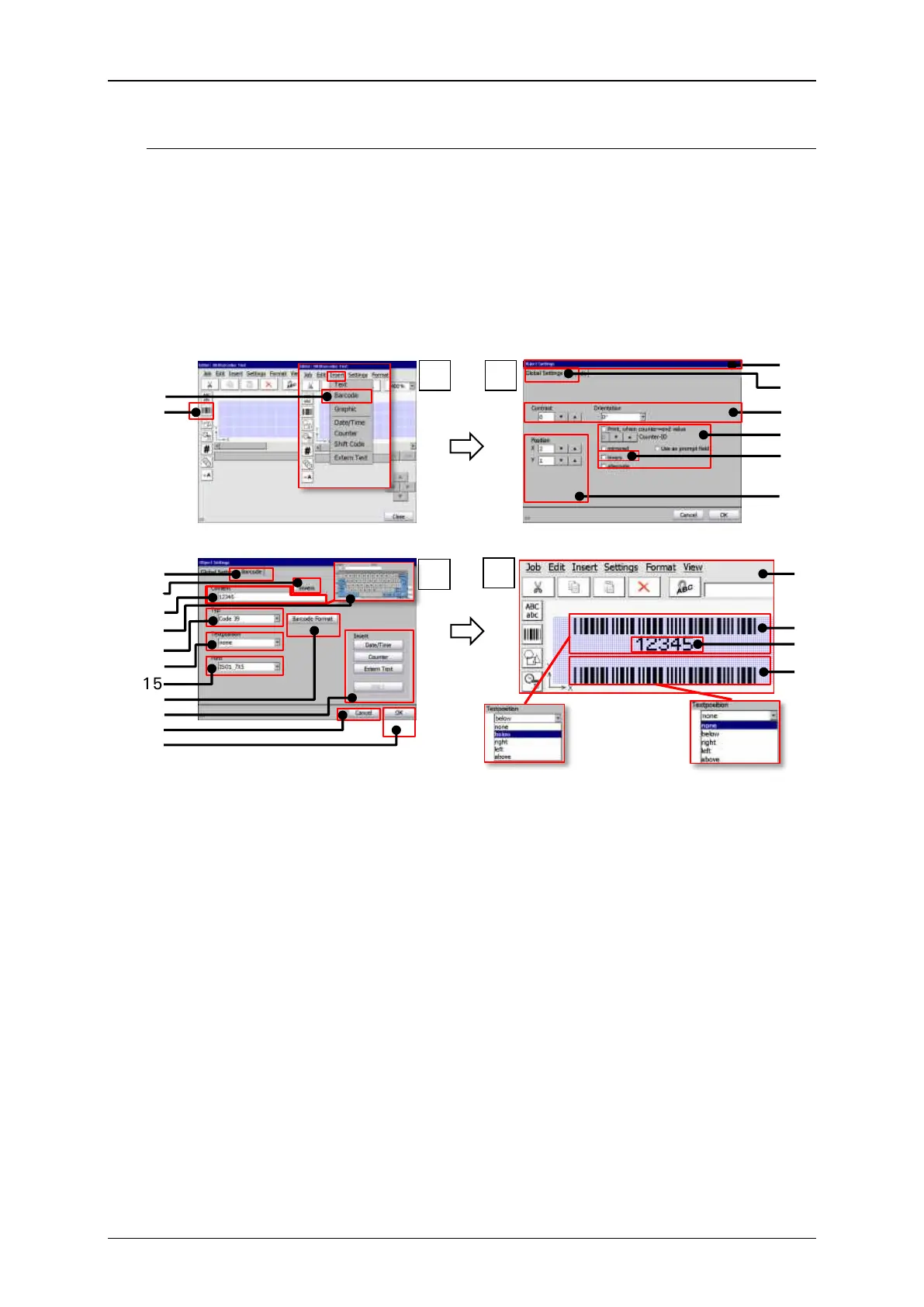
The result of the settings for the plain text is displayed in the job editor (20). The
example shows a job editor preview of two bar codes. Both are code 39 bar codes
with the same content. The upper code (21) is with the plain text option and shows
the content of the bar code below the code (22). The lower bar code (23) is without
the plain text option.
Bar codes: Object creating and settings
1 – Menu item <Extern Text>
13 – Drop-down list bar code <Type>
2 – Direct button <Barcode>
14 – Drop-down list <Textposition>
3 – Dialog box <Object settings>
15 – Drop-down list <Font>
4 – Tab <Global settings>
16 – Button <Barcode Format>
5 – <Contrast> and <Orientation>
options for the bar code object
17 – Options for inserting objects and
functions into the barcode content
6 – Options for the print out
7 – Global <Inverse> option.
8 – Settings for object positioning
21 – Bar code (code 39) with plain text
10 – Barcode <Inverse> option.
22 – Plain text of the bar code content.
Positioned below the bar code.
11 – Display field/input bar code
<Content>
23 – Bar code (code 39) without plain
text
12 – Keyboard for <Content> input



 To Next Page