EasyManua.ls Logo

Leibinger Jet 3 - Page 335

Leibinger Jet 3
378 pages
Print Icon
To Next Page IconTo Next Page
To Previous Page IconTo Previous Page
Loading...
Group 8 Job editor Page 333
Release R2.0 LEIBINGER JET3
IMPORTANT
The resetting of the replacements has only effects on the selected
printing element!
The replacement function is always active and therefore the default
settings are active as long as there are no customized settings!
E.g. the default replacement setting for the <Months> element is
1=01, 2=02, 3=03, 4=04 etc. That means that checking off the
<left-hand-zeros> checkbox in the date/time tab of the objects
settings wouldn’t have an effect on the display of the <Months>
element as long as the replacement settings weren’t changed to 1=1,
2=2, 3=3, 4=4 etc.

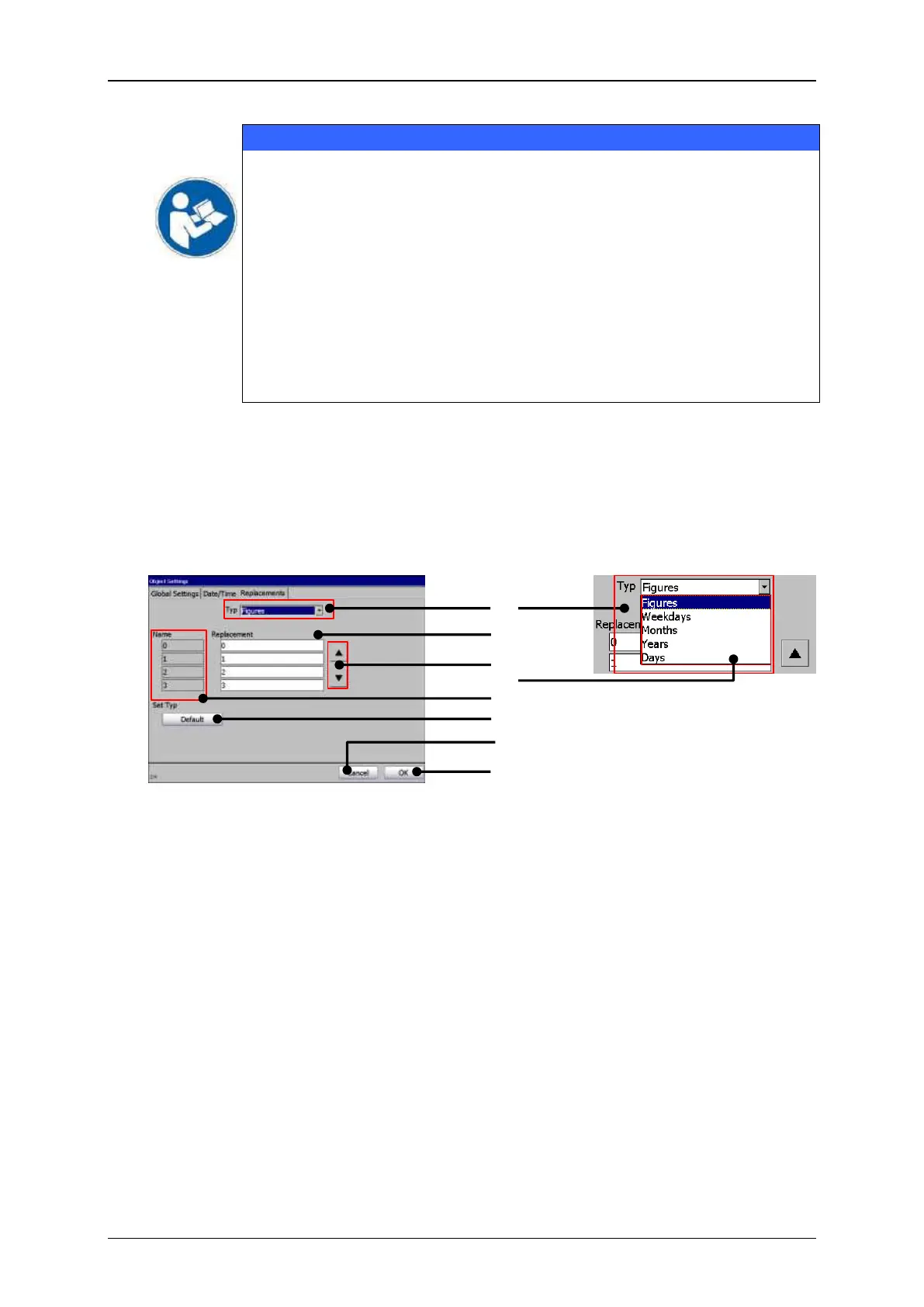
With the button <OK> (8) you can confirm changes and close the dialog box.
The button <Cancel> (7) closes the dialog box without saving changes.
Figure 169
Job editor (tab replacements)
1 Drop-down list <Type>
5 Original setting
2 Display fields <Replacement>
6 Button <Default>
3 Buttons <Scroll>
7 Button <Cancel>
4 Available types
8 Button <OK>
3
5
6
7
8
4
2
1

Related product manuals