EasyManua.ls Logo

Leibinger Jet 3 - Error Message Reference

Leibinger Jet 3
378 pages
Print Icon
To Next Page IconTo Next Page
To Previous Page IconTo Previous Page
Loading...
Group 8 Job editor Page 337
Release R2.0 LEIBINGER JET3
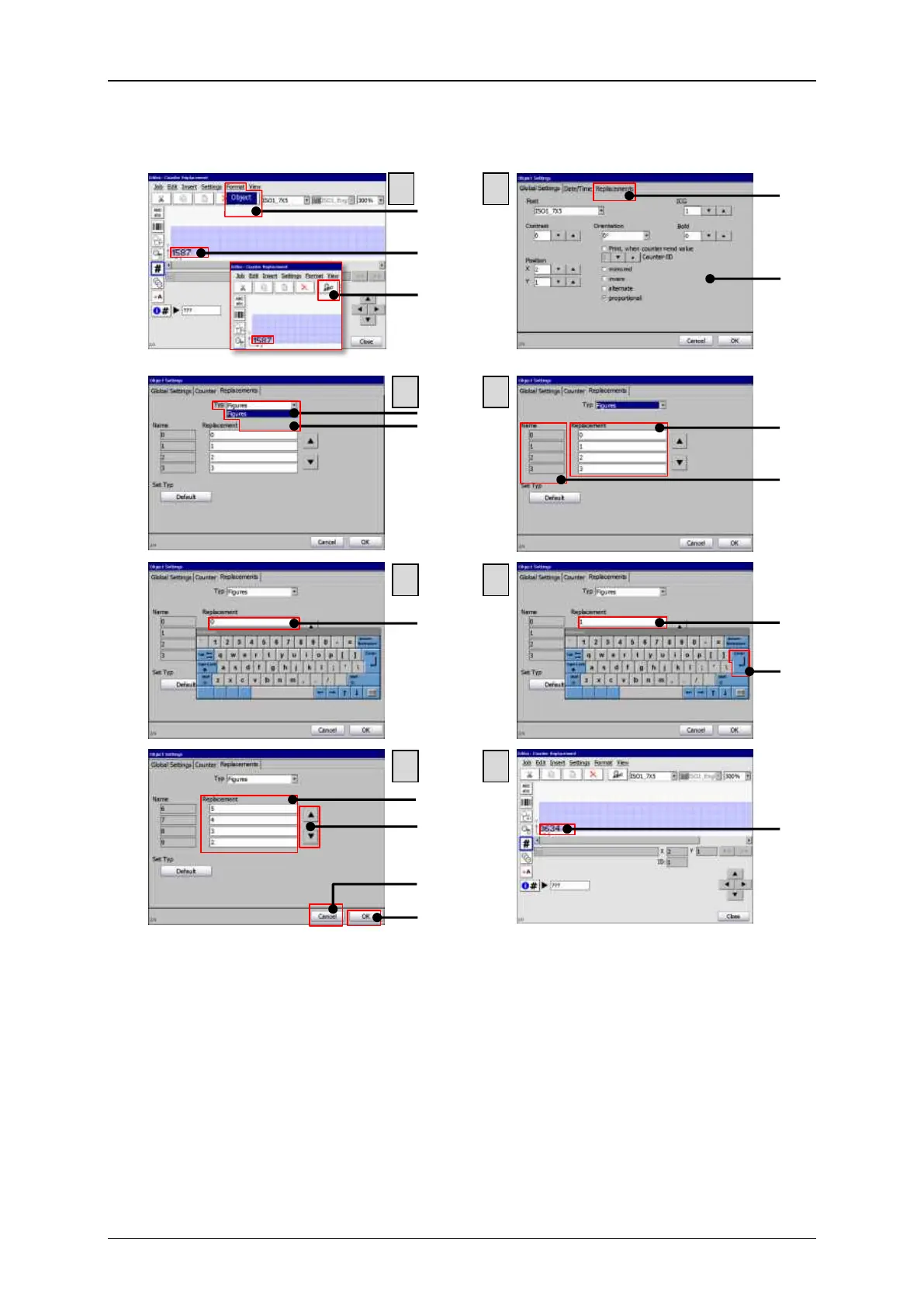
Figure 171
Carry out replacements 2
1 Menu item <Format>-<Object>
10 Open keyboard
2 Original counter object
11 Change settings
3 Direct button <Object settings>
12 Confirm settings with <Enter>
4 Tab <Replacements>
13 Filled-in replacement fields
5 Dialog box <Object settings>
14 Use scroll buttons
6 Drop down list <Type>
15 Button <Cancel>
7 List item <Figures>
16 Button <OK>
8 Setting fields <Replacement>
17 Changed counter object
9 Original element designations
3
4
5
6
7
8
1
2
1
2
3
7
10
13
14
4
8
9
11
17
6
5
15
16
12

Related product manuals