Fault finding Service manual M500 N, M520, M525
08/2007 Gahe
4-6
Doc Code 10 665 751
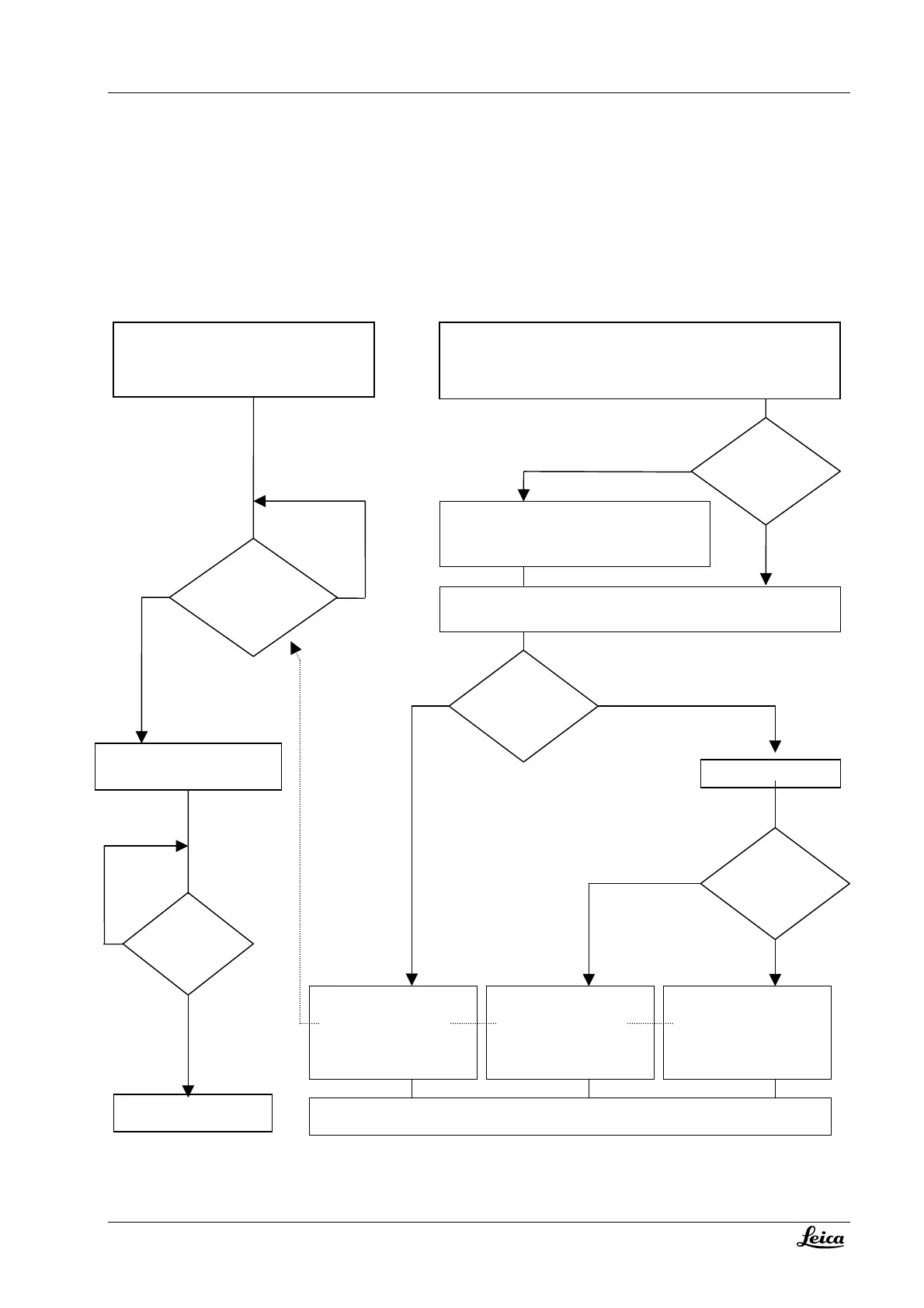
Start-up sequence
Validity
Below description refers to SW 1.87 in the control unit and 2.4 or 4.4 in optics carrier.
Optics-carrier: Control-unit:
Display “Select User”
Initializing motor controller
Initializing microscope motors (zoom and focus drive
into their lower limit; M525 also Iris motor – drives to
most open limit)
Ready
Motors move to their start positions
(defined in user settings)
Parameters
received from
control unit?
NO
YES
Start
position
reached?
YES
NO
Any “user”
selected by
operator (key
pressed) ?
After x seconds
(User selection
imer)
NO
YES
YES NO
Power off/on
ime < setting in
service menu ?
Initializing processor
Display „RTKernel-32 Debug version“
Display “M500 N/M520 N software version 1.87”
Display “Initializing”
Re
uestin
version of o
tics carrier
M500 N or M520 or none
Display “Presetting Optic Carrier defaults”
Resetting of values for total magnification, working
distance and auto focus to the standard values of the
recognized optics carrier (user settings are lost!!)
Requesting of: IGS company ID & IGS calibration code from optics carrier
Requesting of other CAN devices
Optics carrier
version different
to last
configuration
?
NO
YES
Display selected “User name -
Activating user parameters”
Parameters are sent to optics
carrier
Request for confirming of IPD,
diopter, eyepiece mag
Display “Standard setting -
Activating user parameters”
Parameters are sent to optics
carrier
Display last user “User name -
Activating user parameters”
Parameters are sent to optics
carrier
Ready - Display of the main menu



 To Next Page