Operation
M844 / Ref. 10 713 294 / Version 01 43
8.2 Positioning the microscope
4
1
2
3
8.2.1 Coarse positioning
X
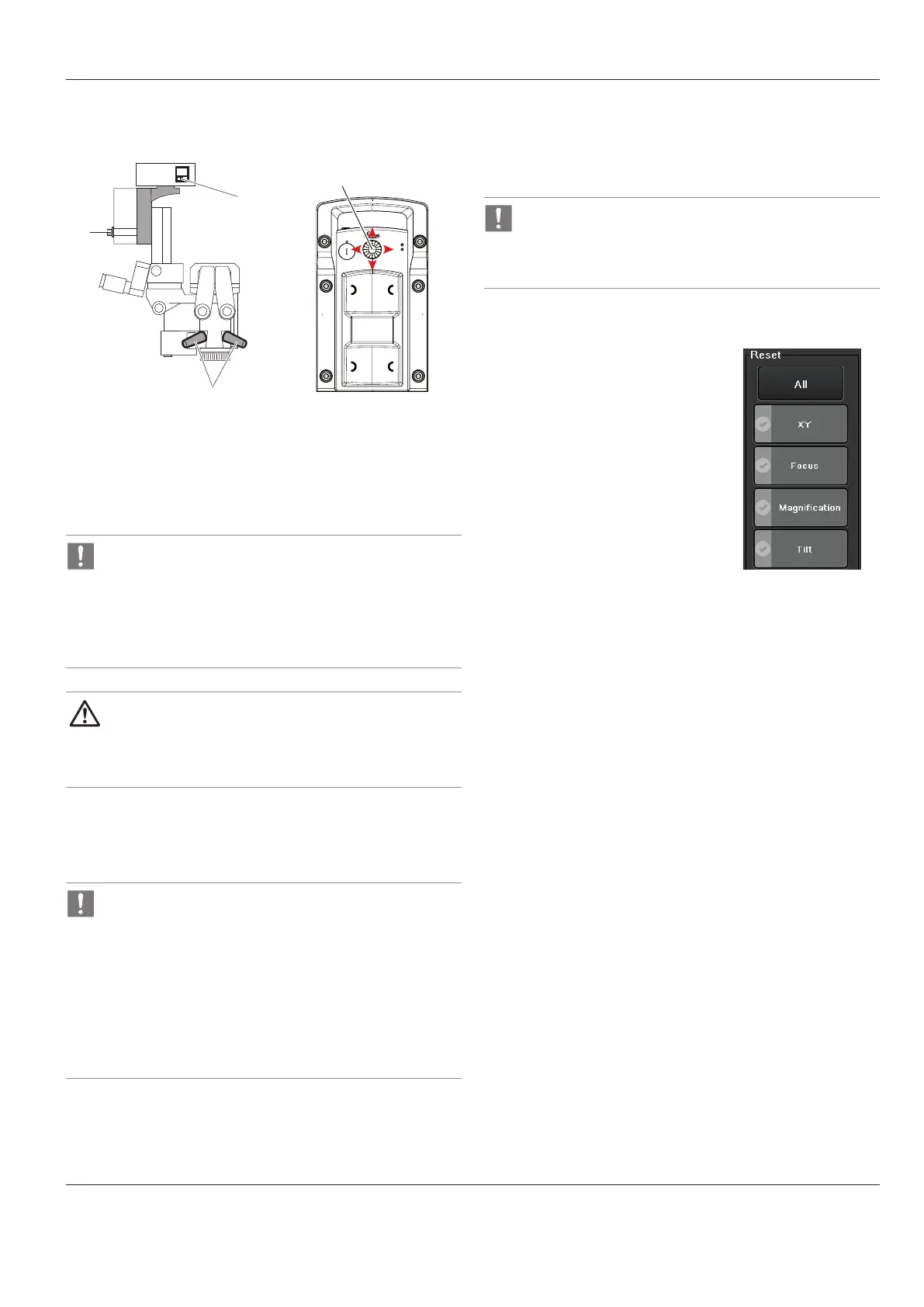
Hold the microscope by both handles (2).
X
Turn one handle to release the brakes (All Brakes).
X
Position the microscope and release the handle.
•
The brakes can also be released using the remote brake
release (see chapter7.11.4).
•
Also refer to the "Releasing the brakes" chapter7.11.4.
•
Adjust the articulation brake for Leica M844 F20
according to personal requirements and weight of the
accessories (see chapter14.13).
CAUTION
Damage to the M844 surgical microscope due to
uncontrolled tilting.
X
Hold the handle when releasing the brake.
8.2.2 Fine positioning
X
Use joystick (1) on footswitch to operate X/Y-drive and position
the microscope.
•
Return to middle position by pressing the "Reset" key
(4) or the "Reset" buttons on the control unit.
•
You can assign the function "XY Reverse" on your or
footswitch in order to reverse the X and Y movement
directions.
•
You can change the speed at which the XY motors move
on the "Speed" menu screen.
•
This value can be saved individually for each user
(seepage 39).
8.2.3 Adjusting the tilt
X
Turn the rotary knob (3) for tilt adjustment in the desired
direction and hold it there.
The microscope tilts in the desired direction.
•
The microscope can be tilted 15° forwards and 50°
backwards.
•
Pressing the "Reset" button on the control unit returns
the microscope to home position (0°).
8.2.4 "Reset" buttons
"Reset" buttons on the control panel:
•
If a drive is in reset position, the "Reset" button assigned to it
appears in green.
•
A "Reset" button that flashes green indicates that the
corresponding drive is moving to the reset position.
•
A "Reset" button that appears in gray indicates that the
corresponding drive is outside of the reset position.
•
Pressing the "Reset All" button returns all motors to the home
position and reloads the user settings of the current user.


 To Next Page