To Next Page

M
Michele MorrisAug 2, 2025
What to do if Leica Rugby Measuring Instruments does not turn on?
- MMatthew HudsonAug 2, 2025
If your Rugby won't turn on, the batteries may be low or dead. Check the batteries, and replace or charge them if needed.

What to do if Leica Rugby Measuring Instruments does not turn on?
If your Rugby won't turn on, the batteries may be low or dead. Check the batteries, and replace or charge them if needed.
What to do if Leica Rugby 840 laser receiver is not working properly?
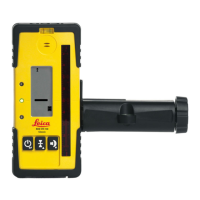
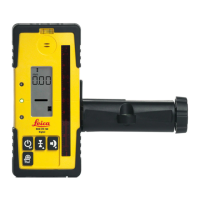
If the laser receiver isn't working correctly, there could be a few reasons: * The Rugby might not be rotating, possibly because it's levelling or in Elevation Alert. Check the Rugby's operation. * The receiver could be out of range. Try moving closer to the Rugby. * The receiver batteries might be low. Replace the receiver batteries.
Why Leica Rugby Measuring Instruments is working, but not self-levelling?
If your Rugby isn't self-levelling, it's likely because it's in Manual Mode. To enable self-levelling, switch the Rugby to Automatic Mode by pressing the Automatic/Manual Mode button. When in Automatic Mode, the X-axis and Y-axis LEDs will flash green while levelling. In Manual Mode, these LEDs will be red.
How to enable Elevation Alert function on Leica Measuring Instruments?
To enable or disable the Elevation Alert function: Turn on the Rugby so it is rotating, then press and hold the Left and Right Arrow buttons simultaneously. While holding these buttons, press the Automatic/Manual Mode button. The Rugby will beep once to confirm the change.
What to do if the distance of the laser is reduced on Leica Measuring Instruments?
If the laser distance is reduced, dirt might be reducing the laser output. Clean the windows of both the Rugby and the receiver.
How to fix Leica Rugby Measuring Instruments that turns on with the last mode saved?
If your Rugby turns on with the last mode saved, this function can be disabled. With the Rugby turned on and rotating, press the power button to turn the Rugby off. Then, press and hold both the Automatic/Manual Mode button and the power button for five seconds. The Rugby will beep once to indicate the change.
Why Leica Rugby Measuring Instruments does not turn on in Automatic Mode?
The Rugby is designed to always turn on in Automatic Mode unless specifically disabled by the user. The Automatic Mode can be enabled or disabled by pressing the Automatic/Manual Mode button.
Identifies product type and serial number for contacting service or agency.
General directions for anticipating and avoiding operational hazards.
Details intended use and reasonably foreseeable misuse of the product.
Specifies suitable environments and outlines user responsibilities.
Highlights potential risks and precautions during product operation.
Classifies laser safety according to international standards.
Details the product's ability to function in electromagnetic environments.
Provides FCC compliance information for the product in the US.
Identifies and illustrates the main components of the Rugby 840 system.
Details the components of the Rugby laser unit.
Lists and illustrates the components found within the product case.
Provides instructions for setting up the Rugby on a tripod or stable surface.
Describes the RC400 remote control panel and its buttons.
Step-by-step guide for pairing the Rugby 840 with the RC400 remote control.
Details the function of each button on the Rugby 840 unit.
Explains the functions and meanings of the Rugby 840's LED indicators.
Instructions for powering the Rugby device on and off.
Explains automatic and manual operation modes for the Rugby.
Details the Elevation Alert function and how to disable/enable it.
Overview of the Rod Eye 180 receiver and its components.
Describes how to access and navigate the Rod Eye 180 receiver menu.
Step-by-step guide for pairing the Rod Eye 180 receiver with the Rugby 840.
Step-by-step guide for using the Rugby for setting forms.
Step-by-step guide for checking grades using the Rugby and receiver.
Step-by-step guide for setting manual grades with the Rugby.
How to use Smart Target for automatic slope catching.
How to use Smart Target for slope lock and monitoring.
Instructions for using dual receivers with Smart Targeting.
Using the Rugby for batter board setups.
Using the Rugby for facade installations.
Using the Rugby for suspended ceiling installations.
Using the Rugby for laying out wall positions and squaring.
General principles for operating and charging batteries.
Specifics on charging the Li-Ion battery pack for the Rugby.
Step-by-step guide for changing the Li-Ion battery pack.
Step-by-step guide for changing alkaline batteries.
Procedure for checking the laser's level accuracy.
Instructions for adjusting the laser's level accuracy.
Step-by-step guide for performing automatic field calibration.
Describes common alerts, symptoms, causes, and solutions.
Guidelines for transporting the equipment safely in various scenarios.
Recommendations for storing the product and batteries properly.
Instructions for cleaning and drying the product and accessories.
Details product compliance with national and international regulations.
Provides key technical specifications for the Rugby 840 laser.
Technical specifications for the RC400 remote control.
Details the lifetime and five-year no-cost warranty coverage.
Covers repairs to the self-levelling system for accidents or knockdowns.
Lists accessories related to powering the Rugby 840.
Lists accessories for mounting and specific application setups.
 General
| Brand | Leica |
|---|---|
| Model | Rugby 840 |
| Category | Measuring Instruments |
| Language | English |