EN
49
Review mode
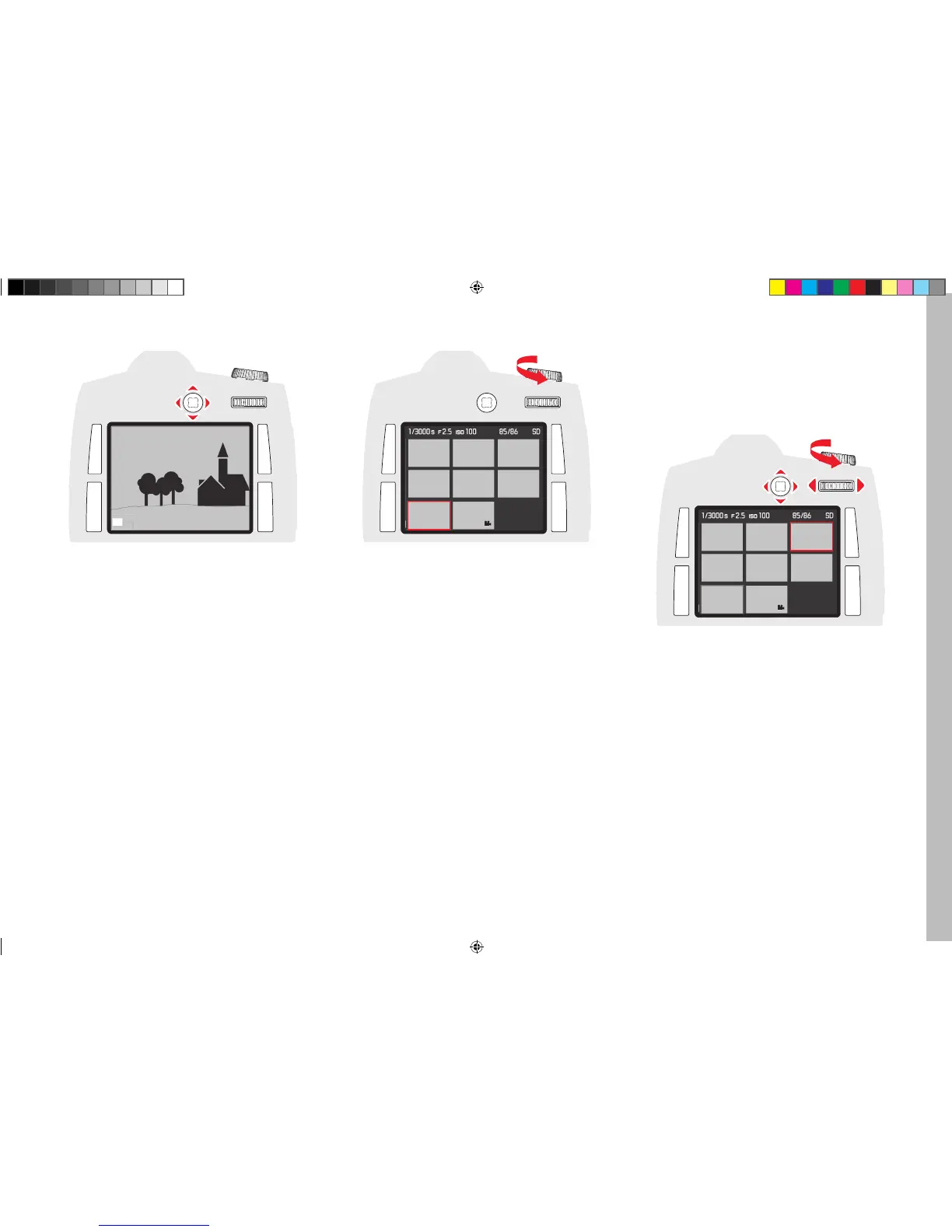
MOVING THE DETAIL
Press the Joystick in the desired direction - up, down, right or left
• The rectangle inside the frame moves in the direction the Joystick is
pressed.
SIMULTANEOUS VIEWING OF SEVERAL REDUCED PICTURES
Turning the shutter speed setting dial to the left reduces possibly previ-
ously enlarged pictures, and turning beyond the review of the whole
picture allows simultaneous viewing of 4 or 9 pictures.
• The red frame marks the picture previously displayed in full size during
the viewing of 4 or 9 pictures.
SELECTION OF ONE OF THE REDUCED PICTURES
1. Select the desired picture by pressing the Joystick up, down, left or
right
• The frame changes to an endless loop in lines from picture to
picture.
2. The framed picture can be enlarged in steps by turning the shutter
speed setting dial to the right
Inhalt_EN.indd 49 12.10.2015 09:34:22



 To Next Page